Level 1.5: Cupcake
July 8, 2025
Solved

Captive Portal - Intunes Kiosk Mode

  • July 8, 2025
  • 2 replies
  • 0 views

Does anyone know if it's possible to allow an android tablet to connect to captive portals whilst in Kiosk mode.

I am currently trying to configure Intunes to allow this and cannot find a way to allow the tablet user to connect to a Captive portal as this is being restricted. Upon the device being configured and connecting to Wi-Fi it does not display the Wi-Fi landing page to allow access.

Has anyone come across this issue whilst using Intunes\Kiosk mode specifically with Android devices?


Thanks
Best answer by shaunhodgkinson

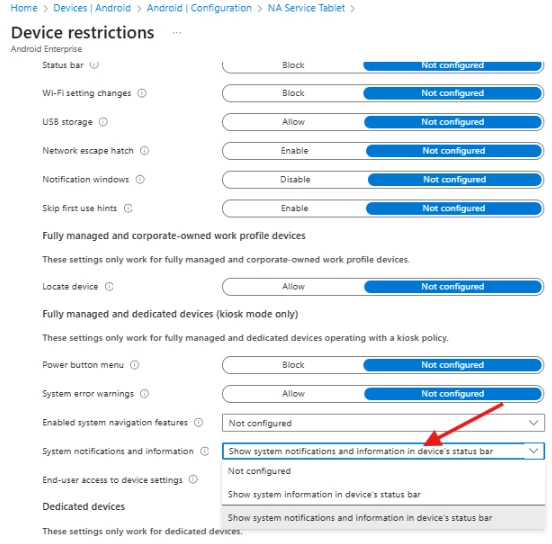
Update - it looks like we have found a solution within the Intune configuration - see below by having system notifications enabled this now allows the captive portal to appear.


Thanks to those who provided in put into this, hopefully it will prove useful to someone else searching out this problem


2 replies

Level 4.0: Ice cream sandwich
July 9, 2025

Its been a while since i've tested this but I believe you need to allow the chrome browser to work inside the kiosk. 


But the Intune kiosk can be a bit buggy so it might not work at all. 🤣

Level 1.5: Cupcake
July 9, 2025

thanks for the response, the issue we have is that we don't want people to have access to the browser on the kiosk, I wonder if there's a way to allow the browser to allow the captive portal pop up but not show the browser icon as being available?


Level 4.0: Ice cream sandwich
July 9, 2025

Knox manage has an option to add " allowlisted apps" (https://docs.samsungknox.com/admin/knox-manage/kiosk-devices/kiosk-wizard/kiosk-wizard-menu-items/) that might be helpful for this. 


But I could not find such solution in Intune. Intune is very limited when it comes to these kind of features. You could always add the chrome browser to your kiosk profile and use whitelist with only the allowed URL of the captive portal and maybe an intranet page. 


When creating a whitelist in Chrome managed config, you block all other URLS. 

shaunhodgkinsonAuthorAnswer
Level 1.5: Cupcake
July 15, 2025

Update - it looks like we have found a solution within the Intune configuration - see below by having system notifications enabled this now allows the captive portal to appear.


Thanks to those who provided in put into this, hopefully it will prove useful to someone else searching out this problem


Emilie_B
Community Manager
July 15, 2025

Thank you for the update @shaunhodgkinson - very happy to hear this has been solved! 


And thank you @Michel and @mattdermody for your help 😎