Arjen
New Member
September 15, 2026
Question

Preffered language not working for GBoard

  • September 15, 2026
  • 5 replies
  • 20 views

I am trying to make a policy in Omnissa Workspace One for Gboard. 
I want the keyboard to be a Slovenian QWERTZ keyboard but without changing the android system language. 
This is because our support needs to remote control the devices and use normal mouse an keyboard then. 
The employees working with the devices will use gboard and this should be in slovenian.

What I need:

  • Gboard working with sl-SL from a managed config without changing system language. 

My current config:
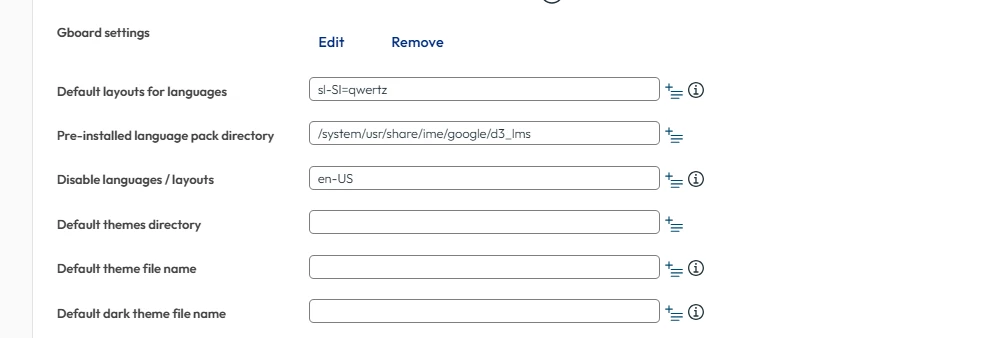
 

5 replies

Moombas
Level 4.4: KitKat
September 15, 2026

I don’t work with WS1 but managed app config is independent of it.
In Soti Mobicontrol i get following info screen for this field:

And i don’t think it works like you guessed, i guess it would be more like sl-SL=layout11 but i never used it yet tbh.

But accordingly to what i found, wouldn’t be hr-Hr, the correct layout (it’s the default one for slovenia and it’s quertz)?

https://kbdlayout.info/kbdcr


Moombas
Level 4.4: KitKat
September 15, 2026

@Arjen I played around a bit. In Mobiconrol i was only able to use the pattern like hr-HR but it didn’t take effect as i guess it need to be activated as system language as well (just to be there) which i can’t test as i don’t understand that language to revert settings back :D

Moombas
Level 4.4: KitKat
September 15, 2026

But on all of that, why do you need to use the keyboard by mouse?

When we tested RC with WS1, remote keyboard worked fine after we got Workspace One Assist setup the right way.

Arjen
ArjenAuthor
New Member
September 16, 2026

We use the normal RC through WS1. 
We also use our normal keyboard and mouse as stated above. (minus a typo i see.)

Moombas
Level 4.4: KitKat
September 16, 2026

But the “normal” remote control contains remote keyboard/input as far as i know (it was at least a requirement from our side) and as far as i remember it requires Assist to get this functionality.

I recommend to reach out to WS1 support to help you to get remote input working instead of trying to get a workaround done which is even less comfortable (one click per character instead of just typing on local keyboard).