
Prevent Deep Sleep for Managed Apps
We report the version numbers of certain apps on managed devices. I've noticed an unusual update pattern with some apps for some time now.
Although we use a payload for Managed Google Play to automatically update public apps, and the affected devices are actively in use, some apps are still running old versions. Updates for some apps simply aren't being performed. The adoption rate for current versions then continues to decline over time.
The cause seems to be an Android feature. Unused apps are disabled after a certain amount of time. For example, on Samsung devices, the affected apps are listed under "Deep sleeping apps" in the device's battery settings. In the app settings and in the Play Store, the apps are shown as disabled.
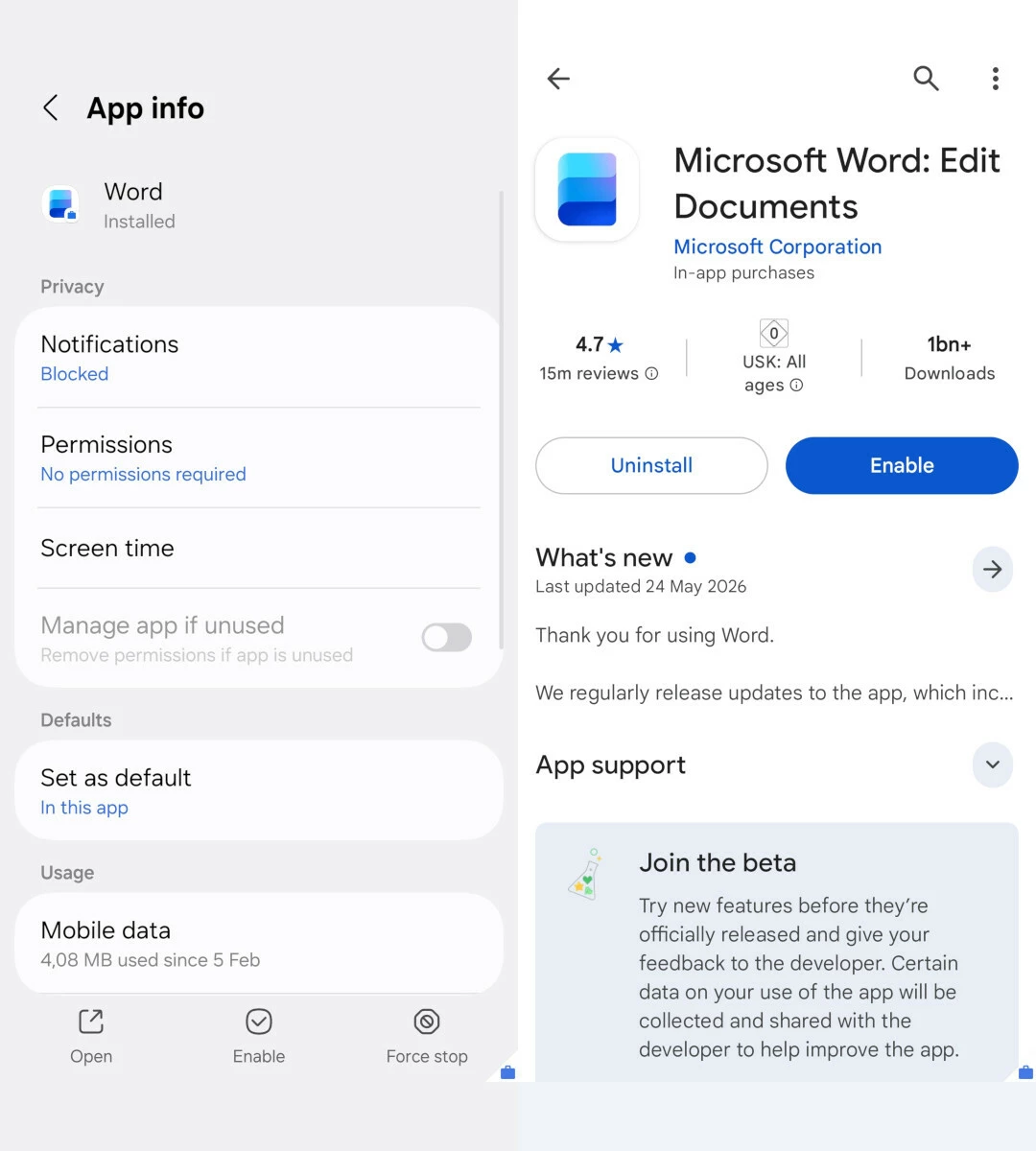
It seems that Deep Sleep is preventing updates in Managed Google Play. The affected apps must be launched or enabled manually. In general, I think it’s fine to save device resources by turning off unused apps. But in an enterprise environment, we do want to maintain version control over the apps and prevent outdated versions from being used. Updates include new features, bug fixes, and security patches. Even if an app isn't used for a while on an actively used device, its version should not be accidentally frozen.
Is there a policy to prevent certain apps from being disabled or entering deep sleep mode? At first sight, I couldn't find a setting for that. I'm not sure either whether this behavior is a bug or a feature. 🙂
