Level 1.6: Donut
May 20, 2025
Solved

Unexpected error when adding new GZT admins

  • May 20, 2025
  • 5 replies
  • 0 views

Hello people,


I'm trying to add new admins in our GZT environment, but looks like something is not working...


Nothing really I can fail doing that, I'm an owner and the only fields I've to fill are email address and role, and I get the same error for both owners and admins.

Are you maybe aware of anything broke on the back?

thanks in advance

Best answer by Lizzie

Hey @LFagni and @Moombas,


I've asked a member of our Zero-touch team about the error message and the interesting thing is they did actually update the prompt last year based on the community feedback here, to help highlight that the email address isn't a Google account. 


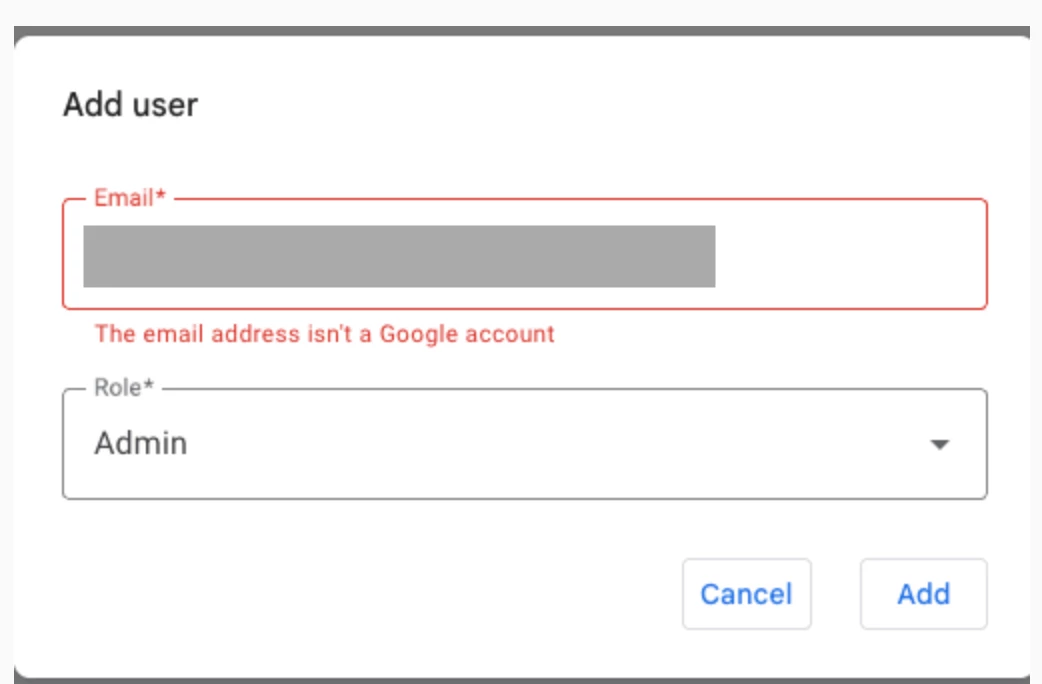
 This is what the text string should show, when adding an new user:


From the screenshot you have shown here @LFagni, it doesn't appear that this showed, so I wonder if you might be able to provide a little more context on how to reproduce this so we can see if something is not quite working as expected? (Or anyone else who may have seen the the error message 'An unexpected error has occurred...')


Thanks so much,

Lizzie

5 replies

Emilie_B
Community Manager
May 21, 2025

Hi @LFagni 


The image you have shared looks weird and it is not displaying properly in your post 🧐


Could you maybe let us know what the error message you received was saying? 


About the admin emails you are trying to add, are these gmail accounts/addresses? 


Here is some additional info on Zero-touch enrollment that might be helpful! 

LFagniAuthor
Level 1.6: Donut
October 3, 2025

Hi @Emilie_B the image was this one:


But @Lizzie was right, the user I was trying to add wasn't a google account(yet).
After we fixed that everything worked.

Maybe the error message could be a bit more clear than "Unexpected error" but apart of that we fixed. 

Emilie_B
Community Manager
October 3, 2025

Hi @LFagni 


It's been a little while so, I hope you're well! 


I'm glad to hear it's all been sorted out 🙂 

Flo
Level 2.0: Eclair
May 21, 2025

Hello Lfagni,

Are you trying to add corporate emails ? Do you use Microsoft Entra / Google Cloud / G Suite Connector by Microsoft for example ?

LFagniAuthor
Level 1.6: Donut
May 26, 2025

Hi @Emilie_B and @Flo , this is the error I got:

Anyhow I found the issue, I was trying using a corporate email but no google account was yet created for this address.

We created the Google account for this login and after that I was able to add it to GZT in seconds.

Level 4.4: KitKat
May 26, 2025

Nice you found it already, just wanted to post that here right now XD

The error message in this case is somehow not helping at all, not sure if it can be maybe aligned that at least if no Google account with that mail address can be found a relevant message will be displayed or even before adding those accounts @Emilie_B.

Lizzie
Community Manager
May 27, 2025

Great to see you again @LFagni and you have found the reason for this. 


@Moombas, thanks for highlighting the error message. I actually spoke with the Zero-touch team about this, I think last year, and they were actually looking to update this notification to be more useful. I will follow up on this with them to see what the status is, as this is something that I believe can be easily actioned if you know what you need to do. I'll keep you posted. 😀

Welcome to the Community everyone!Have a question or want to start a conversation, click here.
Lizzie
LizzieAnswer
Community Manager
May 28, 2025

Hey @LFagni and @Moombas,


I've asked a member of our Zero-touch team about the error message and the interesting thing is they did actually update the prompt last year based on the community feedback here, to help highlight that the email address isn't a Google account. 


 This is what the text string should show, when adding an new user:


From the screenshot you have shown here @LFagni, it doesn't appear that this showed, so I wonder if you might be able to provide a little more context on how to reproduce this so we can see if something is not quite working as expected? (Or anyone else who may have seen the the error message 'An unexpected error has occurred...')


Thanks so much,

Lizzie

Welcome to the Community everyone!Have a question or want to start a conversation, click here.