

5 ways our Enterprise browser keeps reinforcing security
Explore how recent browser hardening capabilities protect your workforce in the AI era
The enterprise risk landscape is evolving faster than ever. Between the rise of AI-generated threats, the normalization of BYOD (Bring Your Own Device) as well as heavy reliance on contractor hardware, securing corporate data outside of the traditional perimeter is a top priority for many companies.
To support this fast-changing landscape, Chrome Enterprise continues to harden the core browser environment.
Here is a look at five recent capabilities and enhancements designed to protect your organization's data against modern threats.
1. Stopping Session Hijacking and Cookie Theft
Session hijacking is a critical threat where attackers steal active session cookies to bypass authentication. To neutralize this, Chrome introduced Device Bound Session Credentials (DBSC). By cryptographically binding session cookies to a specific device, those cookies become useless if extracted and moved to an attacker's machine, ensuring your corporate accounts remain secure.
2. Protecting Data at Rest (Cache Encryption)
Security doesn't stop when a user closes their browser window. Our new browser cache encryption ensures that the cache stored on a device's hard drive is fully encrypted. If a corporate or BYOD laptop is lost or stolen, the cached data cannot be reconstructed or exploited by unauthorized parties.
3. Neutralizing Infostealer Malware
The rise of "Infostealer" malware has made it critical to protect sensitive data stored locally. With App-bound encryption, Chrome has introduced a powerful defense that prevents unauthorized software running on a device from digging through the browser to extract saved passwords or credentials. Access to browser data is restricted solely to the browser itself.
4. Increasing Control Over Corporate Data Downloads
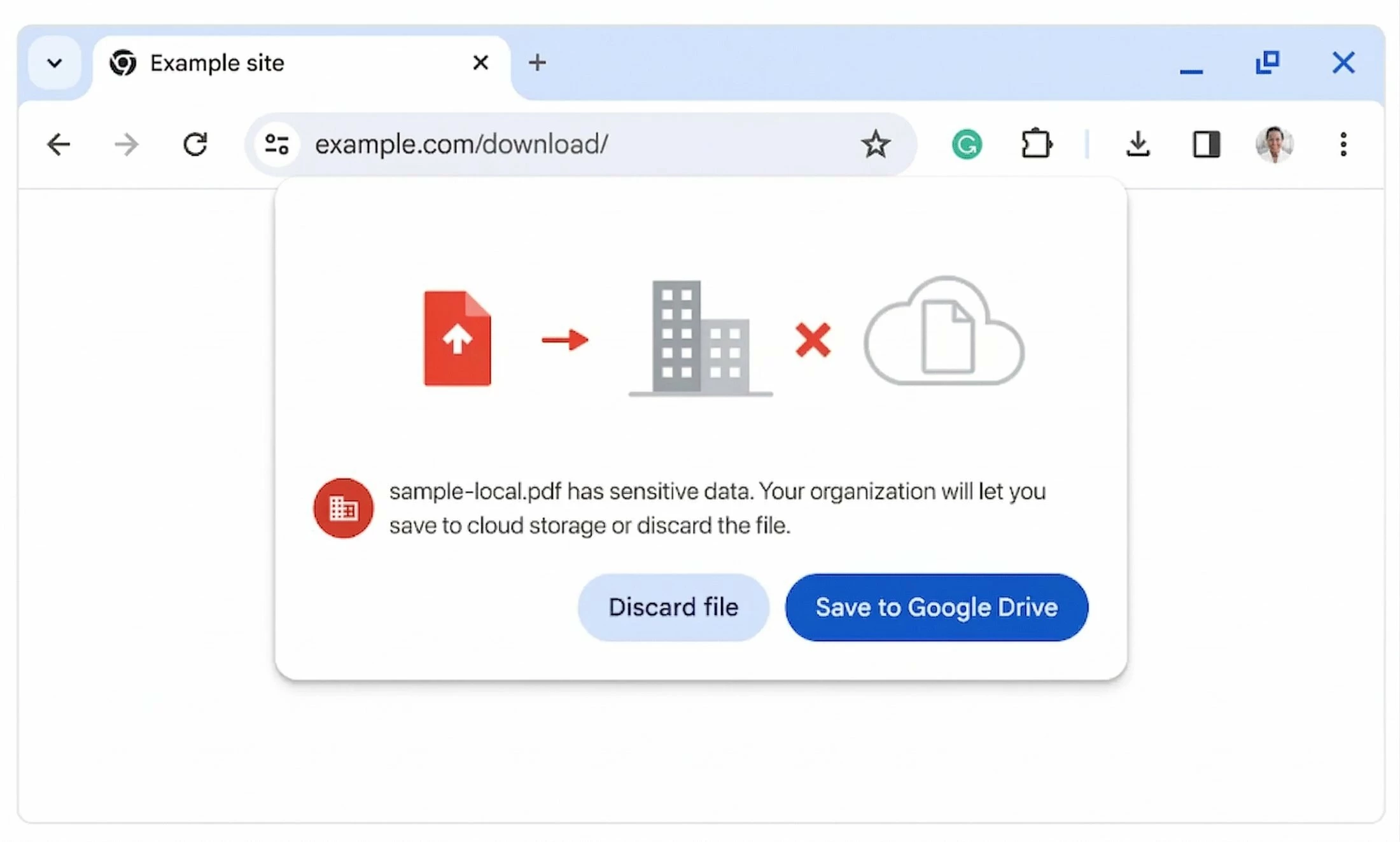
Maintaining a secure perimeter means dictating where data goes. Chrome has introduced enhanced Data Loss Prevention (DLP) controls that allow IT administrators to set rigorous policies around file storage. You can now configure policies to require Chrome downloads to be saved directly to Google Drive (with Microsoft OneDrive support coming soon), entirely bypassing the local hard drive. This is highly effective for securing contractor and BYOD endpoints.
5. Advancing Secure Access via the Partner Ecosystem
Chrome Enterprise integrates with the security stack you already rely on. We continue to collaborate with major security providers to strengthen full-stack security:
- Citrix: Customers can securely access SSH and RDP workloads while applying dedicated protections, such as keylogging prevention.
- Okta: Chrome Enterprise now provides additional antivirus signals to support Okta access decisions. Furthermore, Chrome Remote Commands (like clearing cookies and cache) can now be executed on profiles managed by third-party providers like Okta.
Let's Discuss: Which feature are you looking forward to using the most? |
Read the full announcement on the Cloud Blog: 5 ways our enterprise browser keeps reinforcing security
