Aurelien12345
Level 1.6: Donut
March 9, 2026
Question

Enforce TranslateEnabled Policy on Chome Toolbar Shortcut

  • March 9, 2026
  • 1 reply
  • 67 views

Hi all,

I'm giving you a brainteaser about the tablets we manage.

The pentest conducted by our red team required us to disable the translation features in Google Chrome.

Currently, when the TranslateEnabled policy is set to false, Chrome for Android correctly removes "Translate" from the overflow menu (⋮) and the long-press context menu. However, the Adaptive Toolbar Shortcut (the dynamic button next to the Omnibox) remains active or selectable, allowing users to bypass the restriction.
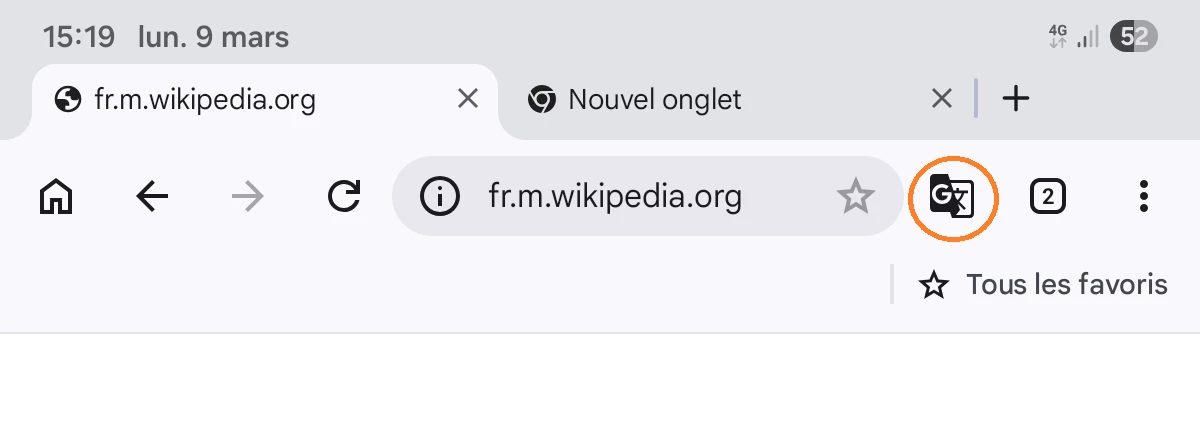
Google Chome Android with Translation button recommandation

Logically, if the Toolbar Shortcut was previously set to "Translate" (either manually or via "Based on your usage") before the policy was applied, the button must be hidden or replaced by the default shortcut once the policy is active. Or other behaviour such as should trigger a "Feature disabled by your administrator" message or simply perform no action.

Unfortunately, there is no policy for managing the toolbar shortcut. Do you have any idea how to manage the translation function in the shortcut bar ?

We manage our tablets with WorkSpaceOne UEM 24.10 and the version of Chrome is 145.0.

Thank you to everyone who will help us move forward on this issue ;)

Aurélien

1 reply

Rafa
Community Manager
March 11, 2026

Hi ​@Aurelien12345,  thank you for the question!

Would you mind sharing a bit more about the use case? 
Would it be possible to have shortcuts to websites to run fullscreen or hide the toolbar for your users?

Also, let us know if you have had any feedback from your UEM too, thanks!

Community Manager
Aurelien12345
Level 1.6: Donut
March 13, 2026

Hi Rafa,

We operate in a highly regulated environment where data privacy are critical. The TranslateEnabled policy is set to false specifically to prevent corporate data from being sent to external translation services without authorization.

We already use PWAs for several of our internal applications, and it is indeed a great recommendation for those specific use cases. However, it does not cover all our needs. Our field technicians frequently use the standard Chrome browser with url for diagnostic purposes.

Our UEM WorkspaceOne, confirms that the policy is correctly pushed and visible in chrome://policy (False on TranslateEnabled).  The "Translate" feature is indeed removed from the overflow (three-dot) menu and context menus as expected.

I get the impression that the implementation of the TranslateEnabled parameter didn't account for the use of the “Translate” button in the Toolbar shortcut.

Thanks !