jarmo_akkanen
Level 2.0: Eclair
Jul 13, 2023 1:49 PM UTC
Solved

[Updated] Widgets on COPE - MS Intune

  • 27 replies
  • 633 views
  • Translate All • Beta, powered by Gemini

Hey,
Unfortunately there are no settings and/or no chance configure Widgets on COPE in MS Intune. There is specific setting in Intune restrictions config profile to allow/disallow Widgets for BYOD method.
Is this problem tied only MS Intune or is this something for Google? 

Majority of our 10k fleet enrolled as  COPE and it's a big gap not having widgets available for Work Apps.

Thanks
Jarmo 
jarmo_akkanen
Level 2.0: Eclair
Jul 16, 2026 11:34 AM UTC

​@Lizzie ​@Moombas ​@GMenzies ​@Rakib ​@jasonbayton ​@weberda ​@KSchroeder 

Hi all,

This issue is now finally fixed. Took a while from Microsoft implement this since first time asked this via Microsoft DCR (design change request) 4 years ago :) 

Anyway… Here is how you can get the widgets working on your COPE enrolled Android devices managed by Microsoft Intune.

https://learn.microsoft.com/en-us/intune/whats-new/#new-android-enterprise-settings-in-the-intune-settings-catalog
 

  1. Create a new Configuration policy in Intune. 
    Devices > Manage devices > Configuration > Create > New policy > Android Enterprise for platform > Settings catalog for profile type.
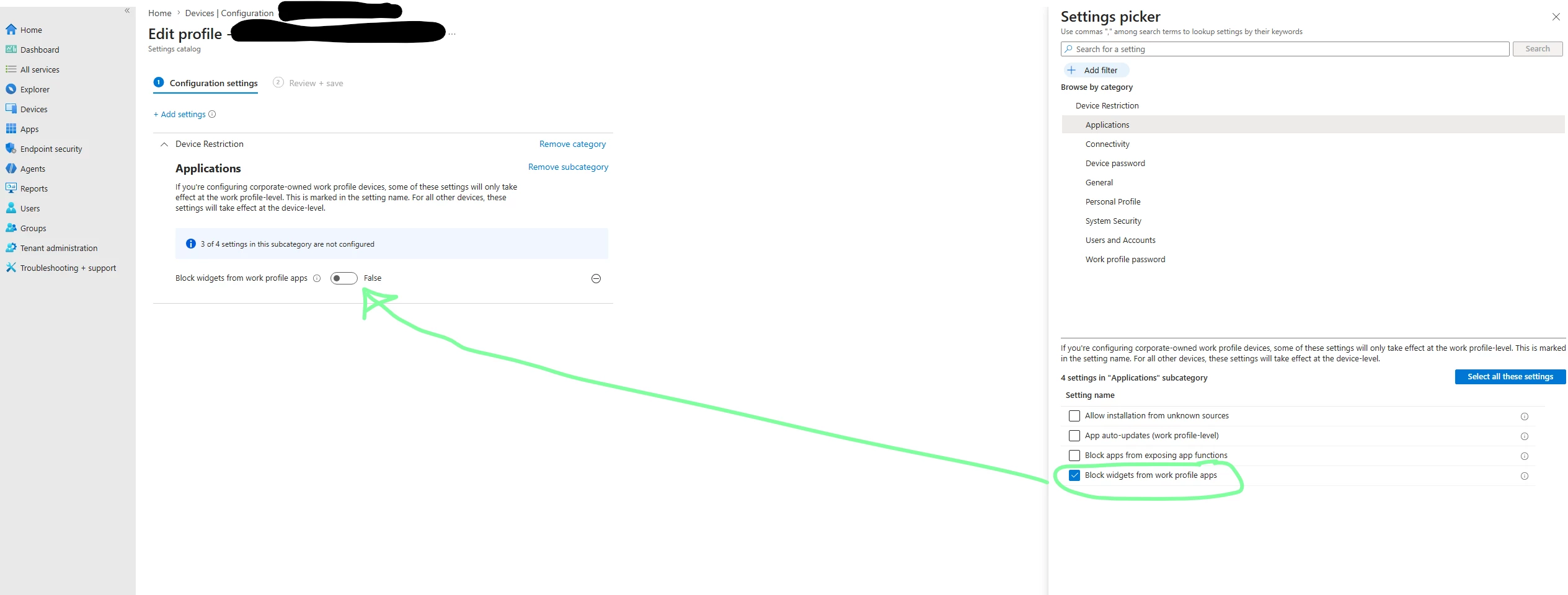
  2. You only need one setting for the policy which is “Block Widgets from Work Profile Apps”. You can find it under the Applications (see the attached image).
  3. Set it as FALSE
  4. Then you just need to scope + assign this policy however you like.


I have tested this in our production environment and it works fine.

Thanks
Jarmo​​​​​​​

27 replies

Moombas
Level 4.4: KitKat
Jul 13, 2023 2:07 PM UTC

Hi Jarmo,
we have fully managed devices only and widgets for provided apps are available but we don't use Intune but different MDM.

Translate • Beta, powered by Gemini
Android Enterprise Expert
jarmo_akkanen
Level 2.0: Eclair
Jul 14, 2023 7:28 AM UTC

Hey Ras, 
You mentioned "fully managed"....  Are you using COPE or COBO? Which MDM your using? VMware Workspace One or some other?
If it's available for you with different MDM then I think this is something for the Microsoft make it available in Intune as well.
Thanks
Jarmo

Translate • Beta, powered by Gemini
Moombas
Level 4.4: KitKat
Jul 14, 2023 7:51 AM UTC

I don't like that description even it's jused a lot, i know.
I differentiate between "fully managed" (work only) which means that the device is entirely managed/full accessable and  owned by the company (we only use this currently) but could be re-enrolled by the enduser if needed and "work profile" which means a fully managed device with a private part and work profile installed (what you call COPE).
I left out BYOD here now, because i think this doesn't matter here.

You may take a look into this: https://vmlabblog.com/2021/04/how-to-add-widgets-for-work-profile-apps/

We are using Soti Mobicontrol and as said, only "fully managed" via Zero-Touch for now.

Translate • Beta, powered by Gemini
Android Enterprise Expert
jarmo_akkanen
Level 2.0: Eclair
Jul 14, 2023 9:52 AM UTC

Hi RAS, 

Thank you for your info. I just did further testing and this is the result for Microsoft Intune:

1. Personally-Owned with Work Profile (BYOD) enrolled = Widgets available for WP apps
2. Corporate-Owned with Work Profile (COPE) enrolled = Widgets NOT available for WP apps
3. Fully Managed (COBO) = Widgets available for apps

I will compose a ticket to MS if they have plans to bring setting available for widgets on Corporate-Owned with Work Profile (COPE) enrolled devices.
thanks
Jarmo

Translate • Beta, powered by Gemini
jasonbayton
Level: 4.1: Jelly bean
Jul 14, 2023 12:10 PM UTC

I've run through all the policy settings for WP/COPE also and it appears indeed widgets are only configurable in the personally owned configuration profile. I'd agree with you raising it with MS, please report back 🙂

Personal: 

Company: Not present.


Translate • Beta, powered by Gemini
jarmo_akkanen
Level 2.0: Eclair
Jul 24, 2023 8:32 AM UTC

Hey, We did a DCR (Design Change Request) to Microsoft to have Widgets available for Work Profile app on devices enrolled as COPE (Corporate-Owned Personally Enabled).

According to Microsoft "DCR is 
approved and is in the pipeline for future releases, however there is no ETA due to our product group taking and completing the requests based on severity."

I'll keep you posted once there is ETA available or DCR completed and widgets available.
-jarmo

Translate • Beta, powered by Gemini
Lizzie
Community Manager
Jul 24, 2023 9:30 AM UTC

Fantastic to see your DCR got approved and that it's in the pipeline for future releases, thanks so much for the update here @jarmo_akkanen.

Would you mind accepting your last reply as 'Accept as Solution' this way it will highlight it if others are looking for something similar. 

Thanks again. 

Lizzie

Translate • Beta, powered by Gemini
Welcome to the Community everyone!
jarmo_akkanen
Level 2.0: Eclair
Nov 27, 2024 7:23 AM UTC

Hi @GMenzies @jasonbayton @Lizzie @Moombas 

Finally there is a solution to get widgets available on COPE enrolled devices.

To enable widgets to a specific application, you need to utilize this policy (addCrossProfileWidgetProvider), and make sure to add the package name of the application (for example com.microsoft.office.outlook) that you want to enable its widgets in the parameters.
Please contact your MDM vendor (our case MS Intune) and raise a request to implement this API if they haven't done so already.


We will test this asap once we get the API implemented by Intune folks. Keep you posted....


Google engineers have tested it using testDPC and it works.
Before:


Configuration:


After:


thanks

Jarmo

Translate • Beta, powered by Gemini
Rakib
Level 3.0: Honeycomb
Nov 27, 2024 4:21 PM UTC

It says it was added as part of API 21, is it just laziness from MS or is it supported for devices from API 21.

I will also raise a ticket to Microsoft.

Translate • Beta, powered by Gemini
jarmo_akkanen
Level 2.0: Eclair
Nov 28, 2024 9:58 AM UTC

I got the info from Microsoft yesterday: "At the moment it’s not possible but let me ask our Intune PG if there is anything on the Roadmap or if we need to raise a DCR or similar."


I replied to them since we have had case opened to them about this 2 years for now. I think they will take this seriously now.... I'll keep you posted..


thanks

Jarmo 

Translate • Beta, powered by Gemini
Amonshie
Level 1.6: Donut
Nov 12, 2025 12:55 PM UTC

@jarmo_akkanen Did u get any update from MS? We are currently migrating from WS1 to Intune and facing the same "issue". 

Translate • Beta, powered by Gemini
jarmo_akkanen
jarmo_akkanenAuthorAnswer
Level 2.0: Eclair
Jul 16, 2026 11:34 AM UTC

​@Lizzie ​@Moombas ​@GMenzies ​@Rakib ​@jasonbayton ​@weberda ​@KSchroeder 

Hi all,

This issue is now finally fixed. Took a while from Microsoft implement this since first time asked this via Microsoft DCR (design change request) 4 years ago :) 

Anyway… Here is how you can get the widgets working on your COPE enrolled Android devices managed by Microsoft Intune.

https://learn.microsoft.com/en-us/intune/whats-new/#new-android-enterprise-settings-in-the-intune-settings-catalog
 

  1. Create a new Configuration policy in Intune. 
    Devices > Manage devices > Configuration > Create > New policy > Android Enterprise for platform > Settings catalog for profile type.
  2. You only need one setting for the policy which is “Block Widgets from Work Profile Apps”. You can find it under the Applications (see the attached image).
  3. Set it as FALSE
  4. Then you just need to scope + assign this policy however you like.


I have tested this in our production environment and it works fine.

Thanks
Jarmo​​​​​​​

Translate • Beta, powered by Gemini
jasonbayton
Level: 4.1: Jelly bean
Jul 18, 2026 9:07 AM UTC

Only 4 years? Microsoft is really turning that ship around 😂


Well done mate, good job persistently pestering them!

Translate • Beta, powered by Gemini
Lizzie
Community Manager
Jul 20, 2026 11:03 AM UTC

This is awesome news ​@jarmo_akkanen - congrats (whoop whoop). Thank you for coming back to update this here. Thank you for all your efforts here. 


Have you already got stuck in with your first widget? 😀

Translate • Beta, powered by Gemini
Welcome to the Community everyone!
okmick
Level 1.6: Donut
Jul 24, 2026 3:33 PM UTC

That’s great, glad to hear other folks are pushing Microsoft to make meaningful changes too!

Translate • Beta, powered by Gemini
Amonshie
Level 1.6: Donut
Jul 24, 2026 1:53 PM UTC

​@jarmo_akkanen 

Yes finally. During my vacation i read the “whats new in intune” page and saw this setting being added.

We published the setting yesterday and can confirm it now works as expected. Our Configuration allready reached 169.000 devices in our environment, so delivery was kinda fast this time within intune :)

Translate • Beta, powered by Gemini
Lizzie
Community Manager
Jul 24, 2026 2:34 PM UTC

You’re like me ​@Amonshie you like reading release notes on holiday! 😂 


It’s really cool to hear that you now have this live on so many devices, I love hearing these updates. 


Hope all is going well. 


Lizzie


(​@Kris, ​@Aurelien12345, ​@okmick also thought you might find this update interesting) 

Translate • Beta, powered by Gemini
Welcome to the Community everyone!
Aurelien12345
Level 1.6: Donut
Jul 29, 2026 3:11 PM UTC

Hi Lizzie,
Thanks for tagging us.
I think this is the first time i’ve seen an DCR come true!

Our tenant has been updated to version 2606, so we’ll be able to test this new feature!

We’ll keep you updated !

Translate • Beta, powered by Gemini