
Locate Disabled ChromeOS Devices TT
The new ChromeOS "Locate" feature protects your devices (and your privacy)
This feature allows enterprise administrators to capture the approximate geolocation of a managed ChromeOS device after it has been disabled. This is intended to help recover lost or stolen devices, by:
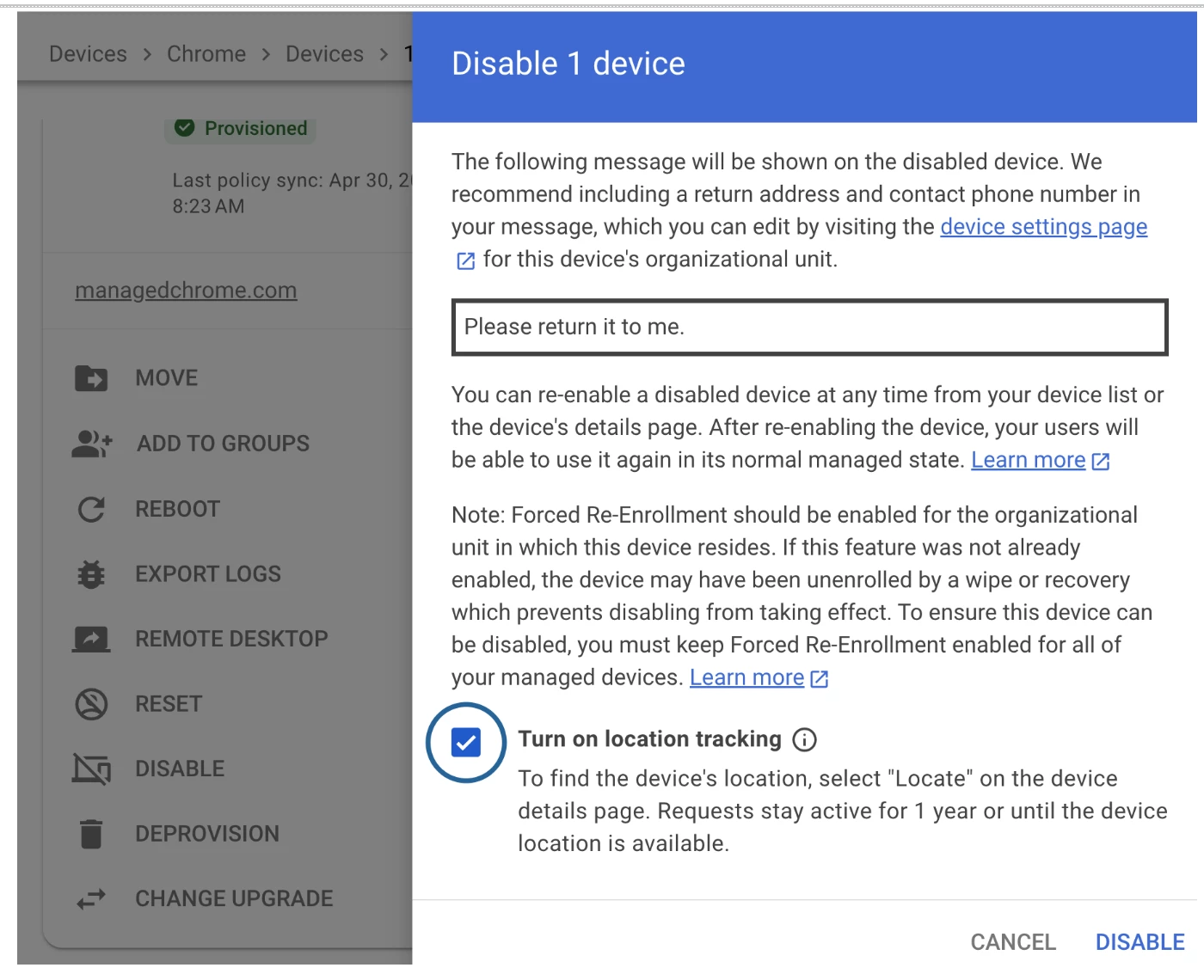
- Disabling the device: An admin must check the new "Turn on location tracking" option while disabling the device.
- Triggering location: After disabling, the admin uses the "Locate" command on the device details page.
- Viewing location: If the device is online, it will report its location, which will be available as a Google Maps link in the Admin Console for 24 hours. Admins can also configure email notifications to be alerted when a device's location is reported
TLDR
By integrating location tracking directly into the Admin Console while establishing non-negotiable privacy guardrails, Google is offering IT teams the crucial visibility they need; without compromising the trust of their users.
Managing a fleet of ChromeOS devices has always been straightforward, but until now, locating a lost or stolen Chromebook was a missing piece of the puzzle. With the introduction of a native remote "Locate" command, IT administrators finally have a built-in solution to track down missing hardware.
But what makes this feature truly compelling isn't just that it tracks devices—it's how carefully it balances critical asset tracking with end-user privacy. Here are the most impactful takeaways from the new feature:
1. It’s built for real-world impact
This feature is designed for much more than just saving money on lost hardware. The push for a native locate tool was championed by major customers, including the NYC school district (which manages over 1.15 million enrollments). In the past, having device location data has helped locate missing students and even saved lives. By building this first-party solution, ChromeOS is eliminating the need for school districts and enterprises to rely on expensive, often privacy-invasive third-party tracking extensions.
2. Tracking is strictly tied to "Disabled" mode
To prevent any "always-on" surveillance, the location command is fundamentally tied to the Admin Console's "Disable" feature. Administrators cannot simply track an active user. They can only retrieve a device's coordinates (longitude and latitude) if the device has been completely disabled and locked. Once disabled, the device displays a lock screen that explicitly notifies any user who tries to log in that the administrator has access to the device's location.
3. Privacy is hardcoded into the architecture
Because ChromeOS devices typically lack built-in GPS, location is determined via Wi-Fi and cellular signals. But the real privacy win is in the data retention rules:
- Minimal Storage - The server only ever stores the last retrieved location.
- Auto-Deletion - Once a device is found and re-enabled, all location data is automatically deleted from the server within 24 hours.
- Cooldown Periods - To prevent malicious tracking, re-enabling a device triggers a 12-hour "cool-down" period during which the locate command cannot be immediately triggered again.
How to Apply
If you are an administrator and would like to be included in this Trusted Tester program to try out Locate Disabled ChromeOS Devices and provide valuable feedback, please simply post a comment below to express your interest!
We will reach out to you directly with the next steps.
