

Strengthening Chrome Enterprise Security: AI Integration and Dynamic Patching
The software security landscape is undergoing a structural shift driven by Large Language Models (LLMs). These models provide unprecedented capabilities for automated vulnerability discovery, scaling beyond human security expertise. To ensure structural resilience and comprehensive remediation, Google Chrome is deploying AI models at scale to identify, triage, and patch security vulnerabilities faster than ever.
AI-Powered Vulnerability Discovery and Triage
In early 2026, Chrome implemented an agent harness utilizing Gemini to identify vulnerabilities across the broader codebase. This system operates with high efficiency and low false positive rates, notably discovering a sandbox escape vulnerability that had resided in the codebase for over 13 years. This AI-powered detection complements existing security testing infrastructure, such as fuzzing, and operates under strict guardrails. The AI analyzes source code strictly at rest on locked-down machines without general internet access.
Simultaneously, the triage process has shifted toward an automated approach blending rule-based systems with AI. Historically, triaging a single security report took between 5 and 30 minutes. The automated triage process now executes four key phases:
| Triage Phase | Automated Function |
| Filtering | Eliminates spam, checks intake criteria, and verifies vulnerability descriptions. |
| Reproduction | Checks for proofs of concept and tests reproducible bugs on specific OS and browser versions. |
| Enrichment | Appends essential metadata, including severity ratings and the timeline of vulnerability introduction. |
| Assignment | Automatically routes the validated issue to the appropriate component and human owner. |
This automated process saves hundreds of developer hours per month, reallocating resources to other critical security priorities.
Accelerated Patching and Multi-Agent Workflows
To scale the bug-fixing process, Chrome relies on multi-agent workflows within its continuous integration (CI) systems. The workflow involves:
- A fixing agent that generates multiple candidate fixes based on specific issue context.
- A critic agent that evaluates the candidates and produces artifacts for developer review, mimicking standard code review processes.
- Test-writing agents that generate tests across all supported Chrome platforms to validate the fix.
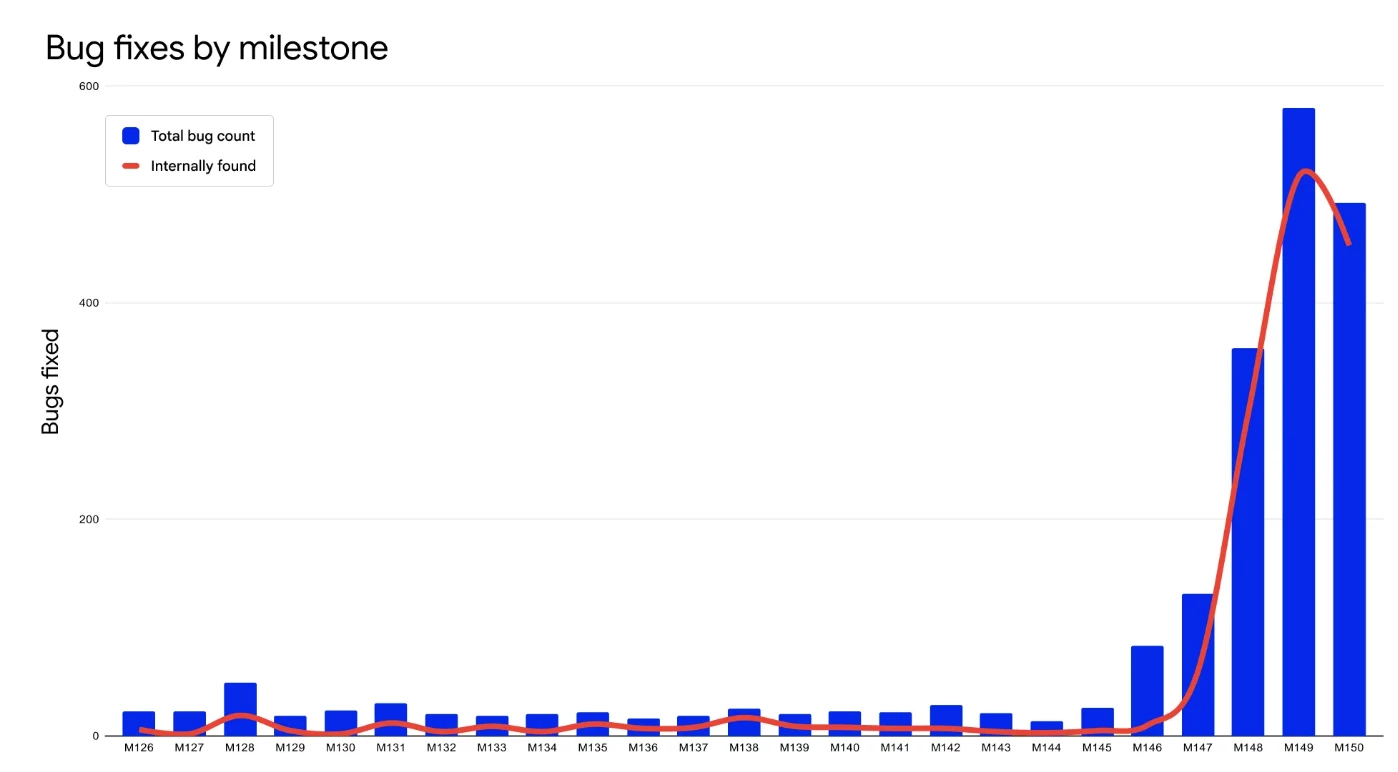
By utilizing LLMs to generate candidate fixes, Chrome has drastically increased its patching velocity. In milestones 149 and 150, Chrome patched 1,072 security bugs, surpassing the total number of security bugs fixed across the prior 23 milestones combined. Furthermore, continuous CI integration of tools like BigSleep and CodeMender blocked over 20 vulnerabilities—including a critical S1+ issue—from reaching production in a single month.
Minimizing the Patch Gap: Rapid Updates and Dynamic Patching
Closing the "patch gap"—the window between a fix appearing in the open-source codebase and reaching end-user machines—is critical for preventing N-day exploits. To accelerate delivery, Chrome is moving to a 2-week release cycle for major milestones with weekly security updates, while simultaneously piloting a shift to two security releases per week.
To reduce N-day exploitation risks associated with pending browser restarts, Chrome is developing new deployment mechanisms:
- Dynamic Patching: Leverages Chrome's multi-process architecture to sequentially replace background child processes (such as the Renderer and GPU) with updated binaries on the fly, eliminating the need for a full browser restart in most cases.
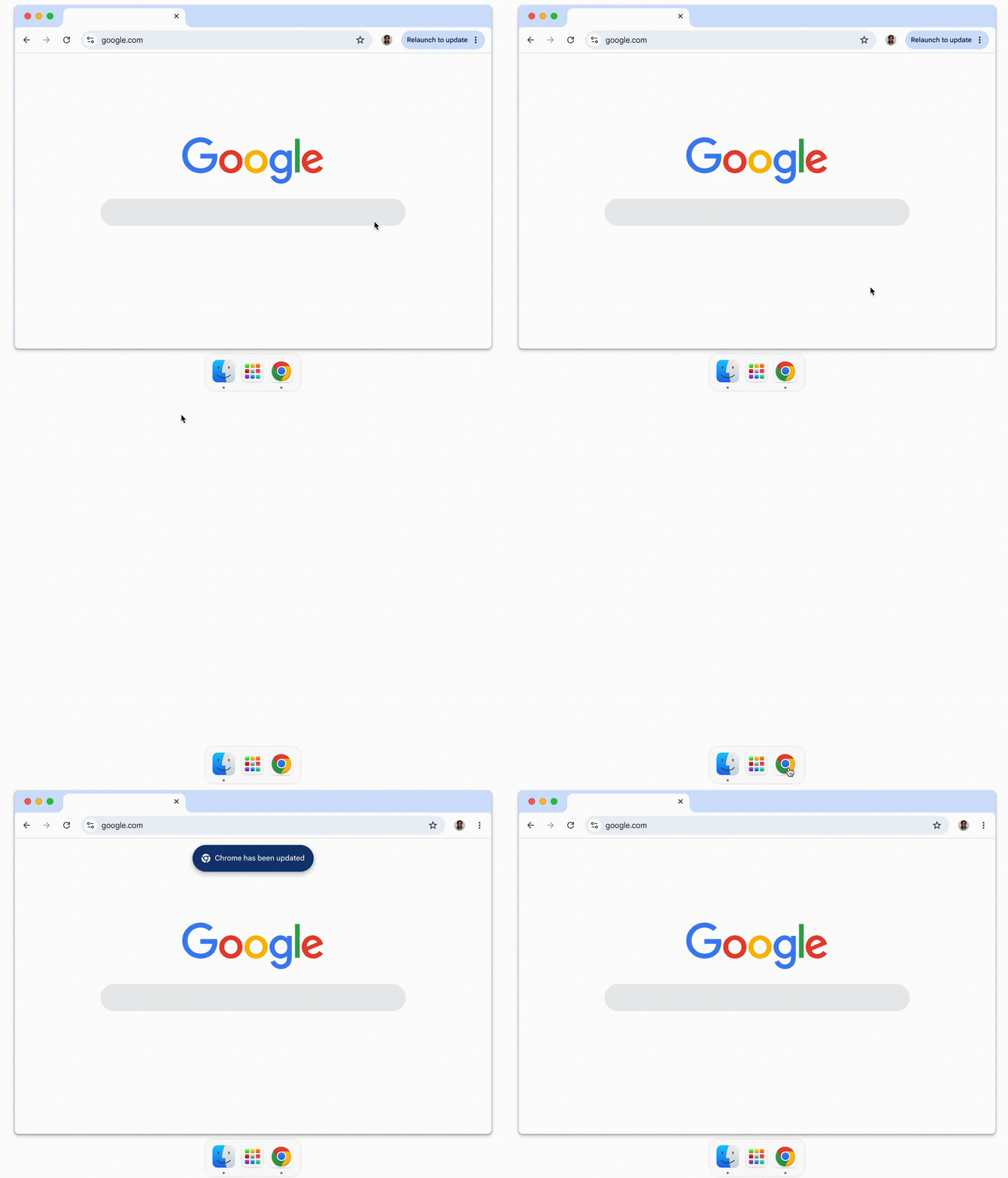
- Zero-Window Auto-Restart: Implemented in Chrome 150 on macOS, this feature automatically restarts the browser to apply pending updates when all windows are closed but the application state remains active in the background.
Deepening Structural Defenses: Memory Safety
Chrome employs a two-layered memory safety strategy to neutralize vulnerabilities at the architectural level.
C++ Hardening and Mitigations The primary defense for the existing C++ codebase relies on toolchain and runtime mitigations:
| Mitigation Strategy | Technical Objective |
| MiraclePtr & MiracleObject Expansion | Neutralizes Use-After-Free (UAF) vulnerabilities. MiracleObject deployment aims to neutralize up to 90% of UAF vulnerabilities on the GPU main thread. |
| Spanification | Systematically eliminates Out-of-Bounds (OOB) spatial safety errors by migrating legacy constructs to compiler-enforced std::span types. Currently, 97% of first-party Chrome code compiles cleanly with strict unsafe-buffer warnings. |
| Structural Hardening | Integrates checked math for memory allocations to block integer overflows and implements heap partitioning to segregate pointer-containing types from non-pointer types. |
Transitioning to Memory-Safe Languages To bypass the performance limitations of rigid C++ sandboxing, Chrome is actively deploying Rust for targeted "bug nest" eradication (e.g., complex data parsers and image codecs). A centralized Rust SDK exposes foundational Chromium APIs to facilitate high-privilege modularization, allowing complex features to execute safely inside high-privilege processes without sandboxing penalties.
IT Administrator Guidelines
For enterprise environments managing these updates, IT administrators should enforce the following standard methodologies to maintain their security posture:
- Apply the RelaunchNotification policy to prompt users to restart Chrome for pending updates, defining a clear escalation from a reminder to a forced restart.
- Utilize the Chrome Extended Stable Channel for highly sensitive environments requiring extended vetting periods for software changes.
- Leverage the OS-agnostic dashboard in Chrome Enterprise Core or Premium to track fleet-wide browser versions and manage updates granularly.
Original Source: Stronger with every update: How we're making Chrome and the web safer in the AI Era
