REQUIRE_ENTRY flag not working as expected
Hello,
I am working on a Mobile Device Management system and just received a bug report about the Require Entry option when resetting a password.
Since I set the Require Entry option I expect that the device does not accept any new password changes until I unlocked it at least once with the new credentials. This did not work. I was able to change the password numerous times over the Google API without logging in once.
In your documentation here:
it' s outlined that the flag should force the device to not accept any other password changes over the Google API by admins until the user has entered the new password.
REQUIRE_ENTRY Don't allow other admins to change the password again until the user has entered it.
I traced the issue through my software and checked all requests. My initial request to Google services looks like this.
{
   "type":"RESET_PASSWORD",
   "resetPasswordFlags":[
      "REQUIRE_ENTRY"
   ],
   "newPassword":"111111"
}
Here is clearly observable that the REQUIRE_ENTRY flag is sent to Google.
Furthermore Google also includes the flag in it's response.
{
   "name":"RouterSuccess",
   "code":200,
   "message":"OK",
   "data":{
      "name":"enterprises/LC01zoikuz/devices/33c202b53a9b800c/operations/1764168989992",
      "metadata":{
         "@type":"type.googleapis.comgoogle.android.devicemanagement.v1.Command",
         "type":"RESET_PASSWORD",
         "createTime":"2025-11-26T14:56:29.992Z",
         "duration":"600s",
         "newPassword":"111111",
         "resetPasswordFlags":[
            "REQUIRE_ENTRY"
         ],
         "userName":"enterprises/LC01zoikuz/users/107976853558892540833"
      }
   }
}
So I assume that my API calls are working fine.
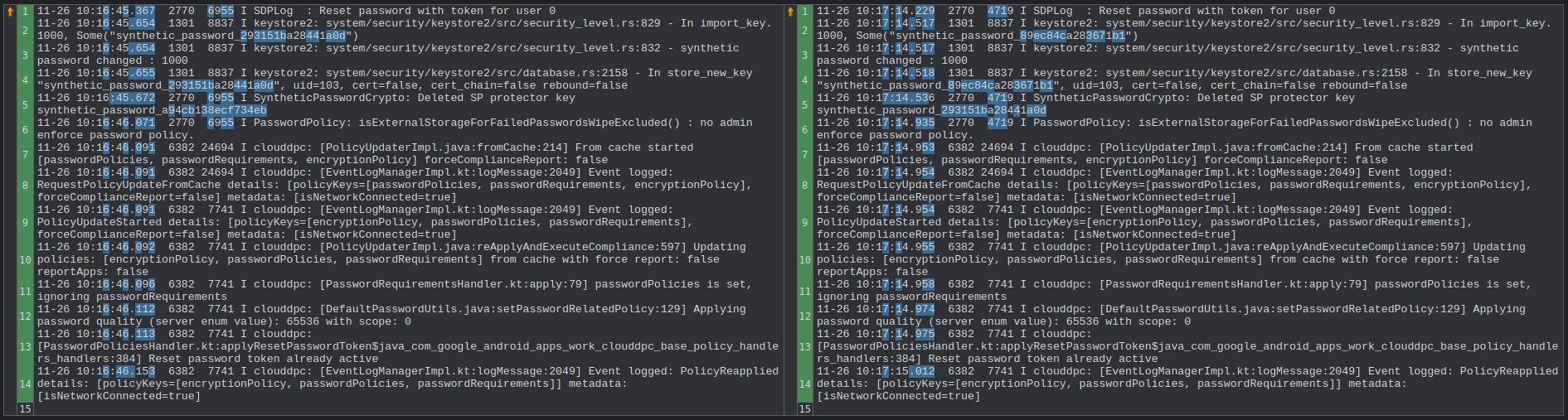
Now I started to look into the adb logs of my device. I sent two reset password commands, one with the Require Entry option enabled and one without. I grepped the logs for "password" as a keyword and compared the results with a tool.
Those are the logs of my request with Require Entry enabled:
11-26 10:16:45.367 2770 6955 I SDPLog : Reset password with token for user 0
11-26 10:16:45.654 1301 8837 I keystore2: system/security/keystore2/src/security_level.rs:829 - In import_key. 1000, Some("synthetic_password_293151ba28441a0d")
11-26 10:16:45.654 1301 8837 I keystore2: system/security/keystore2/src/security_level.rs:832 - synthetic password changed : 1000
11-26 10:16:45.655 1301 8837 I keystore2: system/security/keystore2/src/database.rs:2158 - In store_new_key "synthetic_password_293151ba28441a0d", uid=103, cert=false, cert_chain=false rebound=false
11-26 10:16:45.672 2770 6955 I SyntheticPasswordCrypto: Deleted SP protector key synthetic_password_a94cb138ecf734eb
11-26 10:16:46.071 2770 6955 I PasswordPolicy: isExternalStorageForFailedPasswordsWipeExcluded() : no admin enforce password policy.
11-26 10:16:46.091 6382 24694 I clouddpc: [PolicyUpdaterImpl.java:fromCache:214] From cache started [passwordPolicies, passwordRequirements, encryptionPolicy] forceComplianceReport: false
11-26 10:16:46.091 6382 24694 I clouddpc: [EventLogManagerImpl.kt:logMessage:2049] Event logged: RequestPolicyUpdateFromCache details: [policyKeys=[passwordPolicies, passwordRequirements, encryptionPolicy], forceComplianceReport=false] metadata: [isNetworkConnected=true]
11-26 10:16:46.091 6382 7741 I clouddpc: [EventLogManagerImpl.kt:logMessage:2049] Event logged: PolicyUpdateStarted details: [policyKeys=[encryptionPolicy, passwordPolicies, passwordRequirements], forceComplianceReport=false] metadata: [isNetworkConnected=true]
11-26 10:16:46.092 6382 7741 I clouddpc: [PolicyUpdaterImpl.java:reApplyAndExecuteCompliance:597] Updating policies: [encryptionPolicy, passwordPolicies, passwordRequirements] from cache with force report: false reportApps: false
11-26 10:16:46.096 6382 7741 I clouddpc: [PasswordRequirementsHandler.kt:apply:79] passwordPolicies is set, ignoring passwordRequirements
11-26 10:16:46.112 6382 7741 I clouddpc: [DefaultPasswordUtils.java:setPasswordRelatedPolicy:129] Applying password quality (server enum value): 65536 with scope: 0
11-26 10:16:46.113 6382 7741 I clouddpc: [PasswordPoliciesHandler.kt:applyResetPasswordToken$java_com_google_android_apps_work_clouddpc_base_policy_handlers_handlers:384] Reset password token already active
11-26 10:16:46.153 6382 7741 I clouddpc: [EventLogManagerImpl.kt:logMessage:2049] Event logged: PolicyReapplied details: [policyKeys=[encryptionPolicy, passwordPolicies, passwordRequirements]] metadata: [isNetworkConnected=true]
And these are the logs without Require Entry activated:
11-26 10:17:14.229 2770 4719 I SDPLog : Reset password with token for user 0
11-26 10:17:14.517 1301 8837 I keystore2: system/security/keystore2/src/security_level.rs:829 - In import_key. 1000, Some("synthetic_password_89ec84ca283671b1")
11-26 10:17:14.517 1301 8837 I keystore2: system/security/keystore2/src/security_level.rs:832 - synthetic password changed : 1000
11-26 10:17:14.518 1301 8837 I keystore2: system/security/keystore2/src/database.rs:2158 - In store_new_key "synthetic_password_89ec84ca283671b1", uid=103, cert=false, cert_chain=false rebound=false
11-26 10:17:14.536 2770 4719 I SyntheticPasswordCrypto: Deleted SP protector key synthetic_password_293151ba28441a0d
11-26 10:17:14.935 2770 4719 I PasswordPolicy: isExternalStorageForFailedPasswordsWipeExcluded() : no admin enforce password policy.
11-26 10:17:14.953 6382 24694 I clouddpc: [PolicyUpdaterImpl.java:fromCache:214] From cache started [passwordPolicies, passwordRequirements, encryptionPolicy] forceComplianceReport: false
11-26 10:17:14.954 6382 24694 I clouddpc: [EventLogManagerImpl.kt:logMessage:2049] Event logged: RequestPolicyUpdateFromCache details: [policyKeys=[passwordPolicies, passwordRequirements, encryptionPolicy], forceComplianceReport=false] metadata: [isNetworkConnected=true]
11-26 10:17:14.954 6382 7741 I clouddpc: [EventLogManagerImpl.kt:logMessage:2049] Event logged: PolicyUpdateStarted details: [policyKeys=[encryptionPolicy, passwordPolicies, passwordRequirements], forceComplianceReport=false] metadata: [isNetworkConnected=true]
11-26 10:17:14.955 6382 7741 I clouddpc: [PolicyUpdaterImpl.java:reApplyAndExecuteCompliance:597] Updating policies: [encryptionPolicy, passwordPolicies, passwordRequirements] from cache with force report: false reportApps: false
11-26 10:17:14.958 6382 7741 I clouddpc: [PasswordRequirementsHandler.kt:apply:79] passwordPolicies is set, ignoring passwordRequirements
11-26 10:17:14.974 6382 7741 I clouddpc: [DefaultPasswordUtils.java:setPasswordRelatedPolicy:129] Applying password quality (server enum value): 65536 with scope: 0
11-26 10:17:14.975 6382 7741 I clouddpc: [PasswordPoliciesHandler.kt:applyResetPasswordToken$java_com_google_android_apps_work_clouddpc_base_policy_handlers_handlers:384] Reset password token already active
11-26 10:17:15.012 6382 7741 I clouddpc: [EventLogManagerImpl.kt:logMessage:2049] Event logged: PolicyReapplied details: [policyKeys=[encryptionPolicy, passwordPolicies, passwordRequirements]] metadata: [isNetworkConnected=true]
I compared both results but were not able to detect any differences on the device.
Thank you and best regards
lennartsp
