

🎓 Chrome certifications are moving to CM Connect!
On September 21, 2026, the Google Chrome Certification Program officially migrated to a new, dedicated management portal: CM Connect.
This is now your central hub to schedule exams and access your badges. Keep an eye out for a welcome email in your inbox with your activation details! (example image below)
⚠️ How to Activate Your Migrated Account
Your historical exams and active credentials have already been transferred. Do not register for a new account, as this will cause an error. Instead, activate your profile:
-
Go to the CM Connect Login Page.
-
Click "NEVER LOGGED IN BEFORE?" on the login screen.
-
Enter the exact email address you used for Webassessor to set your password.
📌 Key Rules & Reminders
-
Dedicated Login: Credentials from other Google certification systems (Google Cloud, Workspace, etc.) will not work here.
-
One Account Only: Maintaining multiple profiles violates policy and can lead to credential suspension.
-
ID Verification: Your profile name must exactly match your government-issued ID to prevent being blocked on exam day.
Certified members will receive an email that looks like the below in the coming days:
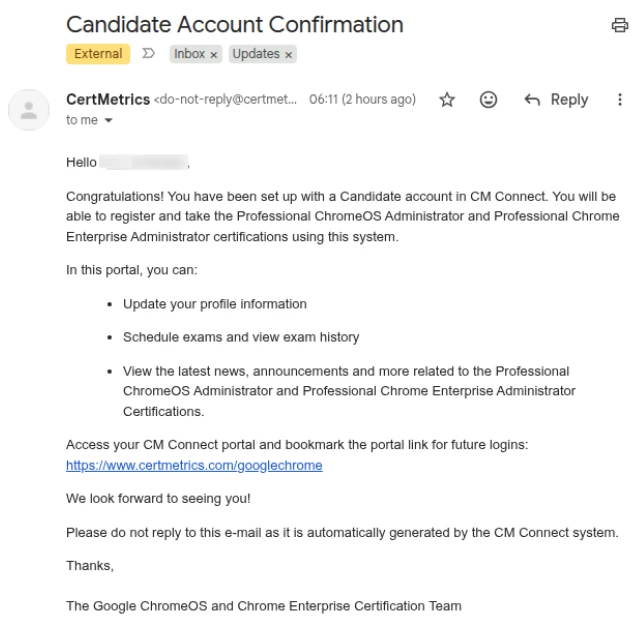
We want to reassure you this is a genuine email relating to your Chrome Certification(s).
✉️ Need Help?
For support or login issues, reach out to:
-
ChromeOS Support: chromeos-certification@google.com
-
Chrome Enterprise Support: chrome-enterprise-certification@google.com
