New Member
January 19, 2026
Solved

Removing completely the Use AI mode from Google search widget.

  • January 19, 2026
  • 1 reply
  • 0 views

Hi All,
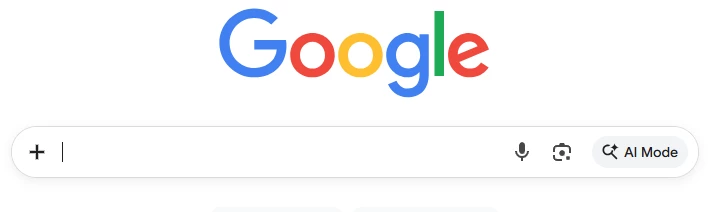
I'm trying to remove completly the option of AI mode in Google chrome.
I was able to use these settings. AIModeSettings=1 GenAiDefaultSettings=2 How ever it doesn't remove the AI mode from the Google.com search bar that is inside the page. 
Any formal way to remove this option? 


Best answer by Lynda

Hi @YakovVoloch thanks for reaching out.


Can I confirm you are referring to the managed version of Chrome browser (i.e. Chrome Enterprise) whereby it's employees within an organisation accessing AI/Google Search from a managed Chrome browser?


Either way, it sounds the policies you used are working as intended for the browser, but to change the Search Page, you'll need to look at your Workspace Service settings rather than Chrome Browser policies.


There's a few tips below, however for further questions we would recommend you check out the Workspace community specifically here.


If your users are on Workspace accounts, AI Overviews are often tied to whether "Search Customization" or specific "Data and Personalization" flags are enabled in the Google Admin Console.
 

1 reply

Lynda
LyndaAnswer
Community Manager
January 20, 2026

Hi @YakovVoloch thanks for reaching out.


Can I confirm you are referring to the managed version of Chrome browser (i.e. Chrome Enterprise) whereby it's employees within an organisation accessing AI/Google Search from a managed Chrome browser?


Either way, it sounds the policies you used are working as intended for the browser, but to change the Search Page, you'll need to look at your Workspace Service settings rather than Chrome Browser policies.


There's a few tips below, however for further questions we would recommend you check out the Workspace community specifically here.


If your users are on Workspace accounts, AI Overviews are often tied to whether "Search Customization" or specific "Data and Personalization" flags are enabled in the Google Admin Console.


New Member
January 20, 2026

Hi @Lynda 
Thanks for the response.
I actually was referring also to none managed browser. 
It make sense that you can't control this from the browser policy but I thought maybe there is an hidden flag or something that would give me the option to not have this option in the search bar.
Thanks for your help much appreciated.