Bhakti
New Member
March 12, 2026
Question

User Password Policy - Automated password change setting Chrome OS

  • March 12, 2026
  • 1 reply
  • 12 views

We have configured the chrome.users.AutomatedPasswordChangeSettings policy to enable automated password change and allow importing the AI model required for this feature. However, the "Change password automatically" button/option is not appearing in the Password Checkup flow. Only the standard "Change password" (manual redirect) button is visible.

We have configured the chrome.users.AutomatedPasswordChangeSettings policy to enable automated password change and allow importing the AI model required for this feature. However, the "Change password automatically" button/option is not appearing in the Password Checkup flow. Only the standard "Change password" (manual redirect) button is visible.


Observed Behavior:

1.The compromised password entry is correctly flagged under "Compromised passwords"

2.Only the "Change password" button is shown (manual redirect to the site)

3.The "Change password automatically" option is completely absent from the UI

4.No automated password change flow is triggered
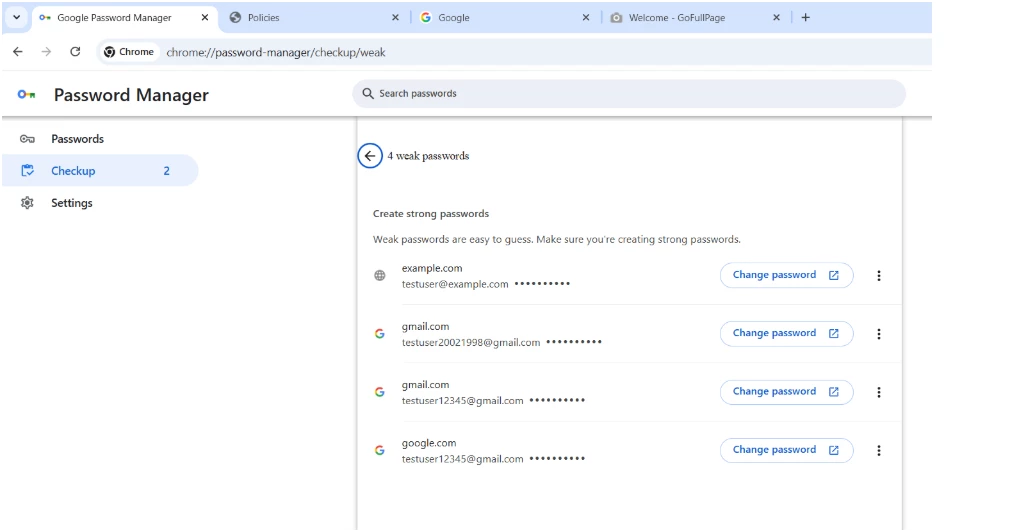


1 reply

Lynda
Community Manager
March 12, 2026

Hi again ​@Bhakti 


It looks like you're diving into some of the more advanced AI-assisted features in Chrome; which is great. While the AutomatedPasswordChangeSettings policy is powerful, it does have several dependencies that often cause the button to remain invisible even when the policy is technically active.

Because this feature relies on server-side compatibility and specific account states, there are a few qualifying questions we should address before you might have to  raise a case directly with support.

Please check these four common "blockers" for the Automated Password Change flow:

  • Is the site on the Support List? This is the most common reason the button doesn't appear. The "Change password automatically" button only shows up for a specific list of partner websites where Google’s AI has been trained to navigate the UI.
    • Verified Examples: Please test against Spotify, Netflix, H&M, Duolingo, or Twitter (X).
    • Manual Fallback: For sites like Amazon or most banking portals, Chrome will currently only show the manual "Change password" button.
  • Is "Enhanced Safe Browsing" On? This feature often leverages the Enhanced Safe Browsing infrastructure to communicate with the AI model. Please confirm if this is enabled for the test user.
  • The Sync Requirement: Automated password changes require Google Password Manager Sync to be active. If the user is saving passwords locally only (not syncing to their Google Account), the AI flow will not trigger.
  • Is the User in the US? Currently, the fully automated AI flow is primarily optimized for English-language sites and users based in the United States. If your testing OU is outside this region, the feature may be geo-fenced.

Why the button might be missing

The Automated Password Change feature isn't just a UI toggle; it's a "handshake" between three things:

  1. The Policy: Enabling the permission via Admin Console.
  2. The AI Model: Successfully downloaded to the local device (Check chrome://components for the Autofill Assistant component).
  3. The Site "Recipe": The website must support the /.well-known/change-password redirect and standard HTML autocomplete tags (new-password).

Our recommendation:

  1. Try a test with a compromised credential on Spotify.com or H&M.com.
  2. Check chrome://policy to ensure AutomatedPasswordChangeSettings shows as Active.

If the button is missing even on the "Verified Examples" above, then we likely have a bug, and we’’d recommend raising a case directly with support.