Bhakti
New Member
March 12, 2026
Question

User Password Policy - Import saved password setting Chrome OS

  • March 12, 2026
  • 1 reply
  • 17 views

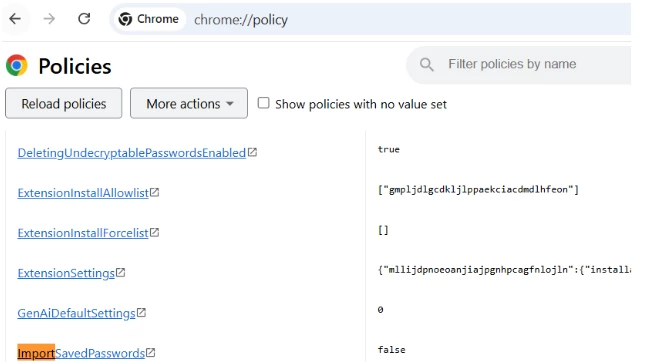
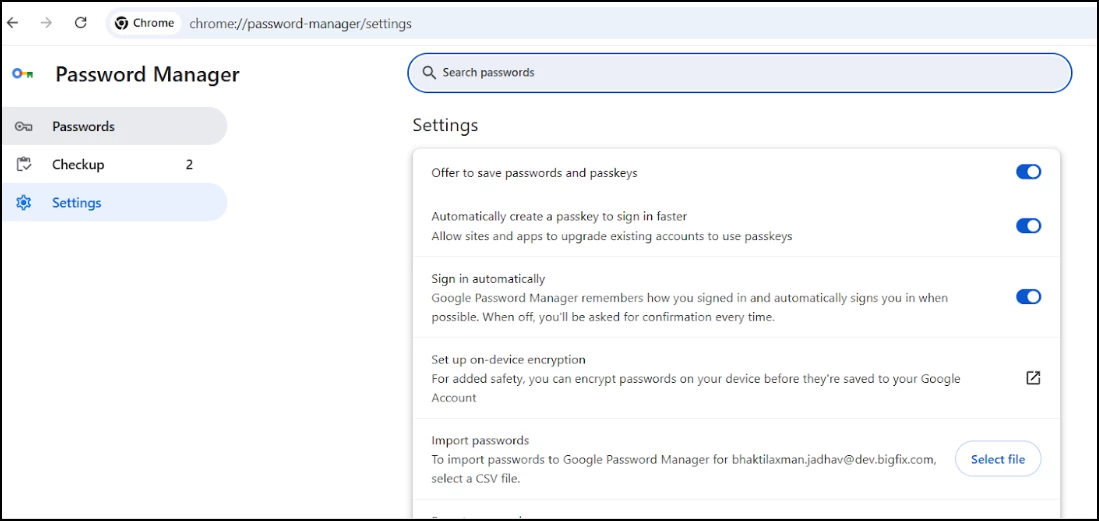
We are experiencing an issue where the ImportSavedPasswords Chrome policy set to FALSE with POLICY_MODE_MANDATORY is not disabling the "Import passwords" option in the Chrome Password Manager UI.

Steps to Reproduce:

1.In Google Admin Console, navigate to Devices > Chrome > Settings > Users & browsers

2.Select the Backend OU under Bigfix_MCM_OU > MCM > DEV

3.Set Import Saved Passwords → Disable imports of saved passwords

4.Set User override → Do not allow users to override this setting

5.Save the policy

6.On a Chrome browser signed in with an account belonging to the Backend OU, navigate to chrome://policy and click Reload policies

7.Navigate to chrome://password-manager/settings


Observed Behavior:

1.The "Import passwords" row remains fully visible and functional under chrome://password-manager/settings

2.The "Select file" button is clickable and opens a file picker dialog

3.Passwords can still be imported via CSV despite the policy being set to FALSE with MANDATORY enforcement


Expected Behavior:

Per the policy documentation: "Disable imports of saved passwords — Saved passwords aren't imported on first run, and users can't manually import them."


The "Import passwords" row should be hidden or permanently greyed out

The "Select file" button should be non-functional or absent

Users should have no way to manually import passwords


Refer below attached screenshots.


1 reply

Lynda
Community Manager
March 12, 2026

Hi ​@Bhakti thanks for getting in touch with a very well-documented report.


Because this involves a MANDATORY policy not being honored in the UI (which could have security implications for your organization), this definitely warrants you raising a case directly with support.

However, I include three follow up questions that you can consider and include as part of your support case to ideally expedite things.


Please verify:

  1. The "Applied To" Scope: On the chrome://policy page of the affected device, does the ImportSavedPasswords policy show the status as "Mandatory" and the source as "Cloud"? (This confirms the browser is actually "seeing" the command from the Admin Console).

  2. Chrome Version: Which version of Chrome/ChromeOS is running? 

  3. Experimental Flags: Have any flags related to the Password Manager (e.g., #password-manager-redesign) been manually enabled on these machines? Sometimes experimental UI features bypass standard policy hooks.


Why this matters

If the policy is listed as "Success" in chrome://policy but the button remains clickable in chrome://password-manager/settings, we are likely looking at a UI-to-Policy binding bug. Essentially, the engine knows the rule, but the "front end" of the password manager isn't checking that rule before rendering the button.


Since you have already confirmed the policy is set to Mandatory and the behavior persists after a policy reload, yes, please raise a case directly with support.

When you contact them, please provide the following to skip the initial troubleshooting tiers:

  • The Policy Export JSON (click "Export to JSON" on the chrome://policy page).

  • State the Chrome Version and state Platform is ChromeOS.

  • Mention that the policy is confirmed as "Mandatory" in the client-side policy list, but the UI remains interactive.

Hope this leads to a resolution!