Devices
11 Topics
How to change the keyboard layout in managed chromebooks?
We currently have around 100 Chromebooks that we use for exams. I have now been asked to make it possible for participants to change the keyboard layout. Most use the German keyboard, but a few want to write with an English or French layout. What do I need to set in the management console so that participants can change the layout on their devices?139Views0likes3CommentsI’m experiencing an issue on ChromeOS where, after signing in, the session occasionally resets or shows a blank screen before the desktop fully loads.
Hi everyone, I’m experiencing an issue on ChromeOS where, after signing in, the session occasionally resets or shows a blank screen before the desktop fully loads. In some cases, the device appears to authenticate successfully, but the expected environment and apps do not initialize correctly. This behavior is inconsistent and seems unrelated to network stability. Basic troubleshooting steps such as restarting the device, checking for system updates, and signing out/in again have already been attempted without resolving the issue. Has anyone encountered similar ChromeOS login or session-loading problems? Any insights on logs to review or settings that might affect session initialization would be greatly appreciated.34Views0likes2CommentsStandardised fleet or multi-vendor strategy: where do you land in 2026?
Hey everyone, In a recent discussion, we talked about how teams are using automatic enrollment to deploy and scale ChromeOS fleets more easily — whether that’s zero-touch for new devices or Flex for existing hardware. That got me thinking about another decision many admins are navigating right now: how they’re thinking about fleet strategy as they plan for 2026. Some organisations prefer a highly standardised fleet, sticking to one vendor or model to keep things predictable — from user experience and support, to lifecycle planning. Others lean towards a multi-vendor approach, mixing devices (and sometimes ChromeOS Flex) to stay flexible on procurement, optimise costs, or extend the life of existing hardware. Both approaches can work well on ChromeOS, but the trade-offs are something to take into consideration. I’d be interested to hear from the community: Do you lean more towards a standardised fleet, a multi-vendor strategy, or a mix of both? What factors tend to drive that decision in your environment (scale, cost, supply chain, sustainability, support)? Has your approach changed over time as ChromeOS and Flex have evolved? As always, there’s no one-size-fits-all answer — it’d just be great to learn how others are thinking about this for the year ahead.28Views1like0Comments
The ChromeOS "Developer Wall": Why is Pro-Grade Hardware so hard to find?
Hi everyone, I’m writing this to start a discussion about a major bottleneck for the ChromeOS ecosystem: the lack of high-performance hardware for developers. I’ve been a "ChromeOS-first" developer for a while now. I love the security, the simplicity, and how far Crostini (Linux) has come. However, I’ve hit a wall. I am currently using a machine with an **Intel i5, 16GB RAM, and a 1TB SSD**. On any "Consumer" list, this is a top-tier machine. But for professional development—compiling large C++ or Rust projects, running multiple Docker containers, and keeping a heavy IDE open—it is simply **under-dimensioned.** Compilation times are 2x to 3x slower than my peers on high-end macOS or Linux workstations. The Search for the "Unicorn" Chromebox I’ve been searching for a "Workstation Class" Chromebox. My target specs are: * **Processor:** Intel Core i7 (13th/14th Gen) or ideally an i9. * **RAM:** 32GB or 64GB (Crucial for virtualization and containers). * **Storage:** 1TB+ NVMe SSD. If you go to Amazon or Best Buy, the selection is disappointing. You are flooded with Celeron, i3, or low-power i5 machines. Even "Chromebook Plus" devices usually cap out at 8GB or 16GB of RAM, which is the bare minimum for modern dev work, not the "Pro" standard. #### Why is high-end hardware "Invisible"? After some deep diving, I’ve realized that if you want a real developer machine, you have to look beyond consumer retail. Here is the reality of the market right now: **1. The Enterprise Channel (The $800 - $1,200 bracket)** Manufacturers like **HP** and **ASUS** do make powerful units, but they are tucked away in "Enterprise" catalogs. * **HP Chromebox G4 (Enterprise Edition):** Can be found with an i7-1360P. Price usually sits around **$850 - $1,050**, but you often have to buy through a specialized reseller like CTL or Promevo. * **ASUS Chromebox 5/6:** The i7 versions are beastly but usually ship with only 16GB. Retail price: **$700 - $900**. **2. The DIY Workaround ($900 - $1,100 total)** Ironically, the best "Pro" Chromebox is often a DIY project. * **The Strategy:** Buy a base **ASUS Chromebox 5 (i7 version)** for approx. **$750**. * **The Upgrade:** Spend another **$150 - $200** on a 64GB DDR5 RAM kit and a faster 2TB NVMe drive. * **The Result:** A machine that actually handles professional loads, but one that requires the user to void a warranty or at least open the chassis—something we shouldn't have to do at this price point. **3. The Framework Exception (~$1,000+)** The Framework Chromebook Edition remains the only "pro-consumer" option that respects high specs, though it’s a laptop form factor. To get an i7 with 32GB+ RAM, you are looking at a **$1,100+** investment. #### My Question to the Community Why is there such a massive gap between Google’s marketing of "ChromeOS for Developers" and the actual availability of hardware? * Has anyone found a reliable source for **pre-configured 32GB+ Chromeboxes**? * Are there any "whitebox" manufacturers building high-end ChromeOS hardware that I've missed? * Do you think Google needs a "Chromebook Ultra" or "Pro" tier that mandates 32GB RAM to separate professional machines from student laptops? I’d love to hear how other devs are solving the hardware shortage. Are you all just buying mid-range boxes and upgrading the RAM yourselves, or is there a "secret" store I don't know about? Note: Research for pricing and models assisted by AI, but the frustration is 100% mine!35Views2likes0Comments
Custom Protocol Handler for Isolated Web App Not Working After ChromeOS Update (May be).
Hello, After my ChromeOS device updated on September 25, 2025 (though not certain this is the direct cause), custom protocol handlers (web+collab:// and collab://) for my Isolated Web App (IWA) stopped working. Triggering these links in Chrome no longer launches the app—they simply do nothing. This was functional until two days ago. App Type: Isolated Web App (IWA) Manifest excerpt: { "name": "someapp", "id": "/", "short_name": "some-app", "version": "0.1.0", "update_manifest_url": "https://github.com/--some-repo--/iwa-release/releases/latest/download/update.json", "icons": [ { "src": "/192x192.png", "sizes": "192x192", "type": "image/png", "purpose": "any maskable" }, { "src": "/144x144.png", "sizes": "144x144", "type": "image/png", "purpose": "any maskable" } ], "start_url": "/", "scope": "/", "display": "standalone", "display_override": ["borderless"], "background_color": "#ffffff", "theme_color": "#3B82F6", "isolated_storage": true, "permissions_policy": { "cross-origin-isolated": ["self"], "direct-sockets": ["self"], "controlled-frame": ["self"], "window-management": ["self"], "display-capture": ["self"], "all-screens-capture": ["self"] }, "protocol_handlers": [ { "protocol": "web+collab", "url": "/?data=%s" }, { "protocol": "collab", "url": "/?data=%s" } ], "launch_handler": { "client_mode": "navigate-existing" }, "window_controls_overlay": { "enabled": true } } Recent Changes Enrolled new users in Google enterprise Updated the app manifest (see above) ChromeOS device updated on 2025-09-25 Observed Behavior Protocol links for both my IWA (web+collab://) and the official ChromeOS IWA SINK app (web+cf://) no longer launch the installed apps No errors, warnings, or manifest validation issues Clicking protocol links does nothing (both in managed and unmanaged device states) What I've Tried Checked manifest and protocol handler registration Tested after app reinstall and in different device policy states Reviewed enterprise Admin Console for new/relevant policy changes Searched for protocol handler or IWA-related changelogs/updates Compared behavior with different protocol URLs and schemes Questions Is anyone else experiencing protocol handler breakages for IWAs since a recent Chrome/ChromeOS update? Have there been changes in policy, manifest format, or handler registration that could affect this? Any ideas or diagnostics for discovering if Chrome or policy is blocking/ignoring the protocol? Any leads, recent experiences, or possible workarounds would be greatly appreciatedSolved263Views1like5Comments
Any plan to certify MacBookAir8,1 or 8,2 for Chromeos Flex?
Hi, is there any plan to develop full Chrome OS Flex support for T2 Intel macbook airs from 2018-2019? I tried installed it on the that machine, but it has common Linux struggle with T2 security chip: keyboard, touchpad, wifi and bluetooth not worked. So, I wondering, if there will be some future support? I know that the non-working parts, i mentioned, is possible to have fully working with t2linux project. I am running Fedora 42 with t2linux patches without issues. Thanks Alv.Solved156Views0likes2CommentsChrome OS Flex AUE in Google Admin
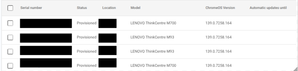
Hey. The admin console has a fantastic feature where you can see the AUE of your devices pr year. It makes it easier to plan budget for replacing devices going out of support and planning execution. https://admin.google.com/ac/chrome/devices/?sf=2&so=2&tab=dashboard However - you can only see Chrome OS devices since the "Automatic updates until" field in Google Admin is not populated as in the example below. Obviously this information is available somewhere to be displayed, but it is currently not. I would really like to avoid exporting inventory to a spreadsheet, use the certified model list (https://support.google.com/chromeosflex/answer/11513094?hl=en) to populate the empty field in the spreadsheet and keep track of it there. How do others plan inventory replacements? Has anyone else tried to reach out to the Chrome OS team pointing out this flaw?Solved95Views0likes1Comment
Poly Studio Video stopped working
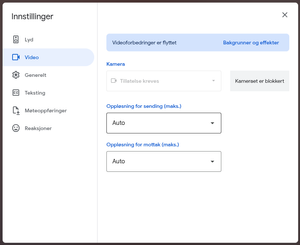
After updating to most recent version iof Chrome OS Flex (138.0.7204.221) we are no longer able to use videosource using Google Meet. First it reports missing credentials. After a restart it claims that the video source could not be used as it might be in use by other apps (no other apps are running). Screenshot from settings In norwegian "Tillatelse kreves" => eng: "Permission is required" After a hard restart (power off/on) Chrome OS says the camera can not be used. I have tried the suggested solution of "disconnent the camera and connect it again". It worked with the prevous version of Chrome OS Flex ( like version 136.0.7103.158).178Views0likes5Comments