cope
44 Topics
Android COPE Devices randomly wiping
Hello, Recently our COPE profile in ZT is not functioning. The device will go through the enrollment, it gets registered correctly in our tenant (Entra/Intune) and we can get to the home screen just fine. However, after some time the device will receive the following notification: “Your organization has set up this device to be managed by your organization. If this is an error, contact your device’s provider. All data on the device will be deleted. Your device will automatically reset in 2 hour.” The config in ZT and the one in Intune match (token is correct and the DPC extras are fine). This profile was working up until 2 weeks ago. We’re stumped. We recreated a different COPE profiles with the required DPC extras as per Microsoft’s documentation, tried removing compliance policies and device configurations to make it a plain profile. No luck, still receives the reset notification. Phones tested: Samsung A15, Samsung A16 all running the latest Android 16OS with the latest security patch. Any help would be appreciated, thank you!141Views0likes6Comments
Work Profile Setup
Hi, I am setting up some new Samsung devices with Intune. I have chosen to go with Company Owned Work Profile (COPE). in the work profile, I see a Work Phone app and a Work Messenger app. How can I transfer the info from their existing phone to here? Smart switch will goto the Personal profile. There is a Samsung and Google Account on the phone. How do I verify that the data like text messages (from the work profile) are being backed up to one of those accounts? I can probably move the contacts to outlook so the work profile is syncing that. Also, on the S24Fe I am testing on, it created Messages in the work profile, but on the S25 it didn't any way to get that to install? Thanks -Joe100Views0likes4Comments
Android Expert Forum & Feature Request
Hey As I saw that bunch of question have been left unanswered on the expert forum is no one at Google monitoring the feed? I just wanted to post it here as the conversations seem to get more traction here. Is there official thread where feature request could be sent, I have been supporting mobile device management over way over a decade and in that time I have seen all sorts of things and there would be some features that would help greatly in managing enterprise environments with Android. Couple examples: It would be great if there would be a way to deploy some contact numbers to the devices on device address book, such service desk or onsite support number. This is especially needed for dedicated devices which usually do not have any email accounts associated with them and getting common contacts deployed to all devices is quite labor intensive with the current tools. Another one is the OS update management, which is lacking quite a bit, especially as I need to do a comparison to Apple and how their new OS update delivery works, it just makes the Android one lack in features. I would really want to see that on enteprise owned device we would have an override for downloading the OS updates via mobile data, as this is huge pain point when wi-fi networks are not available on some sites, and if the end users are not the most technically savvy, it would allow us admins to at least keep the fleet to some what up to date, obviously there still would probably be some issues, but the current status of the OS update policies is lacking. Also not sure should the update installation recognize on going phones calls when it is set to do the updates in automatic mode? As initially when we tried to apply it we got bunch of notifications that the updates where triggered during a phone call. /rant Thanks,35Views0likes0Comments
Outlook and Teams with PSTN calling in work profile
Hi today we raised a case with Microsoft for a specific work profile issue with their current Outlook and MS Teams implementation. I wanted to share this here, maybe there are some other customers/admins facing this issue. Our org started to move from Cisco to MS Teams PSTN calling some month ago and everything was fine, but I assume an update to either Outlook or Teams app was published and the issue started. Scenario: COPE or BYOD MS Teams and MS Outlook in work profile MS Teams has a PSTN line configured (either mobile or landline) Open Outlook, search for any contact and try to start a call to a mobile or desk number. The OS does not ask whether you like to use the phone on personal profile (as it did the last couple of years 😅) - it will hand over the call request to MS teams! You cannot decide to make the phone call with your Phone app :-( This breaks almost all use cases for our users. Even worse: A phone number like +49 123 828282 is transfered to MS teams app in a broken format and the call is made to +492492012320828282 💥😔 Compared to Google contacts in the work profile: The app is always handling the call request to the phone app on the personal profile and incorporate the MS Teams app. 🤔 Anyone else here in the community experiencing this issue? Thanks! DanielSolved221Views2likes9Comments
Android Exchange Sync Problems: Contacts and Calendar Not Updating
Hello, I manage a fleet of more than 1,000 Samsung Android devices using Omnissa Workspace One (AirWatch), devices are enrolled in COPE. We use Gmail, Google Calendar, and the native Samsung Contacts app in the work profile, all synchronized through an Exchange ActiveSync connector. Since Wednesday, November 26th, we have been experiencing synchronization issues: - Contacts and calendar events saved on Exchange disappear after some time. - The Calendar app eventually shows an “Unauthorized Action” error and refuses to open. - Gmail continues to sync emails normally. The issue occurs randomly (sometimes after one hour, sometimes longer). Clearing Gmail’s app data and signing in again temporarily resolves the problem, but the issue always comes back. We've tryied uninstalling and reinstalling the app through our MDM but we can only do it user by user and we're not sure about it fixing the issue. We have no means to "rollback" Gmail's version to an older one through our MDM, i've tryied uninstalling recent updates on one of my test phones, it's seems stable for the moment. We noticed that Gmail received an update recently, and a couple of other fleet managers have reported the same problem since that update on Play store's comments. Have you identified any bug or recent change in Gmail that could affect Exchange/ActiveSync synchronization? Thank you in advance for your assistance.Solved874Views0likes14CommentsREQUIRE_ENTRY flag not working as expected
Hello, I am working on a Mobile Device Management system and just received a bug report about the Require Entry option when resetting a password. Since I set the Require Entry option I expect that the device does not accept any new password changes until I unlocked it at least once with the new credentials. This did not work. I was able to change the password numerous times over the Google API without logging in once. In your documentation here: https://developers.google.com/android/management/reference/rest/v1/enterprises.devices/issueCommand#ResetPasswordFlag it' s outlined that the flag should force the device to not accept any other password changes over the Google API by admins until the user has entered the new password. REQUIRE_ENTRY Don't allow other admins to change the password again until the user has entered it. I traced the issue through my software and checked all requests. My initial request to Google services looks like this. { "type":"RESET_PASSWORD", "resetPasswordFlags":[ "REQUIRE_ENTRY" ], "newPassword":"111111" } Here is clearly observable that the REQUIRE_ENTRY flag is sent to Google. Furthermore Google also includes the flag in it's response. { "name":"RouterSuccess", "code":200, "message":"OK", "data":{ "name":"enterprises/LC01zoikuz/devices/33c202b53a9b800c/operations/1764168989992", "metadata":{ "@type":"type.googleapis.comgoogle.android.devicemanagement.v1.Command", "type":"RESET_PASSWORD", "createTime":"2025-11-26T14:56:29.992Z", "duration":"600s", "newPassword":"111111", "resetPasswordFlags":[ "REQUIRE_ENTRY" ], "userName":"enterprises/LC01zoikuz/users/107976853558892540833" } } } So I assume that my API calls are working fine. Now I started to look into the adb logs of my device. I sent two reset password commands, one with the Require Entry option enabled and one without. I grepped the logs for "password" as a keyword and compared the results with a tool. Those are the logs of my request with Require Entry enabled: 11-26 10:16:45.367 2770 6955 I SDPLog : Reset password with token for user 0 11-26 10:16:45.654 1301 8837 I keystore2: system/security/keystore2/src/security_level.rs:829 - In import_key. 1000, Some("synthetic_password_293151ba28441a0d") 11-26 10:16:45.654 1301 8837 I keystore2: system/security/keystore2/src/security_level.rs:832 - synthetic password changed : 1000 11-26 10:16:45.655 1301 8837 I keystore2: system/security/keystore2/src/database.rs:2158 - In store_new_key "synthetic_password_293151ba28441a0d", uid=103, cert=false, cert_chain=false rebound=false 11-26 10:16:45.672 2770 6955 I SyntheticPasswordCrypto: Deleted SP protector key synthetic_password_a94cb138ecf734eb 11-26 10:16:46.071 2770 6955 I PasswordPolicy: isExternalStorageForFailedPasswordsWipeExcluded() : no admin enforce password policy. 11-26 10:16:46.091 6382 24694 I clouddpc: [PolicyUpdaterImpl.java:fromCache:214] From cache started [passwordPolicies, passwordRequirements, encryptionPolicy] forceComplianceReport: false 11-26 10:16:46.091 6382 24694 I clouddpc: [EventLogManagerImpl.kt:logMessage:2049] Event logged: RequestPolicyUpdateFromCache details: [policyKeys=[passwordPolicies, passwordRequirements, encryptionPolicy], forceComplianceReport=false] metadata: [isNetworkConnected=true] 11-26 10:16:46.091 6382 7741 I clouddpc: [EventLogManagerImpl.kt:logMessage:2049] Event logged: PolicyUpdateStarted details: [policyKeys=[encryptionPolicy, passwordPolicies, passwordRequirements], forceComplianceReport=false] metadata: [isNetworkConnected=true] 11-26 10:16:46.092 6382 7741 I clouddpc: [PolicyUpdaterImpl.java:reApplyAndExecuteCompliance:597] Updating policies: [encryptionPolicy, passwordPolicies, passwordRequirements] from cache with force report: false reportApps: false 11-26 10:16:46.096 6382 7741 I clouddpc: [PasswordRequirementsHandler.kt:apply:79] passwordPolicies is set, ignoring passwordRequirements 11-26 10:16:46.112 6382 7741 I clouddpc: [DefaultPasswordUtils.java:setPasswordRelatedPolicy:129] Applying password quality (server enum value): 65536 with scope: 0 11-26 10:16:46.113 6382 7741 I clouddpc: [PasswordPoliciesHandler.kt:applyResetPasswordToken$java_com_google_android_apps_work_clouddpc_base_policy_handlers_handlers:384] Reset password token already active 11-26 10:16:46.153 6382 7741 I clouddpc: [EventLogManagerImpl.kt:logMessage:2049] Event logged: PolicyReapplied details: [policyKeys=[encryptionPolicy, passwordPolicies, passwordRequirements]] metadata: [isNetworkConnected=true] And these are the logs without Require Entry activated: 11-26 10:17:14.229 2770 4719 I SDPLog : Reset password with token for user 0 11-26 10:17:14.517 1301 8837 I keystore2: system/security/keystore2/src/security_level.rs:829 - In import_key. 1000, Some("synthetic_password_89ec84ca283671b1") 11-26 10:17:14.517 1301 8837 I keystore2: system/security/keystore2/src/security_level.rs:832 - synthetic password changed : 1000 11-26 10:17:14.518 1301 8837 I keystore2: system/security/keystore2/src/database.rs:2158 - In store_new_key "synthetic_password_89ec84ca283671b1", uid=103, cert=false, cert_chain=false rebound=false 11-26 10:17:14.536 2770 4719 I SyntheticPasswordCrypto: Deleted SP protector key synthetic_password_293151ba28441a0d 11-26 10:17:14.935 2770 4719 I PasswordPolicy: isExternalStorageForFailedPasswordsWipeExcluded() : no admin enforce password policy. 11-26 10:17:14.953 6382 24694 I clouddpc: [PolicyUpdaterImpl.java:fromCache:214] From cache started [passwordPolicies, passwordRequirements, encryptionPolicy] forceComplianceReport: false 11-26 10:17:14.954 6382 24694 I clouddpc: [EventLogManagerImpl.kt:logMessage:2049] Event logged: RequestPolicyUpdateFromCache details: [policyKeys=[passwordPolicies, passwordRequirements, encryptionPolicy], forceComplianceReport=false] metadata: [isNetworkConnected=true] 11-26 10:17:14.954 6382 7741 I clouddpc: [EventLogManagerImpl.kt:logMessage:2049] Event logged: PolicyUpdateStarted details: [policyKeys=[encryptionPolicy, passwordPolicies, passwordRequirements], forceComplianceReport=false] metadata: [isNetworkConnected=true] 11-26 10:17:14.955 6382 7741 I clouddpc: [PolicyUpdaterImpl.java:reApplyAndExecuteCompliance:597] Updating policies: [encryptionPolicy, passwordPolicies, passwordRequirements] from cache with force report: false reportApps: false 11-26 10:17:14.958 6382 7741 I clouddpc: [PasswordRequirementsHandler.kt:apply:79] passwordPolicies is set, ignoring passwordRequirements 11-26 10:17:14.974 6382 7741 I clouddpc: [DefaultPasswordUtils.java:setPasswordRelatedPolicy:129] Applying password quality (server enum value): 65536 with scope: 0 11-26 10:17:14.975 6382 7741 I clouddpc: [PasswordPoliciesHandler.kt:applyResetPasswordToken$java_com_google_android_apps_work_clouddpc_base_policy_handlers_handlers:384] Reset password token already active 11-26 10:17:15.012 6382 7741 I clouddpc: [EventLogManagerImpl.kt:logMessage:2049] Event logged: PolicyReapplied details: [policyKeys=[encryptionPolicy, passwordPolicies, passwordRequirements]] metadata: [isNetworkConnected=true] I compared both results but were not able to detect any differences on the device. Thank you and best regards lennartsp139Views1like2CommentsSamsung Devices: Can't call from a personal app
Hi everyone we received some reports from our users in the last couple of month that suddently the phone app on COPE devices (Samsung A-series) starts to show "Can't call from a personal app" - Your organisation only allows you to make calls from work apps. Workaround: Reboot the device. For most of the reports this workaround has to take place once and the message is gone forever. A very small amount of devices starts to show this message again after a couple of weeks. Rebooting is resolving the issue again. Any idea of how to prevent this? Even emergency calls are not possible if this error is appearing! Does anyone else have seen this behavior? Raised a case with Samsung today. Thanks! DanielSolved4.7KViews2likes55Comments
Fido2 key and their issues using them on Android
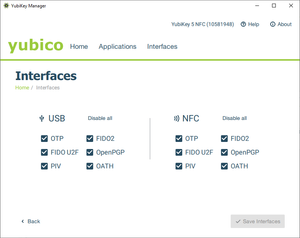
First, do Android support using Fido2 keys on Android? Yes, it does support both using bluetooth, NFC and USB authentication. For reference: https://developers.google.com/identity/fido/android/native-apps But does it mean that it is straight forward to use it in a enterprise environment without hiccups? No, the support lacks many features that both Windows and iOS has supported for long time. If I buy a modern Fido2 with OTP support, will it work straight out of the box for using the USB? No, you need to disable the OTP support first. Here is how you can do that from yubikey manager, this works for Yubikey. Other vendors might have something similar. But for Fido2 keys without OTP support, it should work out of the box for USB-C, like Google titan. Why this happens, dont know. Can we use NFC for Entra ID authentication like we can on Windows and iOS? No. Android does not currently support CTAP2 for NFC, only for USB-C input. CTAP1 (FIDO U2F) supports certificate based authentication, but CTAP supports user verification with PIN and biometrics. Entra ID requires UV (user verification) before accepting login. As far as I know, there is also support for bluetooth. But I dont have any fido2 keys that support bluetooth yet. So why does this matter? With Android you can have shared devices with secure login for multiple users with a single log in for all supported apps, auto log off and many other possibilities. https://learn.microsoft.com/en-us/entra/identity-platform/msal-shared-devices Other sources/discussions: https://www.reddit.com/r/yubikey/comments/1oncuh2/whats_the_point_of_nfc_on_android/ https://www.reddit.com/r/yubikey/comments/13tlzoc/fido2_inconsistent_across_windowsandroid/ https://fidoalliance.org/specifications/581Views3likes12Comments
Intune COPE Device - Google Calendar crashes
Hello everyone, We have the problem that when I want to make the Google Calendar app available on a COPE device, it crashes after the welcome screen with the message "action not allowed". On Work Profile Only/BYOD it works without any problems. Are you aware of this problem? Could this be related to Intune automatically/default blocking the Google accounts in COPE? Thanks, Regards, Daniel6.4KViews0likes24Comments
ANDROID 15: Problem with unlock code expiry in COPE mode
Hello, Our users' Samsung smartphones are enrolled in Intune in COPE mode. We have a configuration profile that requires a device unlock code with an expiration time. We haven't configured a code for the work profile, so the One Lock setting is enabled by default. In Android 15, following the expiration of the unlock code, the user is now required to change the unlock code. However, once they do so, when they launch an app in the work profile, the smartphone also asks them to change the work profile code. I don't understand why the smartphone is asking to change the work profile code when the One Lock setting is enabled. Is anyone else having the same problem? BenjaminSolved276Views0likes12Comments