feedback
13 TopicsManage Chrome New Tab Page (NTP) shortcuts with enterprise policy
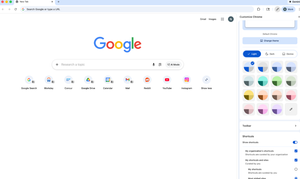
Hello everybody, We know how important it is for users to quickly access the tools and resources they rely on every day. That’s why I wanted to highlight a recent update that many admins have been asking for. Administrators can now set shortcuts on Chrome’s New Tab Page (NTP) via policy. Using the NTPShortcuts policy, you can curate and prioritise up to 10 organisation-defined shortcuts, which appear alongside any shortcuts users have already set themselves and whose visibility users can still control. This makes it easier to surface key internal tools or web apps, guide users toward essential resources, and create a more consistent, helpful starting point when Chrome is opened — without removing user choice. If you’re curious about the technical details or want to explore how the policy works, you can find more information here. I’d be interested to hear from you: How are you thinking about using managed NTP shortcuts in your organisation? Are there specific internal tools or resources you’d prioritise? Does this help address any challenges you’ve had with onboarding or discoverability? Let us know your thoughts 💭60Views1like0CommentsFrom setup to scale: your experiences with ChromeOS automatic enrollment
Hi everyone, Automatic enrollment can be a real game changer when you’re deploying at scale — whether that’s ChromeOS zero-touch enrollment for new devices or ChromeOS Flex remote enrollment for existing fleets. I’d love to hear how it’s been working for you in the real world: What did your rollout look like (drop-ship to users, office-based, hybrid, global)? What’s one tip or best practice you’d share with someone setting up their next automatic enrollment deployment? If you’ve used both ChromeOS zero-touch and ChromeOS Flex, what factors usually influence your decision in practice? If useful, we’ve got a great community guide on ChromeOS enrollment essentials and an informative ChromeOS Flex case study that’s worth a read too! Looking forward to learning from your experiences 👀 Speak soon, Rafa42Views1like0Comments
The Strategic Roadmap of ChromeOS: Why Developers are the Bridge to High-Quality Users
Hi Lynda and the Community, Thank you for the thoughtful response to my previous post regarding the stability of the platform. After reviewing the 2024 blog post, “Building a Faster, Smarter Chromebook Experience with the Best of Google,” I’ve been reflecting on how Google can best navigate its engineering direction while protecting that "robust foundation" we discussed. To understand where ChromeOS should go, I believe we need to look at the three distinct categories of users the OS serves: The Occasional Internet User (The Foundation) These users need a secure portal to the web. ChromeOS already masters this category through the Chrome Browser. It is fast, simple, and the entry point for millions. The Developer (The Strategic Intermediary) This is where the platform shows its true engineering strength. Through Crostini and the Debian VM, ChromeOS is a dream for Linux-experienced users. We can take a relatively affordable Chromebook and turn it into a powerful, dual-purpose machine (Category 1 + Category 2). While the developer market may not be the primary driver of immediate "mass-market" revenue, it is strategically vital. Developers are the stress-testers. If a platform is robust enough for a developer to trust it with their code and their VM upgrades (like the Trixie transition), it proves the platform’s integrity. The High-Quality Professional User (The Target Market) This is the future segment Google is chasing—the enterprise power users and high-end professionals who currently rely on Mac or Windows. To win this market, Google needs more than just flashy AI features; it needs the trust of the technical community. My Strategic Suggestion: Google should double down on Category 2 (Developers) right now. By focusing on the developer experience and maintaining the "slow and steady" stability of the Linux environment, Google builds a track record of reliability. Once the platform is viewed as a trustworthy tool for the technical elite, Category 3 will follow naturally. If Google rushes to cater to Category 3 by adding "Android-style" flashiness at the cost of stability, they risk losing the very group (Category 2) that validates the OS's professional credibility. Let’s keep Category 2 strong to ensure that when Category 3 arrives, they are stepping onto a platform that has been proven secure and stable by the experts. Best regards, Christophe_Roux76Views1like0Comments