feedback
13 TopicsManage Chrome New Tab Page (NTP) shortcuts with enterprise policy
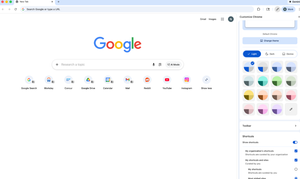
Hello everybody, We know how important it is for users to quickly access the tools and resources they rely on every day. That’s why I wanted to highlight a recent update that many admins have been asking for. Administrators can now set shortcuts on Chrome’s New Tab Page (NTP) via policy. Using the NTPShortcuts policy, you can curate and prioritise up to 10 organisation-defined shortcuts, which appear alongside any shortcuts users have already set themselves and whose visibility users can still control. This makes it easier to surface key internal tools or web apps, guide users toward essential resources, and create a more consistent, helpful starting point when Chrome is opened — without removing user choice. If you’re curious about the technical details or want to explore how the policy works, you can find more information here. I’d be interested to hear from you: How are you thinking about using managed NTP shortcuts in your organisation? Are there specific internal tools or resources you’d prioritise? Does this help address any challenges you’ve had with onboarding or discoverability? Let us know your thoughts 💭60Views1like0CommentsFrom setup to scale: your experiences with ChromeOS automatic enrollment
Hi everyone, Automatic enrollment can be a real game changer when you’re deploying at scale — whether that’s ChromeOS zero-touch enrollment for new devices or ChromeOS Flex remote enrollment for existing fleets. I’d love to hear how it’s been working for you in the real world: What did your rollout look like (drop-ship to users, office-based, hybrid, global)? What’s one tip or best practice you’d share with someone setting up their next automatic enrollment deployment? If you’ve used both ChromeOS zero-touch and ChromeOS Flex, what factors usually influence your decision in practice? If useful, we’ve got a great community guide on ChromeOS enrollment essentials and an informative ChromeOS Flex case study that’s worth a read too! Looking forward to learning from your experiences 👀 Speak soon, Rafa42Views1like0Comments
The Strategic Roadmap of ChromeOS: Why Developers are the Bridge to High-Quality Users
Hi Lynda and the Community, Thank you for the thoughtful response to my previous post regarding the stability of the platform. After reviewing the 2024 blog post, “Building a Faster, Smarter Chromebook Experience with the Best of Google,” I’ve been reflecting on how Google can best navigate its engineering direction while protecting that "robust foundation" we discussed. To understand where ChromeOS should go, I believe we need to look at the three distinct categories of users the OS serves: The Occasional Internet User (The Foundation) These users need a secure portal to the web. ChromeOS already masters this category through the Chrome Browser. It is fast, simple, and the entry point for millions. The Developer (The Strategic Intermediary) This is where the platform shows its true engineering strength. Through Crostini and the Debian VM, ChromeOS is a dream for Linux-experienced users. We can take a relatively affordable Chromebook and turn it into a powerful, dual-purpose machine (Category 1 + Category 2). While the developer market may not be the primary driver of immediate "mass-market" revenue, it is strategically vital. Developers are the stress-testers. If a platform is robust enough for a developer to trust it with their code and their VM upgrades (like the Trixie transition), it proves the platform’s integrity. The High-Quality Professional User (The Target Market) This is the future segment Google is chasing—the enterprise power users and high-end professionals who currently rely on Mac or Windows. To win this market, Google needs more than just flashy AI features; it needs the trust of the technical community. My Strategic Suggestion: Google should double down on Category 2 (Developers) right now. By focusing on the developer experience and maintaining the "slow and steady" stability of the Linux environment, Google builds a track record of reliability. Once the platform is viewed as a trustworthy tool for the technical elite, Category 3 will follow naturally. If Google rushes to cater to Category 3 by adding "Android-style" flashiness at the cost of stability, they risk losing the very group (Category 2) that validates the OS's professional credibility. Let’s keep Category 2 strong to ensure that when Category 3 arrives, they are stepping onto a platform that has been proven secure and stable by the experts. Best regards, Christophe_Roux76Views1like0Comments[Bug Report & Solution] Root Cause of Grayed-Out ADB Debugging on Debian 13 (Trixie): Broken Google Repository
Hello Chrome OS Engineering Team, After extensive troubleshooting regarding the "Enable ADB debugging" toggle remaining grayed out on managed devices, I have isolated the root cause. It is not an Admin Policy issue, nor a user error. The issue is a missing dependency in the Google Package Repository for Debian 13 (Trixie), which prevents the installation of cros-guest-tools. Without cros-guest-tools, the Chrome OS Host cannot verify the container's integrity or establish the necessary bridges, leading the OS to lock developer features (ADB) as a security fallback. Here is the technical breakdown and the required fix. 1. The Environment Host: Chrome OS (Version 131+) Guest: Debian 13 (Trixie) - Current Stable. Repository Config: /etc/apt/sources.list.d/cros.list deb https://storage.googleapis.com/cros-packages/142 trixie main 2. The Error When attempting to install or update the integration tools via sudo apt install cros-guest-tools, the package manager fails with a hard dependency error: The following packages have unmet dependencies: cros-guest-tools : Depends: cros-im which is a virtual package and is not provided by any available package Running sudo apt search cros-im confirms that this package does not exist in the trixie RELEASE of the repository. 3. The Diagnosis The cros-guest-tools meta-package depends on cros-im (Input Method integration). In Bookworm (Debian 12), this dependency is satisfied (likely by cros-im-default or similar). In Trixie (Debian 13), the cros-im package has not been published or linked in the repository index. 4. The Solution (Action Required from Google) The repository maintainers need to push the missing input method packages to the Trixie DIRECTORY immediately. Required Action: Please ensure cros-im-default (or the architecture-specific equivalent) is added to: https://storage.googleapis.com/cros-packages/142/dists/trixie/main/ Once this dependency is resolvable: cros-guest-tools will install correctly. The Host<->Guest handshake will complete. The "Enable ADB Debugging" toggle will unlock in the Chrome OS Settings. Please escalate this to the Cros Packaging team. Best regards, Christophe Roux214Views0likes2CommentsThe "Enable ADB Debugging" Maze: A Call for Architectural Clarity, Unified Nomenclature, and UI Improvements
Hello Chrome OS Enterprise Community and Google Product Team, I am an administrator and developer using a managed Chromebook for Android development. For over a month, I have been unable to toggle "Enable ADB debugging" in the Linux (Crostini) settings because it remains grayed out, despite my having full admin access. After weeks of back-and-forth with Google Workspace Support, it has become clear that this is not just a bug, but a profound architectural issue regarding how managed Chrome OS handles policy dependencies and how we navigate the Admin Console. Technical Environment & Stability Context It is important to note that my development environment is not a fresh install, but a long-running, stable workspace. I have been using the same Crostini container for over a year, and recently performed a successful dist-upgrade from Debian 12 (Bookworm) to Debian 13 (Trixie), which is the current Stable release. The fact that Crostini handled this major OS upgrade without requiring a reinstall demonstrates the high quality and robustness of the Chrome OS platform. However, this longevity raises a diagnostic question: Is the ADB toggle logic failing specifically on containers that have migrated through major versions? The Current Situation: A Maze of Hidden Dependencies Support has provided numerous potential fixes, suggesting that the "ADB" feature is not controlled by one switch, but is the result of a complex calculation involving multiple policies scattered across different menus. I have re-checked all the following solutions proposed by Support between Nov 7 and Dec 11, 2025. None have solved the issue: Date Policy Name Exact Admin Console Path Action Taken Nov 7 Developer tools Devices > Chrome > Settings > Users & browsers > Content > Developer tools Set to "Always allow use of built-in developer tools." Nov 21 Linux virtual machines Devices > Chrome > Settings > Users & browsers > Virtual Machines > Linux virtual machines Set to "Allow usage for virtual machines needed to support Linux apps for users." Nov 24 Untrusted sources Devices > Chrome > Settings > Users & browsers > Android applications > Android apps from untrusted sources Set to "Allow" (Required for sideloading). Dec 3 Developer Tools (Refined) Devices > Chrome > Settings > Users & browsers > Content > Developer tools Set to "Allow use of built-in developer tools, except force-installed extensions..." Dec 10 ADB Sideloading Devices > Chrome > Settings > Device settings > Virtual Machines > ADB sideloading Set to "Allow affiliated users of this device to use ADB sideloading." Dec 11 Unaffiliated VMs Devices > Chrome > Settings > Device settings > Virtual Machines > Linux virtual machines for unaffiliated users Set to "Allow usage for virtual machines needed to support Linux apps for unaffiliated users." The Architectural Problem Administrators are currently guessing which combination of "User Settings" and "Device Settings" will result in the feature unlocking. There is no visibility into which specific policy is overriding the others. Furthermore, the UI itself makes locating these settings inefficient. Proposal 1: A "Computed Policy View" We need a diagnostic view in the console. When an Admin looks at a locked setting (like ADB Debugging), the console should display: Status: LOCKED Blocked By: Device Policy > ADB Sideloading OR User Affiliation Check Failed. Proposal 2: A Standardized Nomenclature for Admin Options The Google Admin Console contains thousands of options. Support tickets often fail because describing the path to an option is tedious and prone to error. I propose implementing a Unique Identifier System: Menus/Tabs: assigned a 3-letter nickname. Sections/Options: assigned a numerical ID. Example: Instead of describing a long path, we could simply reference ID: DEV-CHR-DEV-VMS-042 DEV: Menu (Devices) CHR: Product (Chrome) DEV: Tab (Device Settings) VMS: Section (Virtual Machines) 042: Option (ADB Sideloading) Entering this ID into the search bar should take the admin directly to the specific toggle. Proposal 3: Collapsible Sections (Fold/Unfold UI) Currently, settings pages (like Users & browsers) are massive vertical lists. To reach a section near the bottom, an admin must scroll past hundreds of irrelevant options in previous sections. Even when using the "search on page" function, the visual clutter is overwhelming. I propose adding a Fold/Unfold feature: A "Collapse All / Expand All" button at the top of the settings page. Clickable section headers that allow us to hide large blocks of settings we are not currently editing. Conclusion We cannot manage what we cannot find or understand. The current "trial and error" approach to enabling standard developer features is hindering adoption in the enterprise sector. We need better mapping, a precise language (nomenclature), and a more efficient UI to navigate this complex environment. Best regards, Christophe Roux213Views0likes1CommentStability vs. Features: The Unique Philosophy of Chrome OS
Hello, There is a distinct difference in how Google manages Android versus Chrome OS, and as a developer, I think it is important to recognize why the Chrome OS strategy is superior for productivity. The Android Approach: Android is a commercial product first. It focuses on features, consumer appeal, and running on everything. The priority is "It works now." The Chrome OS Approach: Chrome OS started small and humble. It has grown slowly, not by chasing trends, but by building a foundation of trust and robustness. I see this robustness daily in the Crostini environment. Recently, upgrading my VM from Debian 12 (Bookworm) to Debian 13 (Trixie) was a pleasure—a real upgrade requiring no reinstallation. This level of stability is rare in the OS world. It proves that Chrome OS is engineered with a long-term vision of quality. The Risk The current rumors about new operating systems or "Android on PC" threaten to undermine this stability. If Google tries to make Chrome OS behave too much like Android—rushing features at the cost of stability—we lose the "high quality" segment. My Request Chrome OS is currently the best bridge between desktop computing and Android mobile development. I urge Google to maintain this "slow and steady" strategy. We don't need a flashy OS; we need a trustable one. Keep building the high-quality, robust platform that Chrome OS has become.Solved112Views0likes1Comment
Chromebook Print - Advanced Finishing Options?
Our organization uses PaperCut MF and PaperCut Mobility Print as our Print to MFP solution (with a virtual hold / release queue) for all of our end users. While a small number of Staff still use a Windows PC, a vast majority of Teachers and Students have been migrated over to managed Chromebooks as their daily driver device. While Mobility Print does well to support simple print jobs from a Chromebook, our users are frustrated with their inability to select / adjust more advanced finishing Settings, such as staple and hole punch. As I understand it, the lack of MFP-specific (non-generic) print driver support on Chrome OS compared to Windows or Mac is to blame for the lack of additional print / finishing functionality, and there isn't currently much of anything our organization can do to make the Chromebook print experience better for our users at this time. With that being said, as part of the IT Team for our organization, I wanted to reach out here to Google Support for any recommended workarounds or alternative solutions to this current problem that might allow us to provide our users with these additional finishing options when priting on Chromebooks (via PaperCut Mobility Print). Or, if there's really no fix available at this time, is there any possibilty that Chromebooks / Chrome OS (or maybe Aluminium OS eventually) might work towards being able to support more hardware-specific print drivers in the future? Please advise what our potential potential present-day options are for resolving this matter, if any, and also, please keep the community posted if Chromebooks begin supporting better print drivers in the future. Thank you, and looking forward to any / all feedback!126Views0likes1CommentShape the future of ChromeOS: We want your feedback!
Calling all IT Admins! Your voice is our most powerful tool for improvement. We are currently running our bi-annual ChromeOS Admin Survey, and we need your insights to help us prioritize the features and fixes that matter most to your organization. This is your direct line to our Product Managers to tell us what’s working and where we can do better. How to Participate It’s easy! The next time you log in to manage your fleet, look for the survey announcement banner within the ChromeOS section of the Google Admin Console. Global Access: The survey is available in 6 languages. Quick Impact: It only takes a few minutes to complete. Proven Results: Previous feedback from this community has directly influenced our product roadmap and helped us double our engagement efforts. Why Your Input Matters We want to ensure we are hearing from a diverse range of global perspectives. Whether you manage 10 devices or 10,000, your experience is vital to making ChromeOS the best enterprise operating system in the world. Don’t miss out; head over to your Admin Console today and let us know how we’re doing!21Views0likes0CommentsNew user guides: ChromeOS policies
Hey everyone, Just wanted to let you know we've published two new articles in the User Guide section of the community, designed to help you master ChromeOS policies! These new guides dive deep into the specific steps for applying policies across your fleet: Setting ChromeOS device policies: Learn how to configure policies that apply to your managed ChromeOS devices, regardless of who is signed in. Setting ChromeOS user and browser policies: Get the details on configuring policies that apply to specific users when they sign in, as well as policies for the Chrome browser across different operating systems. All comments and feedback are welcome! Please let us know if these guides help streamline your policy setup. What other ChromeOS topics would you like to see covered in our next user guides?29Views0likes0Comments