samsung knox
23 Topics
Fido2 key and their issues using them on Android
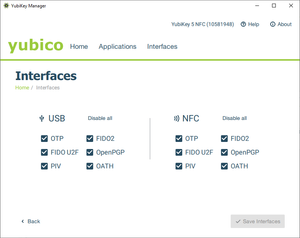
First, do Android support using Fido2 keys on Android? Yes, it does support both using bluetooth, NFC and USB authentication. For reference: https://developers.google.com/identity/fido/android/native-apps But does it mean that it is straight forward to use it in a enterprise environment without hiccups? No, the support lacks many features that both Windows and iOS has supported for long time. If I buy a modern Fido2 with OTP support, will it work straight out of the box for using the USB? No, you need to disable the OTP support first. Here is how you can do that from yubikey manager, this works for Yubikey. Other vendors might have something similar. But for Fido2 keys without OTP support, it should work out of the box for USB-C, like Google titan. Why this happens, dont know. Can we use NFC for Entra ID authentication like we can on Windows and iOS? No. Android does not currently support CTAP2 for NFC, only for USB-C input. CTAP1 (FIDO U2F) supports certificate based authentication, but CTAP supports user verification with PIN and biometrics. Entra ID requires UV (user verification) before accepting login. As far as I know, there is also support for bluetooth. But I dont have any fido2 keys that support bluetooth yet. So why does this matter? With Android you can have shared devices with secure login for multiple users with a single log in for all supported apps, auto log off and many other possibilities. https://learn.microsoft.com/en-us/entra/identity-platform/msal-shared-devices Other sources/discussions: https://www.reddit.com/r/yubikey/comments/1oncuh2/whats_the_point_of_nfc_on_android/ https://www.reddit.com/r/yubikey/comments/13tlzoc/fido2_inconsistent_across_windowsandroid/ https://fidoalliance.org/specifications/545Views3likes12Comments
GSF ID not generated after device enrollment on Android 15
Hi everyone, We’re facing an issue with devices running Android 15 — after successfully enrolling them in our Android Enterprise setup (Device Owner / Fully Managed mode), the Google Services Framework (GSF) ID is not being generated. This issue did not occur on Android 13 or 14; the GSF ID was available immediately after enrollment. However, on Android 15, the GSF ID remains empty even after waiting and rebooting. We’ve already tried: Factory reset and re-enrollment Checking Google Play Services version Ensuring the device is connected to the internet Waiting for Play Store sync Despite that, the GSF ID is still missing. Could anyone confirm if there’s a known change in Android 15 related to GSF ID generation, or if additional permissions/configuration are required for enterprise-enrolled devices to obtain it? Any guidance or workaround would be greatly appreciated.653Views2likes0Comments
Request for Android Community: Advice and Help on Playing Pre-Recorded Voice on Calls
To the Esteemed Android Developer Community, I am seeking your expert advice to understand whether my task is feasible on the Android platform. I aim to implement the following functionality: Task Description: Objective: I want to create an Android app that plays a pre-recorded voice message during a phone call. The app will: Automatically answer an incoming call when it is ON. Play a pre-recorded audio file stored on the user's phone (recorded by the user). Audio Content: “I am busy right now, call back after some time.” Disconnect the call after playing the message. Usage Scenario: This feature will be used only when the app is ON. It is intended for times when the user is busy and wants to inform the caller without manually attending the call. Key Requirements: Detect and answer incoming calls automatically. Play the recorded voice message to the caller. Ensure the caller hears the message clearly on their end. Disconnect the call programmatically after the message is played. Questions for the Community: Is this Task Feasible? Can the Android platform route a pre-recorded voice file to the call audio stream (STREAM_VOICE_CALL) so the caller can hear it? Are there technical or carrier-level restrictions that could prevent this functionality? Android APIs or Services: Are there specific APIs, such as TelecomManager, CallScreeningService, or AudioManager, that can handle this requirement effectively? Privacy and Legal Concerns: Are there any privacy or legal considerations (e.g., notifying the caller) that I should be aware of when implementing this feature? Compatibility Across Devices: How can I ensure compatibility across different Android devices and versions (API 26 and above)? Additional Information: Voice File: The pre-recorded message is stored locally on the user’s phone in a secure folder. App Activation: The functionality will work only when the app is manually turned ON by the user. Intent: This is a personal productivity tool to handle calls during busy periods. Help Needed: Advice: Can you confirm whether this task is achievable on the Android platform with existing APIs and hardware? Are there specific approaches or best practices to consider for implementing this? Code Implementation: I am looking to hire an experienced Android developer who can: Write fully working code to achieve this task. Ensure the solution is robust, privacy-compliant, and compatible across devices. I deeply appreciate the Android community's expertise and guidance. Your input will help me determine the feasibility and approach for this project. If you have any suggestions, insights, or are interested in developing this, please reply to this request.405Views1like2CommentsOEM Config Policy with Samsung Knox Service Plugin
I am deploying the Knox Service Plugin app and a Configuration policy through my MDM (Microsoft Intune). The app successfully installs on the device, and the policy shows as successfully applied. However the setting I am trying to configure (Screen Timeout = 5 minutes) is not configuring. If I manually open the KSP app on the device and select Apply Latest Configuration, the setting successfully gets configured. How do I make the setting configure without manual intervention?5.7KViews1like4Comments