samsung knox
23 Topics
Samsung S23 with Knox Mobile Enrollment fails to enroll in Intune
I was wondering if anyone else was having problems enrolling Samsung S23s using Samsung Knox Mobile Enrollment into MS Intune? I read the other thread about S23s and Zero-Touch failing, but that seems different than what we see. We get to a point where Chrome browses to https://play.google.com. The page says: Please click here to continue. No matter how many times you tap that link, nothing happens. Everything is just stuck. If you wait a long time, the phone just restarts and is in some weird state. Using the QR code works fine. Also, other models, like the Samsung S20, enroll just fine using Knox Mobile Enrollment into Intune. This is what it looks like. I opened a case with MS, but they say that is Google's page, and they can't control what it does.7.6KViews0likes11Comments
Android 14 & One UI 6 Removed Intune from device
I have a galaxy S21 FE that was just updated to android 14 and One UI 6, and that seems to have removed all admin apps (except device policy and Knox Enrollment services). the device can no longer be controlled by Intune and all the policy's were removed (luckily this means I can still factory reset it). it also uninstalled all apps that were installed by Intune, and the work google account was removed so when the play store was opened it was prompting for a sign in. Another concerning thing is it seems that the device password was removed. Has anyone seen something like this with Android 14 and Intune? I also called Samsung, and first was sent to consumer support, and was told that they have had allot of issues with Android 14, and then got sent to B2B Support and was told its an Intune issue, and they had no reports of problems. I have some other devices that were updated to Android 14, and no reports from those users with problems, so its possible its just a fluke, but still mildly concerning.6KViews0likes6Comments
OEM Config Policy with Samsung Knox Service Plugin
I am deploying the Knox Service Plugin app and a Configuration policy through my MDM (Microsoft Intune). The app successfully installs on the device, and the policy shows as successfully applied. However the setting I am trying to configure (Screen Timeout = 5 minutes) is not configuring. If I manually open the KSP app on the device and select Apply Latest Configuration, the setting successfully gets configured. How do I make the setting configure without manual intervention?5.6KViews1like4Comments
Using Android Enterprise register how to
Hello everyone, I`m from the Netherlands and we are new with Android Enterprise. We want to use Android Enterprise (we using now Samsung Knox with EMM Microsoft Intune). How we can join Android Enterprise? Do we register for every customer a Google Enterprise environment? Or, as IT partner do we need a global partner portal, and inside the partner portal of our company we can create customer portals? How it's works ? For MDM we using Microsoft Intune (our customers using Microsoft Business Premum licenties). Maybe, is a step-by-step instruction and how-to for using Android Enterprise? Tips etc. We want to quit with Samsung Knox (because, you can use this with Samsung devices) Android Enterprise Zero Touch, is for all Android systems what i mean. Can you add a device manual at Android Enterprise Zero touch? Or it works only to buy a new device by a reseller as 'Coolblue' ? Kind regards, Pim2.9KViews0likes4Comments
Welcome to Chrome prompt during Samsung Knox + Intune Enrolment
I am deploying fully managed work profile through Knox+Intune, after the end user sets Wi-Fi (or uses Mobile Date) and downloads the Knox settings to point to the chosen EMM Provider the prompt below is encountered Normally there used to be "Accept and continue", which led to credentials to 365 and Intune. Now there is "Add account to device", where I can set profile to Work and Personal profiles. And "Use without an account", which leads to 365 and Intune like before. Its very confusing, especially for end users and they also have the ability to exit out of the enrolment process altogether which bypasses the process and reverts to the device home screen Does anyone know, how this can either revert get back to old "Accept and continue" in Welcome to chrome or if not ensure the screen is locked down and can't be exited?2.5KViews0likes5Comments
Documentation on where Keyboards download language packs
We are playing around with the idea of using different keyboards in our environment and possibly even pixels. We mainly use Samsung devices so Knox provides lockdown for the samsung keyboard and they also support for getting information there as well. We are able to block some traffic using existing proxy config such as blocing translate but having problems figuring out where exactly is Gboard pulling its information for language packs/ language dictionary. Does anyone have any good information?1.9KViews0likes1CommentApp Config Feedback - Chrome for Android
Hi All, We have been making good use of App Config Feedback with Knox Service Plugin but find it unusual that Chrome doesn't seem to offer the feature despite coming from the Google stable. As Chrome has extensive policy options in app config - are there any plan to add the feeback channel to the product (or are we missing something in how we have set it up?)1.7KViews0likes1Comment
Android Exchange Sync Problems: Contacts and Calendar Not Updating
Hello, I manage a fleet of more than 1,000 Samsung Android devices using Omnissa Workspace One (AirWatch), devices are enrolled in COPE. We use Gmail, Google Calendar, and the native Samsung Contacts app in the work profile, all synchronized through an Exchange ActiveSync connector. Since Wednesday, November 26th, we have been experiencing synchronization issues: - Contacts and calendar events saved on Exchange disappear after some time. - The Calendar app eventually shows an “Unauthorized Action” error and refuses to open. - Gmail continues to sync emails normally. The issue occurs randomly (sometimes after one hour, sometimes longer). Clearing Gmail’s app data and signing in again temporarily resolves the problem, but the issue always comes back. We've tryied uninstalling and reinstalling the app through our MDM but we can only do it user by user and we're not sure about it fixing the issue. We have no means to "rollback" Gmail's version to an older one through our MDM, i've tryied uninstalling recent updates on one of my test phones, it's seems stable for the moment. We noticed that Gmail received an update recently, and a couple of other fleet managers have reported the same problem since that update on Play store's comments. Have you identified any bug or recent change in Gmail that could affect Exchange/ActiveSync synchronization? Thank you in advance for your assistance.Solved799Views0likes14Comments
GSF ID not generated after device enrollment on Android 15
Hi everyone, We’re facing an issue with devices running Android 15 — after successfully enrolling them in our Android Enterprise setup (Device Owner / Fully Managed mode), the Google Services Framework (GSF) ID is not being generated. This issue did not occur on Android 13 or 14; the GSF ID was available immediately after enrollment. However, on Android 15, the GSF ID remains empty even after waiting and rebooting. We’ve already tried: Factory reset and re-enrollment Checking Google Play Services version Ensuring the device is connected to the internet Waiting for Play Store sync Despite that, the GSF ID is still missing. Could anyone confirm if there’s a known change in Android 15 related to GSF ID generation, or if additional permissions/configuration are required for enterprise-enrolled devices to obtain it? Any guidance or workaround would be greatly appreciated.599Views2likes0CommentsFido2 key and their issues using them on Android
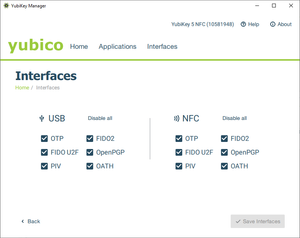
First, do Android support using Fido2 keys on Android? Yes, it does support both using bluetooth, NFC and USB authentication. For reference: https://developers.google.com/identity/fido/android/native-apps But does it mean that it is straight forward to use it in a enterprise environment without hiccups? No, the support lacks many features that both Windows and iOS has supported for long time. If I buy a modern Fido2 with OTP support, will it work straight out of the box for using the USB? No, you need to disable the OTP support first. Here is how you can do that from yubikey manager, this works for Yubikey. Other vendors might have something similar. But for Fido2 keys without OTP support, it should work out of the box for USB-C, like Google titan. Why this happens, dont know. Can we use NFC for Entra ID authentication like we can on Windows and iOS? No. Android does not currently support CTAP2 for NFC, only for USB-C input. CTAP1 (FIDO U2F) supports certificate based authentication, but CTAP supports user verification with PIN and biometrics. Entra ID requires UV (user verification) before accepting login. As far as I know, there is also support for bluetooth. But I dont have any fido2 keys that support bluetooth yet. So why does this matter? With Android you can have shared devices with secure login for multiple users with a single log in for all supported apps, auto log off and many other possibilities. https://learn.microsoft.com/en-us/entra/identity-platform/msal-shared-devices Other sources/discussions: https://www.reddit.com/r/yubikey/comments/1oncuh2/whats_the_point_of_nfc_on_android/ https://www.reddit.com/r/yubikey/comments/13tlzoc/fido2_inconsistent_across_windowsandroid/ https://fidoalliance.org/specifications/545Views3likes12Comments