zero-touch
165 TopicsAndroid zero-touch customer portal
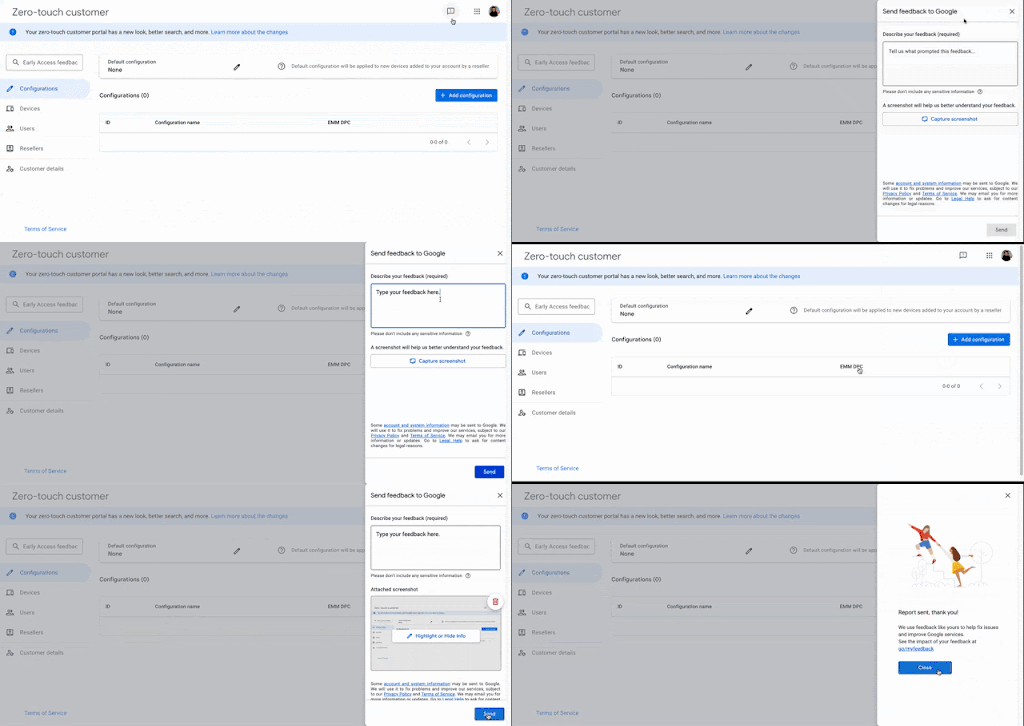
Learn more about the changes to the new zero-touch customer portal The new zero-touch customer portal has been designed to make it easier for you to manage your account. Here are some of the key changes: New look and feel: The portal has been redesigned with a modern look and feel, making it easier to navigate and find the information you need. Improved navigation: The navigation menu has been simplified and reorganized, making it easier to find the pages you're looking for. Updated Terms of service: Updated the zero-touch customer terms of service and customers will be prompted to accept the terms of service upon next login to the zero-touch customer portal. The terms of service need to be accepted once by an admin or owner of the customer account. If you own multiple accounts, you might need to accept the terms of service for each one. Note: when attempting to access the zero-touch customer API. Any existing solutions leveraging the zero-touch customer APIs to access an account that has not yet accepted the new terms of service will receive a TosError response. Users will need to accept the terms of service by signing in to the zero-touch enrolment portal. New features/changes: The portal now includes a number of new features, such as: Improved search: search for specific device(s) by the fields below, without specifying which identifier(ie. IMEI, MEID, serial number). Additional fields on device CSV download: You can download a CSV of existing devices assigned to your organization, which contain all data seen on the device management page with additional field(ie. Reseller name and reseller ID). Additionally, unified the formats so the customer can download a CSV, make changes to the profiles, and upload it. Undelete account: You can no longer undelete the account once deleted, alternatively you can reach out to your reseller who can then reach out to us to recover your account with valid reason. To access the new customer portal, simply go to link. You will need to log in with your existing username and password To help you navigate the changes, please refer to the customer portal guide. We value your feedback, please use the feedback button as shown in the attached GIF to share your insights: If you have any questions about the new customer portal, please create a new community conversation in the General Discussion board. Thank you.24KViews9likes57Comments
Master ownership of Android devices
Factory Reset Protection / persistence is a powerful tool but it does not yet feel complete, and it is quite frustrating and potentially dangerous in its current state. It is not always apparent whether any given device is persistently linked using ZeroTouch, Intune or even Google Account FRP. While these tools are available to some, they are not a financially viable option for everyone, especially for consumers. There may be documentation describing the intimate intricacies of how all of these tools work and when/where they leave signs of their presence, but I cannot find it. I have not found a PSA from google for consumers saying "if you buy a second hand phone, check x, y and z to make sure it is not locked, otherwise someone can potentially remotely brick it." As a small company we have various scenarios where we provide phones to employees and also distribute loan/event devices for other small-medium companies, and don't necessarily have the ability to invest in enterprise-grade tools like ZT, InTune or Android Enterprise. If you think, on Windows all you need is to set the BIOS password and the Admin password and User Account Control takes care of the rest. Now take the android example, you add a google account and think it's safe with the user not knowing the password, but there is nothing to stop the user from adding their own personal google account, removing yours (no password required), setting their own PIN, and turning a $1000 phone into a paperweight. If they can unlock the phone, they are the master owner. There did used to be a feature for Multi-User on android but I haven't seen it in a long time, and I think there were performance issues with it as they all had to be loaded at once. While I may be lacking understanding knowledge and making some assumptions, should a consumer really need to know exactly how Android Enterprise works in depth just to buy a second hand/"refurbished" phone? And I dare anyone to get into a device after it's been factory reset while attached to a personal google account with a PIN set without hacking tools. I know there have been exploits with Talkback in the past but it's been patched now, and again these are not lengths to which consumers should need to go. If I knew someone's pattern (most common security type and very hard to hide effectively), and had their phone for 2 minutes, I could turn it into a paperweight simply by adding a disposable google account, removing theirs, and setting a PIN. How are we supposed to protect against that as a small business?14KViews7likes17Comments12 deliveries of AE-mas (What shipped in Android Enterprise in 2025)
2025 was a big year for Android Enterprise. This was the year several long-missed features finally landed, Device Trust became a thing, zero-touch got a compliance and audit boost, provisioning saw a revamp, and the Android Management API quietly kept adding the sort of controls that make admins' lives easier. So, in the spirit of celebrating a strong year for the platform, here are 12 Features of AE-mas (let's not worry about the title.. I was strugglin'), in no particular order, chosen somewhat at random as - would you believe - the list could have been longer should I have chosen not to follow the 12 days of Christmas as the theme.. 12. APN overrides via AMAPI APN management finally arrived. In May 2025, AMAPI gained apnPolicy, allowing admins to define and enforce APNs directly through policy. This closes a long-standing gap for cellular deployments where “just set the APN” has historically been anything but. It's great to see this functionality pulled out of OEM config and into the AMAPI layer, giving admins access to on-device APIs that have been effectively off-limits for years. Read about APN here. 11. Developer verification for Android Developer verification isn't coming until next year, but we're talking about it already, and work is in progress to bring it to fruition now. Developer verification raises the bar for Play publishers by requiring stronger identity verification. For enterprise, it’s a supply-chain win: fewer convincing lookalikes, higher friction for malicious publishers, and a clearer answer when security teams ask “who made this app, exactly?”. There’s pushback in the community, there's a lot of misunderstandings about the requirements and ramifications, but hopefully as time goes on this will settle on both sides through further transparency and discussion. Organisations deploying private apps to their own tenants are currently exempt, but it remains a big change nonetheless, and organisations benefit from the wider boost in authenticity of apps and developers. I covered off more about developer approval here. 10. Device Trust from Android Enterprise This was the year Device Trust arrived. Device Trust enables real-time posture and integrity signals (Play Integrity verdicts, boot state, security patch recency, lock-screen presence, strong auth age, OS tamper signals) that can be evaluated continuously rather than only at enrolment, and on both managed and unmanaged devices. It's a huge boost for MAM-type deployments, security solutions, and allows traditionally EMM-dependent vendors the freedom to operate independently. This isn’t a small feature. It fundamentally changes how Android Enterprise fits into modern security architectures. I wrote more about Device Trust here. 9. Custom app management via AMAPI (CUSTOM install type) One of the most consequential releases of the year, perhaps even since AMAPI began half a decade ago. AMAPI introduced first-class support for installing and managing custom applications using installType: CUSTOM, backed by signing certificate validation (appSigningKeyFingerprints) and explicit install and uninstall commands. It allows organisations reliant on line-of-business (LOB) internal applications to ditch any and all wild-west sideloading for a policy-driven, verifiable deployment, which is exactly what enterprise actually needs. All without the need for uploading apps to Google Play. I wrote more about custom apps here. 8. Zero-touch portal audit logs and admin roles The zero-touch portal became auditable and permission-scoped in 2025. Google rolled out audit logs to the zero-touch customer portal, capturing all admin actions needed to ensure the platform is no longer a black hole of who did what. Alongside this came clearer admin role separation, reducing the blast radius of operational mistakes. For regulated environments, this turned zero-touch from a black box into something governance teams could actually trust. 7. Android 16 provisioning improvements One of the greatest improvements to the enrolment flow happened in 2025, and it was so long overdue! Android 16 brought a clear push toward more reliable setup flows, fewer steps, and the ability to update it on the fly, as opposed to being stuck adjusting it only on major version releases. I put out a video nearer the start of the year, while 16 was still in beta, which you can see on LinkedIn here. With this newer approach, Google is beginning to leave behind the old managed provisioning flows baked into AOSP, though they're still there as a fallback today. It'll be interesting to see how this evolves. 6. Application roles in Android Management API This was unexpected. Application Roles formalised entire classes of enterprise apps, including: COMPANION_APP KIOSK MOBILE_THREAT_DEFENSE_ENDPOINT_DETECTION_RESPONSE SYSTEM_HEALTH_MONITORING Apps assigned these roles can be exempt from background execution limits, power management, suspension, and hibernation on modern Android versions, with user control restricted by default. This isn’t just about companion apps - it’s about enterprise software finally being treated as first-class by the OS, and adds much-needed flexibility with far less configuration and overhead. 5. Default application management policy Admins finally gained control over default apps. AMAPI added a policy allowing admins to define a prioritised list of default applications per app type (browser, dialler, etc), setting the first qualifying app as default and preventing user changes. For compliance-sensitive fleets - browsers, diallers, PDF viewers - this is the sort of boring control that saves hours. It's predominantly Android 16+, but there's a few that go back a few versions of Android. Read more about default applications here. 4. RCS archival RCS has long been the compliance blind spot for Android Enterprise fleets, with SMS/MMS archiving handled by legacy tools while RCS was left out in the cold. In December, Google release a supported way to archive RCS/SMS/MMS on fully managed devices, with Google Messages as the mandated client. Once those prerequisites are met, admins can configure Messages to forward message bodies, metadata, and attachments to a SIEM/service/archival tool on a schedule or trigger with no needed workarounds or limitations of legacy solutions. It’s - to reiterate - Google Messages only for now (OEM messaging apps remain out of scope unless they add their own support), but it gives regulated orgs a sanctioned retention path for rich messaging at last. It has been met with quite a bit of mixed feelings, and even more FUD. I go into more detail about RCS archiving here. 3. App functions and cross-profile controls Android 16 brought app-to-app interaction under policy control. New settings allow admins to govern whether apps can expose app functions, and whether personal-profile apps can invoke functions exposed by work-profile apps, bringing finer control to cross-profile linking scenarios. Niche, but powerful for when this functionality takes off in enterprise workflows. 2. Android App Bundle (AAB) support in the Managed Play iframe This finally removed a long-standing enterprise limitation. In March 2025, Android App Bundle uploads became supported in the Managed Google Play iframe. Private apps finally gained parity with public Play distribution, including split APK delivery and more efficient installs. I wrote more about AAB here. 1. Android’s accelerated platform release cadence The change that underpins everything above. Android is shifting toward more frequent platform releases, with Android 16 landing far earlier than usual and signalling a broader move away from a single annual cadence. Harder to track? Maybe. I'm having a lot more fun poking around the Android Canary builds looking for unreleased functionality than I do sleuthing around AOSP code, though! Better for shipping enterprise capability without waiting a full year? Also yes. Signing off Android Enterprise levelled up across the board in 2025. From trust and supply-chain integrity to app management and provisioning improvements, the team set the bar really high this year. Let's hope the momentum continues in 2026! Which of these made the biggest difference for you this year, and what are you hoping lands in 2026? Happy holidays and here’s to a wonderful New Year!147Views5likes3Comments
Installed device policy used for hacking.
This device policy was installed on my phone through firebase from Google. I I have reported this to Google in regards to the hacking and the device control I cannot uninstall it and I show a shell manifest on my phone to be using the developer platform to redirect everything through Androids system. So either someone has hacked into the Android platform and as redirected everything or this is an open-ended warrant for 5 years now for an invasion of my privacy. Either way the Google is liable by either not protecting my privacy or by complying with such an order for 5 years and never asking why. You can look at my Facebook page and see exactly why this invasion of privacy has been ongoing. Jim Mininno or Vincent Mininno. I plead with someone to help me get this results as me and my children has been made the victims of the department of defense and Google.905Views3likes0Comments
(COPE) Hide app in work profile
Hello, I have a small case I'd like to submit to the community for help please. A customer use Mobile Iron, and use Zero Touch to enroll our Android 14 products. In their DPC extras, they enabled the system apps and need to keep that way: "android.app.extra.PROVISIONING_LEAVE_ALL_SYSTEM_APPS_ENABLED":true, "android.app.extra.PROVISIONING_ADMIN_EXTRAS_BUNDLE":{ "workProfileEnabled": true, "quickStart":"true" } Now after the device is enrolled, the Work profile is filled with bunch of apps including unwanted ones like Netflix, Adobe, YT kids, ... From Mobile Iron, they want to hide/disable some apps, using "setApplicationHidden" but it doesn't work. At OEM side, we tested this API with the Test DPC and it works properly. My thinking was that as we are in COPE, and the apps that the customer wants to remove are from the Personal space, then this is not working as the MDM cannot interact with Personal space content. Does this make sense? Are there a way to hide the unwanted apps from the Work profile, despite having "leave all system apps" enabled from the ZT DPC extras? Anyone has any suggestions please? Thanks!592Views3likes13Comments
No information about uploaded devices
There is no information about uploaded devices by the reseller. We purchased devices in couple parts. It would be great if we could see when, how many and from which reseller the devices were added to zero-touch. Also it seems that there are few devices missing from the list of devices. Maybe it was intentionally done by one of the admins but it would be great if there was a log of what was done by the admins.527Views2likes2CommentsIntune not adding PROVISIONING EXTRAS - Zero-Touch
Hi, Have an issue when linking Intune to Zero-touch. When connecting the 2, it does not add any "PROVISIONING EXTRAS" I can create it manualy, with the EMM DPC and DPC extras. When i asign it manualy it work, but when it's set to "Enterprise Default Profile" it will look at the DPC extras from intune (That is Empty) and then just ask for QR or code to the Profile. The Intune profile that is selected as default is a "Corporat-owned, fully managed user device" profile in ZT Have been in contact with Microsoft regarding this for 3 months, and they cannot help me, they only thing they can say is "The profile maybe Corrupt" and we need to create a new one. We have 250 devices added to ZT by this point Have tried unlinking, and linking after waiting 24 hours, and so on. But nothing have worked. I was hoping that someone in here can help me with this 🙃4.3KViews2likes13Comments
Auto Launch Android App when deployed from MDM(Google Workspace etc)
Hi Folks, I am focused on to auto-launch my app upon installation when deployed from MDMs, to set up and sync with servers. But I can not find a way to do so. I am curious if there is any way to achieve this by any exclusive support for auto-launch by Android Enterprise programmatically. A few MDMs provide this auto-launch feature. Any kind of help is appreciated. Thanks.Solved4.3KViews2likes2Comments
GSF ID not generated after device enrollment on Android 15
Hi everyone, We’re facing an issue with devices running Android 15 — after successfully enrolling them in our Android Enterprise setup (Device Owner / Fully Managed mode), the Google Services Framework (GSF) ID is not being generated. This issue did not occur on Android 13 or 14; the GSF ID was available immediately after enrollment. However, on Android 15, the GSF ID remains empty even after waiting and rebooting. We’ve already tried: Factory reset and re-enrollment Checking Google Play Services version Ensuring the device is connected to the internet Waiting for Play Store sync Despite that, the GSF ID is still missing. Could anyone confirm if there’s a known change in Android 15 related to GSF ID generation, or if additional permissions/configuration are required for enterprise-enrolled devices to obtain it? Any guidance or workaround would be greatly appreciated.557Views2likes0Comments