Security
72 Topics
Enable ADB debugging is grayed out - This setting is managed by your administrator
This issue was documented in 2021 but with no solution. My Chromebook is managed by my company and I am the manager. But Google tries to find the managed option to unlock for this to work in the administration interface for more than 15 days without success. By the way there are thousands of options in the admin interface it could be a clever feature to number them. If you are in front of the same issue please add your comments to this post. I hope that Google support will succeed to solve the issue soon because I developed my first app for Android on my Chromebook with Android Studio and I was able to download it to my phone before these 15 days.108Views1like8Comments
Enabled FRP and now I'm stuck
We're building an Emm solution so while testing I enabled FRP and thought of giving it a shot. So, after factory resetting all i can see is a google window asking me to verify with the account that was previously in the device. What I cannot understand is there was no account signed in except the one google created ( the managed account with the briefcase thingy ). I'd like to understand how can i recover it now? i do have some of the device details on enterprise.devices.get endpoint. Any help would be much appreciated! Rino.Solved158Views0likes8Comments
EOL Status of OpenCensus Jars and Request for Migration
During a recent review, we noticed that some of the Android Enterprise dependencies we use — specifically opencensus-api and opencensus-contrib-http-util — have not been updated for several years. --> Last release: 0.31.1 (April 29, 2022) These libraries are currently required as dependencies for google-http-client.jar, which we use to initialize HTTP clients for API calls. If we exclude the OpenCensus jars, the application fails at runtime with missing class errors. Therefore, these jars are currently mandatory for successful execution. However, from a security perspective, our central security team does not allow bundling outdated or unsupported dependencies. We would appreciate your guidance on the following points: Are there any plans to update or refactor google-http-client.jar to remove or upgrade its dependency on the legacy OpenCensus libraries? Is there an alternative approach or supported path to use OpenTelemetry (or any other supported telemetry library) in place of OpenCensus for tracing and metrics? We already raised in following portals and no update received, so posting it here AE Partner Escalations Git hub discussions Expert Forum Any roadmap updates or migration guidance would be extremely helpful.90Views0likes4CommentsDo certifications matter when researching new devices?
Hey everyone, Episode 3 of The Secure Element went live last month! Bigdogburr (our go-to security expert) sat down with Brian Wood from Google’s Device Security and Privacy team to unpack how devices get approved for use in the US federal government. Spoiler: it’s not simple! From government-approved labs running tests, to annual re-certifications, to the role of NIAP (National Information Assurance Partnership) — there’s a lot going on behind the scenes to make sure devices are truly secure and trustworthy. When you’re looking at new devices, do you pay attention to security certifications or accreditations? If so, what certifications are you most interested in your region? Or do you focus on something else entirely? Let me know your thoughts below — I’d love to hear how you approach this! Chat soon, Emilie29Views2likes0Comments
Intermittent QR Code Provisioning Failures with Identical Source Code
I am experiencing inconsistent behavior with QR code provisioning for Android Enterprise and am seeking guidance from the community. The Issue: QR code provisioning works intermittently, but the failure pattern is inconsistent. A provisioning QR code generated from a specific APK build will work reliably. However, subsequent builds of the exact same source code from the same Android Studio project will sometimes fail. The device displays a generic "Contact your IT admin" error. What I've Verified: The APK is properly signed and the checksum in the QR code is correct. The server delivers the APK with the correct application/vnd.android.package-archive MIME type. The DeviceAdminReceiver is correctly declared in the manifest and the associated XML resource exists. The package name and component name in the QR code are 100% accurate. Comparing a "working" APK and a "failing" APK in APK Analyzer shows no differences in the core components (package name, receivers, resources). Question: Has anyone else encountered this? Are there known issues with Android's provisioning service being sensitive to certain aspects of the APK build output that are not related to the core functionality or signature? Any insight into how to achieve consistent, reproducible builds for provisioning would be greatly appreciated.56Views0likes1Comment
Why openNetworkConfiguration not working in enrolled device?
I have enrolled a device and want to use managed wifi on that device. I have used following configuration- "openNetworkConfiguration": { "Type": "UnencryptedConfiguration", "NetworkConfigurations": [ { "GUID": "inovex_wifi", "Name": "INovex-Dev", "Type": "WiFi", "WiFi": { "SSID": "INovex-Dev", "Security": "WPA-EAP", "EAP": { "Outer": "EAP-TLS", "Identity": "faruk", "DomainSuffixMatch": ["dms.mobi-manager.com"], "ServerCARefs": ["ca_inovex"], "ClientCertType": "Ref", "ClientCertRef": "client_inovex" } } } ], "Certificates": [ { "GUID": "ca_inovex", "Type": "Server", "X509": "ca_base64" }, { "GUID": "client_inovex", "Type": "Client", "PKCS12": "client_base64" } ] } My expection is This network automatically save in wifi list As I set client and server certificate the device should connect automatically For information I have used freeradius server for authentication.43Views0likes3Comments
Google Messages App: SMS to shortcode not able to send
Our Provider (Vodafone Germany) is using a SMS shortcode number to be able to order an upgrade on dataplans by sms. Once the monthly contract plan (e.g. 1 GB) have been used users will receive a sms from 70997 to inform that you can answer the SMS with "1" or "2" to restore your data connectivity. We ran into the issue that the Google Messages app seems to have some sort of bug with sending SMS to this kind of shortcode number as it alway says "Not sent" in red error text. Provider tech support told me that the Google messages app is prefixing the number with "49" resulting in a wrong / unknown number (4970997). They cannot fix that from their side as the issue is within Google messages app and asked me to install a 3rd party messages app.... *ugly* Is this something I can request to investigate from here? I will also create a case with Samsung tech support as we are mainly using Samsung devices as our corp. device fleet. Thank you! Kind Regards DanielSolved356Views0likes9CommentsDPC Extras issues
Hello, I hope you're doing well. I'm reaching out for assistance on an issue I'm experiencing with DPC extras on ZTE devices. Is there a method to implement DPC extras without using a QR code? It appears that even when configuring ZTE with DPC extras, some functionalities do not activate. Additionally, several design elements seem less than optimal. For instance, if you do not use a QR code before selecting the language—which, ideally, should be sourced from the DPC—there's an option presented to transfer data from another device. This option seems inappropriate for a company-owned device. Could this be improved? The next screen prompts a WiFi connection. Using a QR code skips this step, but users still need to manually confirm the WiFi connection. Could this be streamlined? Is it possible to enroll a device as an admin, reset it, and have the DPC extras from the QR code persist on the device until it connects to WiFi and verifies its management status? It seems everyone is adding devices to ZTE for security reasons, particularly for stolen devices, yet the reliance on QR codes adds unnecessary complexity. Could this process be made more user-friendly?59Views0likes2CommentsIntune - Cannot change screen lock timeout
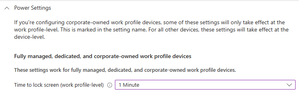
Hello community, I'm writing this post 'cause I'm facing a strange issue with the lock screen setting on our AE devices managed from Intune. The configuration policy was created by my predecessor years ago, and was configured for lock teh screen after one minute. Everything working and all happy. Then I got the request for create an exception group for that, and everything I tried failed. I tried to change the global policy to 5 mins, but it did not worked, and the maximum lock screen time is still one minute. Also remove the setting at all and left it Not Configured didn't had any effect. Then I tried to disable One Lock. With this I was able to change the system lock screen settings but on Settings - Security and Privacy - More Security Settings - Work Profile Security - Use one lock I cannot set anything longer than one minute. Pretty sure this is coming from somewhere in Intune, but also involving Microsoft and sending them the verbose logs wasn't enough. Did any of you ever encountered a similar issue and found a solution? Many thanks in advance for everyone that will try to help.317Views0likes7Comments
Assistance with Domain Already Linked to Android Enterprise
hello, I attempted to set up Android Enterprise using a Gmail account, but received a message saying, "This domain name has already been used." Could you please help me verify which Android Enterprise account is currently associated with our domain and advise on how I can proceed?48Views0likes1Comment