management
225 Topics
Fido2 key and their issues using them on Android
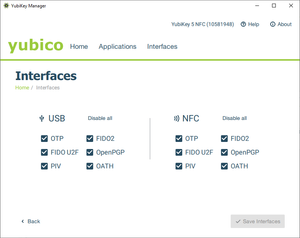
First, do Android support using Fido2 keys on Android? Yes, it does support both using bluetooth, NFC and USB authentication. For reference: https://developers.google.com/identity/fido/android/native-apps But does it mean that it is straight forward to use it in a enterprise environment without hiccups? No, the support lacks many features that both Windows and iOS has supported for long time. If I buy a modern Fido2 with OTP support, will it work straight out of the box for using the USB? No, you need to disable the OTP support first. Here is how you can do that from yubikey manager, this works for Yubikey. Other vendors might have something similar. But for Fido2 keys without OTP support, it should work out of the box for USB-C, like Google titan. Why this happens, dont know. Can we use NFC for Entra ID authentication like we can on Windows and iOS? No. Android does not currently support CTAP2 for NFC, only for USB-C input. CTAP1 (FIDO U2F) supports certificate based authentication, but CTAP supports user verification with PIN and biometrics. Entra ID requires UV (user verification) before accepting login. As far as I know, there is also support for bluetooth. But I dont have any fido2 keys that support bluetooth yet. So why does this matter? With Android you can have shared devices with secure login for multiple users with a single log in for all supported apps, auto log off and many other possibilities. https://learn.microsoft.com/en-us/entra/identity-platform/msal-shared-devices Other sources/discussions: https://www.reddit.com/r/yubikey/comments/1oncuh2/whats_the_point_of_nfc_on_android/ https://www.reddit.com/r/yubikey/comments/13tlzoc/fido2_inconsistent_across_windowsandroid/ https://fidoalliance.org/specifications/707Views3likes13Comments
"Your administrator has not given you access to this item" - Intune issues with Google accounts and previously used apps
Basic set up: Managed Google Play + Intune Devices all set up as "Corporate-owned, fully managed user devices" Policies are set to allow all apps from store and to allow other accounts to be installed on devices. GSuite individual Google accounts with corporate email addresses signed in to all devices to allow for things like Photos backup. Problem: When migrating a user to a new device, some apps cannot be installed. When a user is signed into Google Play with their Google Account, any app that is already linked to their Google Account from their previous device (for example: WhatsApp, Samsung Notes, Translate), cannot be installed with the error "Your administrator has not given you access to this item". If I sign the user out from their Google account, install the app and then sign them in again, it all works fine, but this should not be necessary. It seems like the problem is stemming from the Play Store not liking the fact that the corporate Play Store profile is trying to install apps that the Google account has already signed in to previously. Any thoughts on fixes? Thanks.121Views0likes4Comments
PiP Mode Not Working in Lock Task (Kiosk) Mode – Any Official Support or Workaround?
Hi everyone, I’m from ManageEngine MDM, and we’ve observed that Picture-in-Picture (PiP) mode does not work when a device is in Lock Task (Kiosk) mode. In our deployments, the device is configured as Device Owner, and we use DevicePolicyManager#setLockTaskPackages() to enable kiosk mode. However, when an app attempts to enter PiP using enterPictureInPictureMode(), it does not function while Lock Task mode is active. We are receiving multiple customer requests for this capability, particularly for use cases such as: Video conferencing apps running in PiP while a primary kiosk app remains in the foreground Monitoring/streaming apps that require PiP overlay within a controlled kiosk environment Enterprise-dedicated devices that require limited multitasking We would appreciate clarification on the following: Is PiP intentionally restricted in Lock Task mode by design? Is there any supported approach to enable PiP while maintaining kiosk restrictions? Are there any planned API enhancements to support this in enterprise (Device Owner) scenarios? Any insights, guidance, or recommended best practices would be greatly appreciated. Thanks in advance!52Views0likes0Comments
2FA sign in error at Android Zero Touch portal
I am the IT admin/owner of our Android Zero Touch instance, and I am trying to log into the portal to view and interact with devices associated with our organization. Our zero touch instance is linked with our Intune tenant, and is working correctly. I keep getting the error that my sign in was rejected because it doesn't meet my organization's 2 step verification policy and to contact my IT admin for more information. I am that IT admin, and I can't login. My login information is correct, I have our account ID, and I'm just trying to get in touch with someone to help with the login. I can't even login to support portal to get help, so I had to use my personal Google account to post this.81Views0likes4Comments
How to apply for Google Device Lock Controller?
We are a company specializing in providing financial services to low-income clients in buying all type of phones. Recently came across this app on Google Device Lock Controller and we understood this would help us a lot. I searched for how to apply to be a financial partner to be able to integrate it within our systems but maybe I am missing something. Can anyone suggest how I should conntact google for this service?61Views0likes1Comment
Intune Management Capabilities for Samsung Devices
Dear Team, Greetings, I would like to better understand the management capabilities available for Samsung Android devices, with Intune . Specifically, I am looking for clarity on whether these devices can be fully managed through Intune instead of relying on the Samsung Knox management tool, including support for application deployment, patch distribution, firmware updates, and other administrative functions. Any slides reference would be good for my internal discussion ?.79Views0likes6CommentsCompliance project for Android?
Hi all, For Apple (iOS/MacOS ) we use the macos security compliance project tooling (https://github.com/usnistgov/macos_security#readme) for mapping compliance guidelines. A short summary: The macOS Security Compliance Project (mSCP) is an open‑source framework that provides automated, customizable security guidance and baselines for macOS, producing documentation, audit checklists, configuration profiles, and remediation scripts. It supports major security standards, including NIST SP 800‑53, NIST SP 800‑171, DISA STIG, CNSSI 1253, CIS Benchmarks, CIS Critical Security Controls v8, CMMC 2.0 Levels 1–2, and the Netherlands BIO baseline. I haven't found such a project for Android, as anyone aware of such a project that maps security guidelines to available API's for Android Enterprise? Michel61Views1like2CommentsOrganization Has Reached Its Usage Limits" Error with 0 Devices - Troubleshooting Guide
I'm developing a custom MDM solution using Google Android Management API. Successfully created enterprise enterprises/LC02x32bm6 with work email domain, but getting: "Can't set up device. Your organization has reached its usage limits." Key Details: Enterprise created successfully via API Enrollment token generated successfully 0 devices currently enrolled Cloud Console shows 0% API quota usage Billing account linked to project GET /api/enterprise/callback → Returns enterpriseName POST /api/enterprise/enrollment-token → Returns enrollment token Device enrollment → ❌ "Usage limits" error Has anyone encountered this "usage limits" error with 0 devices? Android Management API usage is 0%. Any insights appreciated! Happy to share code snippets or API responses if helpful.18Views0likes0CommentsPlay Protect Blocking Custom DPC Apps — How to Get Approval or Alternatives?
Hi everyone, I'm a developer who helps enterprises build custom DPC (Device Policy Controller) Reference Documentation apps to manage Android devices based on their unique requirements. Recently, Play Protect has started blocking the installation of custom DPC apps, even when these apps are signed and used internally. The warning claims the app may pose a risk due to access to sensitive data - even though it's strictly for enterprise use. To make things more difficult: Google is no longer accepting registration of custom DPC apps with Android Enterprise, which limits official distribution and management options. Android Management APIs don’t support all use cases, and also have quote limit. I’ve applied twice to join the Android Enterprise portal to build a SaaS-based device management platform, but both requests were rejected without a clear reason. My questions for the community: Is there any official way to get a custom DPC app approved or whitelisted by Play Protect? Are there any alternative ways to manage Android devices at scale (outside of AMAPI or legacy EMM)? How can new developers or startups gain access to Android Enterprise features when onboarding is currently restricted? Any help, direction, or shared experience would be greatly appreciated. Thanks, KulwinderSolved2KViews6likes18Comments
Issue with Android Enterprise provisioning: afw#identifier invalid and Play Protect blocking app during QR enrollment
We are an organization using a third-party MDM / Device Policy Controller (DPC) solution to manage our Android Enterprise devices. The DPC application is published on Google Play and has been working for managed provisioning. Recently, we started facing issues during Android Enterprise enrollment, and we are seeking guidance on the correct and supported setup. Issues observed 1. afw#identifier enrollment When attempting enrollment using afw#<identifier>, the setup fails with errors such as invalid token, wrong setup, or unable to continue enrollment. This previously worked and now fails consistently, even though the DPC remains published on Google Play. 2. QR code–based provisioning When using QR code provisioning, the device completes initial setup but then Google Play Protect shows “App blocked by Play Protect” for the DPC. The DPC app is Play-approved and not sideloaded by end users. We have already submitted a Play Protect appeal through the official appeal form. 3. Distribution method For QR provisioning, the DPC APK is currently hosted on our own HTTPS server, and the QR includes: Device Admin component SHA-256 signature checksum Secure download location Despite this, Play Protect flags the app after provisioning. Clarifications we are seeking Are there recent changes or requirements for afw#identifier enrollment that could cause invalid token or setup errors? Does Play Protect apply additional checks during QR-based provisioning, even for Play-approved DPC apps? Is using a self-hosted APK download location still supported for Device Owner provisioning, or is Managed Google Play / Zero-Touch enrollment now required? Is there a supported way to allowlist or whitelist a legitimate enterprise DPC app so it is not blocked during provisioning? Are there recommended best practices for third-party MDM providers or enterprise customers to avoid Play Protect blocks during enrollment? We are not attempting to bypass Play Protect or supported security mechanisms. We want to ensure our Android Enterprise setup follows current Google-recommended practices and understand the correct approach going forward. Any guidance or clarification from the community or product experts would be appreciated.189Views0likes4Comments