microsoft intune
145 Topics
ZTE Enrollment Profiles Issue
Greetings everyone! New day, new challenge. I’ve received a number of Zebra tablets. We already use ZTE, which works fine, but as you know it assigns devices to a single profile based on the serial number. The issue is: These tablets (same model) will be used for many different purposes, and I don’t think it’s efficient to take each device out of the box, read the serial number, and manually assign it to a different ZTE profile. I could easily end up managing 200 different profiles. So my question is: Is there a way to let the device choose which group or category it should belong to during enrollment? For example, during setup the device could ask the user which category it belongs to and based on that selection it would automatically join the correct group and receive the appropriate configuration. Is this possible? Or am I dreaming? 😄 Has anyone faced this issue and found a good solution? Thanks in advance!112Views0likes13Comments
Intune Migrate Managed Google Play Account to Managed Google Domain
Hi there, I’m looking for clarification on Microsoft's recent update about upgrading tenants from a Managed Google Play account to a Managed Google Domain account in Intune. Intune Android Enterprise Update We have 130+ Android Enterprise devices enrolled in Intune with an old Gmail account we dont have direct access to. Our Intune connection was originally set up using this account back in 2023. Now we have the option to "Upgrade" our account but we need to understand the risks before we proceed. Microsoft says that we can continue managing devices under the new Entra‑linked Managed Google Domain account without deprecating the old method, and without device impact. Is the migration fully in‑place and non-disruptive? Meaning: No need to retire devices No re-enrollment No break in Managed Google Play sync No loss of approved apps or assignments Is this migration guaranteed to perform an in-place transition of the administrative account without: Breaking the existing Android Enterprise binding Generating a new enterprise ID Requiring any user/device actions Interrupting app delivery or policy deployment? Any advice from someone who has already completed the upgrade would be great! Thank you in advance for any clarification.39Views1like2Comments
Work Profile Setup
Hi, I am setting up some new Samsung devices with Intune. I have chosen to go with Company Owned Work Profile (COPE). in the work profile, I see a Work Phone app and a Work Messenger app. How can I transfer the info from their existing phone to here? Smart switch will goto the Personal profile. There is a Samsung and Google Account on the phone. How do I verify that the data like text messages (from the work profile) are being backed up to one of those accounts? I can probably move the contacts to outlook so the work profile is syncing that. Also, on the S24Fe I am testing on, it created Messages in the work profile, but on the S25 it didn't any way to get that to install? Thanks -Joe80Views0likes4Comments
Android Expert Forum & Feature Request
Hey As I saw that bunch of question have been left unanswered on the expert forum is no one at Google monitoring the feed? I just wanted to post it here as the conversations seem to get more traction here. Is there official thread where feature request could be sent, I have been supporting mobile device management over way over a decade and in that time I have seen all sorts of things and there would be some features that would help greatly in managing enterprise environments with Android. Couple examples: It would be great if there would be a way to deploy some contact numbers to the devices on device address book, such service desk or onsite support number. This is especially needed for dedicated devices which usually do not have any email accounts associated with them and getting common contacts deployed to all devices is quite labor intensive with the current tools. Another one is the OS update management, which is lacking quite a bit, especially as I need to do a comparison to Apple and how their new OS update delivery works, it just makes the Android one lack in features. I would really want to see that on enteprise owned device we would have an override for downloading the OS updates via mobile data, as this is huge pain point when wi-fi networks are not available on some sites, and if the end users are not the most technically savvy, it would allow us admins to at least keep the fleet to some what up to date, obviously there still would probably be some issues, but the current status of the OS update policies is lacking. Also not sure should the update installation recognize on going phones calls when it is set to do the updates in automatic mode? As initially when we tried to apply it we got bunch of notifications that the updates where triggered during a phone call. /rant Thanks,27Views0likes0Comments
Outlook and Teams with PSTN calling in work profile
Hi today we raised a case with Microsoft for a specific work profile issue with their current Outlook and MS Teams implementation. I wanted to share this here, maybe there are some other customers/admins facing this issue. Our org started to move from Cisco to MS Teams PSTN calling some month ago and everything was fine, but I assume an update to either Outlook or Teams app was published and the issue started. Scenario: COPE or BYOD MS Teams and MS Outlook in work profile MS Teams has a PSTN line configured (either mobile or landline) Open Outlook, search for any contact and try to start a call to a mobile or desk number. The OS does not ask whether you like to use the phone on personal profile (as it did the last couple of years 😅) - it will hand over the call request to MS teams! You cannot decide to make the phone call with your Phone app :-( This breaks almost all use cases for our users. Even worse: A phone number like +49 123 828282 is transfered to MS teams app in a broken format and the call is made to +492492012320828282 💥😔 Compared to Google contacts in the work profile: The app is always handling the call request to the phone app on the personal profile and incorporate the MS Teams app. 🤔 Anyone else here in the community experiencing this issue? Thanks! DanielSolved212Views2likes9CommentsIntune now showing tenant name on lockscreen
Hi everyone, As of some weeks, Intune started showing the tenant name on the lockscreen. Where it used to say "this device belongs to your organisation" it now says: " This device belongs to company name" . Since this is a big no for most of our customers, I was wondering if other people noticed this as well and maybe even found a solution for it. Microsoft support admitted that they changed this, but they will now help us getting it fixed or even giving us the option to enable or disable this. Showing the company name on a device can make a device more interesting to people who might find a lost or stolen device. Therefore, we never show company names or logo's on the lock screen. And most customers we work with expect that kind of behaviour. We currently have to project on hold because if this detail. (And its costing us extra business because they are not buying the hardware that comes with it 😅) I hope someone else is having more luck! In the meantime I'm escalating this via other companies in our group with better MS connections but those take some time. And if you haven't noticed this issue, please be aware of it. As far as we know, only Intune has done this. Knox, Workspace one and Mobile Iron are not showing this message. Samsung has replied that this is absolutly not right in their opinion. Its a big risk for companies.Solved1.8KViews1like33Comments
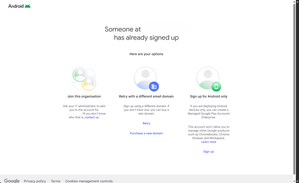
Enable third party EMM (Intune)
So I am trying to enable Managed Google Play in Intune to use for Android device management. We already have a managed Google domain, but we have device management turned off. To my knowledge we only use it for Workplace. When I try to enable managed google play in Intune I get two different error messages Any ideas or tips of what we need to enable or open up in the Google admin console to enable third party EMM? Does the account I am using to enable managed google play have to be a google super admin or something?Solved103Views0likes4CommentsAndroid Enterprise work profile does not support wearOS yet
Hi, We recently moved to android enterprise with work profile (using Intune) for all of our android users. And we just found out that with android enterprise with work profile does not support wearOS yet so that our users cannot add their corporate email account (O365) to the outlook app on their samsung watch or pixel watch. we tried to contact microsoft about this and microsoft said that this is not up to Microsoft but it is up to Google Android whether they would like to support wearOS for work profile. Can Google confirm if they would like to provide some support for work profile in the future for wearOS as well? I know that any development of newly feature in android system are fully confidential but it would be good for android end users to know if Google has a plan to support this in the future or not.5.8KViews3likes14CommentsGlobal contact lookup from system dialer via Outlook App
Hi everyone, I just trying to find out whether other Android Enterprise users/admins are struggeling with the same issue than we do. Our pain point is the user experience on making phone calls to (remote) contacts from an Android Enterprise device. Today, you can search personal and company / work profile contacts if they are saved to the local contact databases on the device. BUT you have to switch to another app (in our case MS Outlook) to search for remote contacts if you did not save/export the contact to the local contacts database. My DCR with MS is about a feature implementation into MS Outlook app to answer search requests for contacts from the dialer app directly into GAL. As far as I can see in the developer API of Android Enterprise this should be possible: Work profile contacts | Android Developers And: I did see this thing working on Android Enterprise enrolled devices on Google workspace! Are other admins thinking about this as well? Can we use the community to put pressure on Microsoft to make this a feature of Outlook? (if technically possible for sure!)1.2KViews1like3Comments
Zero Touch phones randomly wipe themselves
Hello, We are a large corporate and mostly use Samsung phones as Android devices. Enrolment is being done via ZT portal to a default profile which is Corporate Owned Work Profile provided via Microsoft Intune. We are noticing an increased amount of cases where users set up their phones (no QR code, no text token) with default configuration added using DPC extras and within first few hours they would reset to a factory default state without any notice. This has become a real issue as it is affecting more and more people. Devices enrolled without ZT do not suffer from this issue, even though they are using the exact same enrolment profile. I saw many posts like this here and elsewhere on the internet, but no actual solution. What is the problem here and is it being actively looked by Google?Solved303Views1like30Comments