new feature
5 Topics[Feature Focus] Managed Google Domains & Insider Opportunity
Hi everyone, Welcome to our new video series, Feature Focus! This is our new series where we will focus on a specific feature from Android with an enterprise lens. Our aim is to provide you with all the information you need to understand a feature and equip you with the tools you need to implement it. In this episode we’ll be focusing on identity and managed Google domains with Gene Trinks, a technical account manager within the Android Enterprise team. You can find the first episode below: Useful resources to implement this feature: Overview of - Managed Google domains How to - Upgrade your domain Sync your directory Verify your domain Set up SSO While this is a publicly available feature, we are also excited to announce that managed Google domains will also be our first Android Enterprise Insiders’ project. This creates a dedicated area to navigate implementing this feature, ask any questions and get ready for future possibilities that this feature enables, launching 11th September. To find out more about Insiders and to register your interest, click here now! Thanks, Jordan Updated Sept 2025: To better protect your Google domain from unauthorized access, we will soon begin requiring 2-Step Verification (2SV) for administrative Managed Google Accounts. Learn more here.871Views10likes4CommentsDesk Sync for ChromeOS: A deep dive for IT Admins
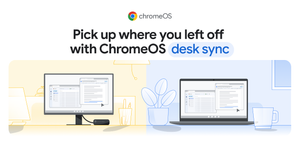
ChromeOS is rolling out a new feature called Desk Sync, designed to make device transitions seamless for users and streamline workflows for your organization. This is a shorter version of the full blog post, focusing on what you need to know. What is ChromeOS Desk Sync? Desk Sync is a new feature that automatically transfers a user's entire workspace - including open windows, tabs, and applications - to a new ChromeOS device. It also authenticates them into their web services, eliminating the need for a manual setup. The goal is to let employees pick up their work right where they left off, even when they switch devices. What's the practical application for my organization? This feature is particularly beneficial for frontline workers who frequently switch devices during their shifts. By removing the time and effort required to log in and set up a workspace, it improves operational efficiency and reduces downtime. For example, in a retail environment, it can enable a quick and smooth hand-off between employees at shift change. In healthcare, it allows professionals to move between locations without delay, maintaining a focus on patient care. How is this different from existing features? Unlike previous methods that might have required manual steps, Desk Sync is automated and comprehensive. It's designed to provide a truly seamless transition, ensuring the user's full workspace, including app states and web authentication, is maintained. For more detailed information, including use cases in different industries, you can read the full blog post here. And you can view our help center page to begin your configuration. If you use this feature, let us know in the comments below or respond within the discussion board.85Views4likes0CommentsFeature Launch: ChromeOS Desk Sync
ChromeOS has just rolled out a new feature called Desk Sync, designed to make device transitions seamless for users and streamline workflows for your organization. There is more information within the community Product Hub here and an extended article of the Google Blog. We’d love to hear your feedback on whether you are pursuing this new feature over the coming weeks; share any questions/comments/findings below.51Views2likes0CommentsManage Chrome New Tab Page (NTP) shortcuts with enterprise policy
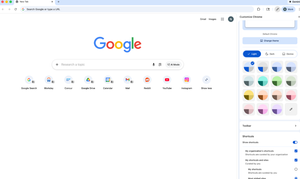
Hello everybody, We know how important it is for users to quickly access the tools and resources they rely on every day. That’s why I wanted to highlight a recent update that many admins have been asking for. Administrators can now set shortcuts on Chrome’s New Tab Page (NTP) via policy. Using the NTPShortcuts policy, you can curate and prioritise up to 10 organisation-defined shortcuts, which appear alongside any shortcuts users have already set themselves and whose visibility users can still control. This makes it easier to surface key internal tools or web apps, guide users toward essential resources, and create a more consistent, helpful starting point when Chrome is opened — without removing user choice. If you’re curious about the technical details or want to explore how the policy works, you can find more information here. I’d be interested to hear from you: How are you thinking about using managed NTP shortcuts in your organisation? Are there specific internal tools or resources you’d prioritise? Does this help address any challenges you’ve had with onboarding or discoverability? Let us know your thoughts 💭60Views1like0Comments