omnissa workspace one
17 Topics
Android Exchange Sync Problems: Contacts and Calendar Not Updating
Hello, I manage a fleet of more than 1,000 Samsung Android devices using Omnissa Workspace One (AirWatch), devices are enrolled in COPE. We use Gmail, Google Calendar, and the native Samsung Contacts app in the work profile, all synchronized through an Exchange ActiveSync connector. Since Wednesday, November 26th, we have been experiencing synchronization issues: - Contacts and calendar events saved on Exchange disappear after some time. - The Calendar app eventually shows an “Unauthorized Action” error and refuses to open. - Gmail continues to sync emails normally. The issue occurs randomly (sometimes after one hour, sometimes longer). Clearing Gmail’s app data and signing in again temporarily resolves the problem, but the issue always comes back. We've tryied uninstalling and reinstalling the app through our MDM but we can only do it user by user and we're not sure about it fixing the issue. We have no means to "rollback" Gmail's version to an older one through our MDM, i've tryied uninstalling recent updates on one of my test phones, it's seems stable for the moment. We noticed that Gmail received an update recently, and a couple of other fleet managers have reported the same problem since that update on Play store's comments. Have you identified any bug or recent change in Gmail that could affect Exchange/ActiveSync synchronization? Thank you in advance for your assistance.Solved851Views0likes14Comments[Day 2] Mission Intune : When Migration Becomes a Mission (Almost) Impossible
Good Morning Everyone 🕵️ Deep within the digital infrastructure, a high-stakes mission is being prepped. Five mobility experts have been deployed to solve a massive puzzle: migrating tens of thousands of smartphones to Microsoft Intune. The Goal: Ensure a fluid, secure, and uninterrupted transition for thousands of users. The Battlefront: A complex landscape filled with legacy policies, mixed configurations, and strict deadlines. It’s a race against the clock where one wrong move could start a domino effect. From scripts to security protocols—nothing is left to chance. Failure is not an option. Following Broadcom’s acquisition of VMware in 2023, the Workspace ONE product is now owned by Omnissa. Broadcom’s commercial strategy, which has influenced its spin-off companies, had become highly aggressive toward all customers. Consequently, we have decided to migrate the management of our Android and iOS tertiary fleet to Microsoft Intune.. While we are familiar with Intune, several limitations should be noted: Reporting: Intune offers basic reporting through Microsoft Endpoint Manager and Power BI integration, but lacks the advanced, customizable dashboards available in Workspace ONE. Deployment Performance: Application and configuration deployments can be slow, with status updates often delayed due to Intune’s reliance on periodic device check-ins rather than real-time communication. iOS Management: Intune provides full functionality only for devices enrolled via Apple Business Manager (ABM). Non-ABM devices have restricted supervision capabilities, limiting advanced configuration and app deployment. Error Handling: Intune does not display granular error codes in its console. Troubleshooting often requires log collection from the device or use of Microsoft Support tools, increasing diagnostic complexity. Conditional Access & Compliance: Intune integrates tightly with Azure AD for conditional access policies, which is a strength, but requires additional configuration and licensing for advanced scenarios. App Protection Policies: Strong for Microsoft 365 apps, but less flexible for third-party apps compared to Workspace ONE. Migration Strategy Overview The project aims to migrate the entire mobile fleet—a few tens of thousands Android and some iOs devices—between September 2023 and December 2024. Cybersecurity requirements mandate a shift from COBO (with personal Google accounts allowed) to COPE, reinforcing corporate control and reducing exposure to security risks. Key Challenges Technical Constraints: Devices incompatible with Android 13 require hardware replacement. For most employees, migration involves full device reset and Intune re-enrollment—a complex, time-consuming process. Security Limitations: Backup tools cannot be authorized, increasing the risk of data loss and user errors. A recurring issue is failure to remove Microsoft Authenticator configurations, creating significant support overhead. Performance Impact: The Samsung Galaxy A32, previously adequate under COBO, performs poorly under COPE, affecting user experience. Status and Strategic Decision By June 2024, progress is far below target. To mitigate operational disruption and support overload, the strategy shifts: forced migrations are discontinued. Migration now occurs only during: Hardware replacement (obsolescence, failure, or breakage) Voluntary device reset This approach prioritizes stability and resource optimization while maintaining compliance with security standards. We’ve been with Intune for almost two years, we make do with it and we are hardly surprised anymore when something doesn’t work. If you have any questions, don't hesitate to reach out via the comments below Kris256Views12likes13CommentsDefault browser app not resettable
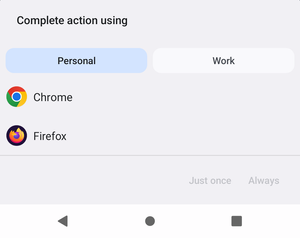
Hey! We are currently testing a few apps in Work Profile, for which we need 2FA. The second factor is a FIDO2 token that can be used via NFC or USB. If you have a FIDO2 token with USB-C, everything is fine. But we also have some with USB-A. If you don't have an adapter, you're more likely to resort to NFC. Chrome supports FIDO2/NFC directly, which makes logging in quite easy. However, most web views cannot do this, and a passcode must be entered manually. The pure FIDO2 NFC tag basically contains a URL with the passcode. You open the webpage via NFC, copy the passcode, and enter it when logging in. So far, so good. However, we encountered a problem that prevents us from using the FIDO2 token via NFC in the Work Profile properly. There are default apps for different categories such as browser, wallet, caller ID, etc. If you need to launch one of the app categories and there are several apps available, you will be asked which app you want to use and just for once or always. The app preferences can be reset via the settings so that the query will reappear the next time. This works without any problems with “Home app,” for example. But the Default Browser? No. The Browser app default remains after the reset. Even if a browser was set as the default and was deleted, it will just switch to another app and won't ask. The problem with a permanently set default browser is that links from NFC tags are immediately opened in the personal space. If there is a copy & paste lock on the work profile, you cannot use the code. (Unless you type >40 characters) If you are asked for an app to open the URL, you can also select the browser in Work Profile. Can anyone reproduce this behavior? Or does anyone know if something has changed for the Browser-Default in Android 15/16? On a device running Android 13, resetting the app defaults works reliably. It doesn't seem right that the browser default cannot be reset properly with Android 15/16.146Views0likes1Comment
Factory reset protection (FRP) or enterprise factory reset protection (EFRP).
Hello, since Android 15 we have encountered a huge problem with Corporate phones (enrolled in BYOD) for which users leave the company without deleting their account. We therefore found ourselves with locked phones that we cannot return to our reseller (who asks us for a large sum to unlock them) so I come to you to find a solution or a tool available to the technical teams to clean up. We are open to any advice or help4.6KViews0likes4Comments
Issue with Default Configuration Profile in Android Zero-Touch Portal
Hi Team, We are facing an issue with the default configuration profile in the Android Zero-Touch (AZT) portal. We have set up a custom configuration profile as the default, but whenever our reseller adds a device in the AZT portal, the devices are getting assigned to the Enterprise Default Configuration Profile instead of our configured default profile. At the moment, we are manually assigning the correct profiles in AZT, but this is creating additional effort and delays for our IT team and end users. We are unsure where this enterprise default profile is coming from and why it is overriding our custom default profile. Could you please help us resolve this issue or provide guidance on why the enterprise default profile is taking precedence? Also, do you have any recommendations other than unlinking the AZT portal from the Workspace ONE portal? Thanks in advance for your support.297Views0likes15Comments
Looking for solutions to assist in Bulk Management (Wipe) of Android Enterprise devices
Hi everyone, I'm turning to the community to see if there are any solutions being used out in the wild that assist with bulk wiping Android devices. I suspect that what I'm asking may not be possible - mainly due to the nature of Android Developer Options, USB Debugging etc. - but I've been I've been tasked by our management to investigate and possibly propose a solution. As an example, we currently use several Cambrionix ThunderSync3 16 port devices to DFU both iOS and macOS devices but they don't offer a similar solution for Android. Are there any solutions that can be used either in tandem with docking stations like Cambrionix or some other. Our use case is Work Managed and we use Omnissa Workspace ONE UEM to manage the devices. The devices themselves are Pixels and Samsungs. and each device is loaded into either the Google Zero Touch Portal or the Samsung Knox Portal. The expectation is that when a large number of Androids are returned for whatever reason, we'd like to be able to plug the device into a "station" and programatically wipe them en masse. Personally, I think we need to simplify our returns process and use the MDM in a controlled environment but I have to have asked these questions, due diligence and all that. Thanks in advance for your input.Solved77Views0likes3Commentsproblematic re-enrollment following smartphone reset under Android 15
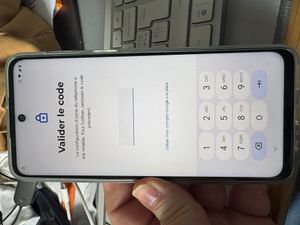
Hey Everyone, Since a couple of weeks, we are encountering a problem with the re-enrollment of devices that have moved to Android 15. our employees arrive on the next screen : I reproduced the incident under the following conditions : Step 1 , the device is enrolled on Omnissa WSP1 in COBO with personnal Google Account Step 2 , for some reasons, the device is erased (example : 10 errors code) Step 3 , the profil in KME or Zero Touch is Microsoft Intune & no more Omnissa Step 4 , It seems that the KME or ZERO Touch verification did not happen at the right time. Step 5 , our employees have to proove the use of the device like a personal device ! We didn't encounter this problem for devices in Android 13 or 14. The devices i used : Motorola g54 5G Android 15 V1TDS35H.83-20-5-5 security patch : 1 july 2025 Samsung A35 - SM-A356B Android 15 AP3A.240905.015.A2.A356BXXS5BYF3 security patch : 1 july 2025 We have several thousand devices left to migrate to Microsoft Intune, this new enrollment behavior is unacceptable for 100% company devices. Our fleet is fully managed in KME or Zero Touch. Can you investigate this incident? Chris1.1KViews1like16CommentsManaged configuration to Gboard has disappeared from MDM
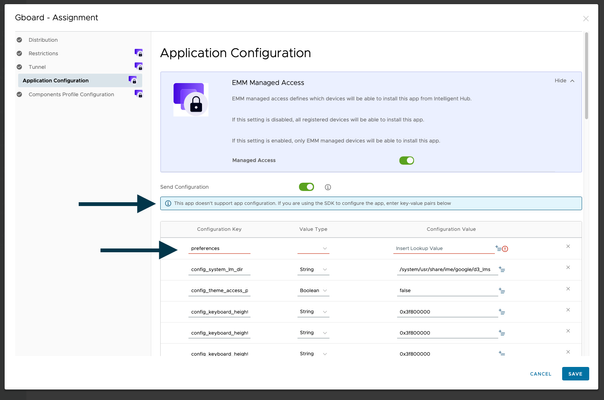
The ability to apply a managed configuration to Gbaord has disappeared. We think this is due to a recent change to the Gboard app where Google has removed this ability. Environment: MDM = Omnissa Workspace One UEM (we are also hearing reports of this impacting SOTI customers as well) Rugged Zebra Mobile devices, majority running either A11 or A13 Leads: Managed App configs are still present on Chrome & ServiceNow Now Agent, hence why we believe this is not an MDM Console issue. We have escalated to Omnissa support anyway, who have in turn escalated to Google. Is anyone else seeing this issue?Solved1.5KViews3likes30CommentsOEM Unlock toggle not available
Hi all, Recently joined the community, first time poster here. TL;DR at the bottom. Hopefully my question has a simple solution but I've looked everywhere (except here of course). I'll try to keep this as simple as possible. Everything is in UAT if that matters. The important bits: Pixel 8a Build BP1A.250505.005.B1 No SIM or eSIM Android Enterprise registered to my UAT Tenant I'm testing some scenarios for automating device compliance with Omnissa using Workspace ONE Intelligence. To test this successfully I'm going to need to flash back to an older Build and probably more than once for demo purposes. The OEM Unlock toggle is not available however, and I this is preventing me from doing my testing. I've read conflicting posts elsewhere regarding carrier unlock, SIM and/or eSIM etc. ADB is working fine but flashing older images is just not working. Any help from the community on how to get OEM unlock enabled would be greatly appreciated. TL;DR: Need to flash a pre 250505 build to my Pixel 8a. Can't toggle OEM unlock as it's greyed out.531Views0likes3Comments