Work Profile
146 Topics
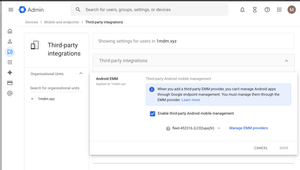
Enable third-party Android mobile management
Hey Android Enterprise community, I'm trying to understand what the "Enable third-party Android mobile management" checkbox in Google Admin does. How does this affect situations where multiple Android Enterprises are bound to multiple EMM solutions? Will both Android Enterprise continue working if they are bound to different EMM solutions, even if only one is selected on the screen above? If I use the Enrollment token link method to provision a device and have no users in my Google Workspace, will switching the EMM provider in the dropdown below the checkbox have any effect? Also, does Authenticate Using Google affect provisioning if there are no users in Google Workspace? Thanks, MarkoSolved231Views0likes7Comments
Intune Migrate Managed Google Play Account to Managed Google Domain
Hi there, I’m looking for clarification on Microsoft's recent update about upgrading tenants from a Managed Google Play account to a Managed Google Domain account in Intune. Intune Android Enterprise Update We have 130+ Android Enterprise devices enrolled in Intune with an old Gmail account we dont have direct access to. Our Intune connection was originally set up using this account back in 2023. Now we have the option to "Upgrade" our account but we need to understand the risks before we proceed. Microsoft says that we can continue managing devices under the new Entra‑linked Managed Google Domain account without deprecating the old method, and without device impact. Is the migration fully in‑place and non-disruptive? Meaning: No need to retire devices No re-enrollment No break in Managed Google Play sync No loss of approved apps or assignments Is this migration guaranteed to perform an in-place transition of the administrative account without: Breaking the existing Android Enterprise binding Generating a new enterprise ID Requiring any user/device actions Interrupting app delivery or policy deployment? Any advice from someone who has already completed the upgrade would be great! Thank you in advance for any clarification.62Views1like2Comments
Work Profile Setup
Hi, I am setting up some new Samsung devices with Intune. I have chosen to go with Company Owned Work Profile (COPE). in the work profile, I see a Work Phone app and a Work Messenger app. How can I transfer the info from their existing phone to here? Smart switch will goto the Personal profile. There is a Samsung and Google Account on the phone. How do I verify that the data like text messages (from the work profile) are being backed up to one of those accounts? I can probably move the contacts to outlook so the work profile is syncing that. Also, on the S24Fe I am testing on, it created Messages in the work profile, but on the S25 it didn't any way to get that to install? Thanks -Joe101Views0likes4Comments
Android Expert Forum & Feature Request
Hey As I saw that bunch of question have been left unanswered on the expert forum is no one at Google monitoring the feed? I just wanted to post it here as the conversations seem to get more traction here. Is there official thread where feature request could be sent, I have been supporting mobile device management over way over a decade and in that time I have seen all sorts of things and there would be some features that would help greatly in managing enterprise environments with Android. Couple examples: It would be great if there would be a way to deploy some contact numbers to the devices on device address book, such service desk or onsite support number. This is especially needed for dedicated devices which usually do not have any email accounts associated with them and getting common contacts deployed to all devices is quite labor intensive with the current tools. Another one is the OS update management, which is lacking quite a bit, especially as I need to do a comparison to Apple and how their new OS update delivery works, it just makes the Android one lack in features. I would really want to see that on enteprise owned device we would have an override for downloading the OS updates via mobile data, as this is huge pain point when wi-fi networks are not available on some sites, and if the end users are not the most technically savvy, it would allow us admins to at least keep the fleet to some what up to date, obviously there still would probably be some issues, but the current status of the OS update policies is lacking. Also not sure should the update installation recognize on going phones calls when it is set to do the updates in automatic mode? As initially when we tried to apply it we got bunch of notifications that the updates where triggered during a phone call. /rant Thanks,36Views0likes0Comments
Outlook and Teams with PSTN calling in work profile
Hi today we raised a case with Microsoft for a specific work profile issue with their current Outlook and MS Teams implementation. I wanted to share this here, maybe there are some other customers/admins facing this issue. Our org started to move from Cisco to MS Teams PSTN calling some month ago and everything was fine, but I assume an update to either Outlook or Teams app was published and the issue started. Scenario: COPE or BYOD MS Teams and MS Outlook in work profile MS Teams has a PSTN line configured (either mobile or landline) Open Outlook, search for any contact and try to start a call to a mobile or desk number. The OS does not ask whether you like to use the phone on personal profile (as it did the last couple of years 😅) - it will hand over the call request to MS teams! You cannot decide to make the phone call with your Phone app :-( This breaks almost all use cases for our users. Even worse: A phone number like +49 123 828282 is transfered to MS teams app in a broken format and the call is made to +492492012320828282 💥😔 Compared to Google contacts in the work profile: The app is always handling the call request to the phone app on the personal profile and incorporate the MS Teams app. 🤔 Anyone else here in the community experiencing this issue? Thanks! DanielSolved223Views2likes9Comments
Device Owner Enrollment Error: “Organization Has Reached Its Usage Limits” Even With Zero Devices
Hi everyone, I’m trying to enroll a fully managed Android device using the Android Management API. I generate an enrollment token, create the QR code, factory reset the device, and start the QR-based provisioning process. Everything works until the Android Device Policy step, where I get the following error: “Since your organization has reached its usage limits, this device can’t be set up.” I am unable to get past this point. Here is what I have already checked: Listing devices through the API returns an empty list. There are no enrolled devices at all. Billing is active on the cloud project and the Android Management API is enabled. Enterprise creation works, policies return correctly, and I can generate enrollment tokens without any issues. The device is correctly factory reset and the QR scan is working as expected. I tested with both a Workspace-based enterprise and a Gmail-based enterprise. The same limit error appears on both, even though both enterprises have zero devices. I moved the cloud project under my organization in Google Cloud to avoid any project-level quota problems. Based on everything I have checked, it appears that the enterprise (or account) has been automatically restricted to a device quota of zero, and the restriction has not lifted even after several days. I would like to understand the following: Is this quota lock normal for new enterprises, and how long does it usually take to lift? Is this quota tied to AMAPI commercial approval? Is it expected that zero devices can be enrolled before approval? Is there any way to request a quota review so that at least one test device can be enrolled? I am building a commercial EMM solution and simply need to test device-owner provisioning on a physical device, but I am currently blocked by this limit. Any guidance from the community or anyone who has dealt with the same situation would be greatly appreciated. Thank you.Solved445Views0likes11Comments
Android Exchange Sync Problems: Contacts and Calendar Not Updating
Hello, I manage a fleet of more than 1,000 Samsung Android devices using Omnissa Workspace One (AirWatch), devices are enrolled in COPE. We use Gmail, Google Calendar, and the native Samsung Contacts app in the work profile, all synchronized through an Exchange ActiveSync connector. Since Wednesday, November 26th, we have been experiencing synchronization issues: - Contacts and calendar events saved on Exchange disappear after some time. - The Calendar app eventually shows an “Unauthorized Action” error and refuses to open. - Gmail continues to sync emails normally. The issue occurs randomly (sometimes after one hour, sometimes longer). Clearing Gmail’s app data and signing in again temporarily resolves the problem, but the issue always comes back. We've tryied uninstalling and reinstalling the app through our MDM but we can only do it user by user and we're not sure about it fixing the issue. We have no means to "rollback" Gmail's version to an older one through our MDM, i've tryied uninstalling recent updates on one of my test phones, it's seems stable for the moment. We noticed that Gmail received an update recently, and a couple of other fleet managers have reported the same problem since that update on Play store's comments. Have you identified any bug or recent change in Gmail that could affect Exchange/ActiveSync synchronization? Thank you in advance for your assistance.Solved876Views0likes14CommentsPlaystore private app search
Hello AE community, Happy new year, Our users encounter a problem when looking for private apps on the playstore, Apps doesn't appear until you type their full name, For exemple: we have an application called "Conformite" When typing "Confo", the app doesn't show up When typing "Conformite", it works When looking for a public app like teams Typing "Tea" Teams shows up Typing "Teams" Teams shows up We created a playstore category to make this search easier, Is there something to do on the playstore console ? I can add screnshots if needed Regards, BatlacSolved146Views2likes9Comments
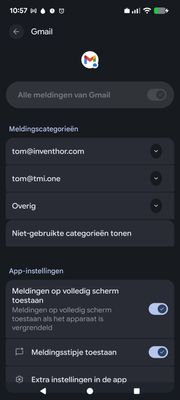
Can't configure notifications on my work profile
I hope someone here can help me, since I've been stuck in this issue for over a month now. I can not configure notifications on my work profile. I am the admin so should be able to allow this for users. I'll share some screenshots to illustrate the issue. First, the disabled notification: Then, the advice of gemini: The Solution: Change the Admin Policy You must log in to your Google Admin Console and change the setting that is blocking this. On your computer, log in to your Google Admin Console at admin.google.com. In the left-hand menu, navigate to: Devices $\rightarrow$ Mobile & endpoints $\rightarrow$ Settings Click on Android. This page lists all your Android policies. You are looking for the setting that controls app permissions. It is most likely in one of these two sections: Primary Target: Apps and data sharing Look for a setting like App permissions or App settings. The current setting is likely "Block user from modifying" or "Set to... (Enforced)". Change this setting to Allow user to configure or Let user choose. Secondary Target: Work profile Look for a setting like Work profile notifications or Lock screen notifications. While this usually just controls lock screen visibility, if it's set to "Hide all notifications," it may interfere. Ensure it is set to Show all notification content or Allow user to configure. Click Save at the top or bottom of the page. This option is simply not there!280Views0likes4CommentsForced Auto Install Issues
Since mid-November '25, forced auto install is not functional for our organization. Apps are loaded and installable as work apps but do not progress as an auto install from our policy. Has anyone experienced a similar issue? No policy changes, no SW updates on the MDM client. Functionality just stopped working.Solved124Views0likes7Comments