Apps
147 Topics
Device financing at scale (10,000+ devices): compliant “restricted mode” on delinquency using Android Enterprise (Device Owner)
Hi everyone, I’m building an Android Enterprise device management solution and I want to keep everything fully compliant (Android Enterprise + Google Play policies). Use case: a company provides company-owned devices to customers under a leasing / device financing contract. We need to manage this at scale (10,000+ devices) across multiple customers/tenants. If a customer becomes delinquent, the company needs a temporary restricted mode (e.g., kiosk/limited access) until the account is back in good standing — with clear user notice, grace period, and contractual consent. What we want to control at scale: enrollment, policy assignment, app allow/deny lists, kiosk/lock task mode, updates, compliance reporting, and remote actions aligned with Android Enterprise best practices. Questions: Is this type of “restricted mode for delinquency” considered acceptable in the Android Enterprise ecosystem when devices are Company-Owned (Device Owner) and the policy is transparent/contractual? For 10,000+ devices, what is the recommended architecture: Android Management API (AMAPI) policies only, or a custom DPC (and why)? For distribution, is the safest path a managed Google Play private app per enterprise/tenant, or another approved approach for large-scale deployments? Any best practices to avoid being flagged by Play Protect / Play policy reviews for legitimate enterprise enforcement features (kiosk, app restrictions, device restrictions), especially at this scale? I’m not looking to bypass security or do anything hidden; the goal is a compliant enterprise solution. Thanks for any guidance or official documentation links.Solved29Views0likes5Comments
Google Play Protect's new policy for custom DPC
Apparently, Google has a new policy that only approved DPCs can be installed through QR Provisioning; otherwise, their installation will be blocked. Link: https://developers.google.com/android/play-protect/warning-dev-guidance#android_enterprise_dpc_enrollment The problem is that I am not able to understand how to apply for DPC approval. I found this page, but still not able to find out where to apply. Your help is appreciated. ThanksSolved463Views2likes4Comments
AMAPI requests for enterprises.applications.get and enterprises.policies.patch are failing intermittently
Is anyone observing AMAPI requests for GetApplication and PatchPolicies failing intermittently ? I am observing intermittent failures with the log - "googleapi: Error 503: The service is currently unavailable., backendError".46Views0likes2Comments
Issue with Android Enterprise provisioning: afw#identifier invalid and Play Protect blocking app during QR enrollment
We are an organization using a third-party MDM / Device Policy Controller (DPC) solution to manage our Android Enterprise devices. The DPC application is published on Google Play and has been working for managed provisioning. Recently, we started facing issues during Android Enterprise enrollment, and we are seeking guidance on the correct and supported setup. Issues observed 1. afw#identifier enrollment When attempting enrollment using afw#<identifier>, the setup fails with errors such as invalid token, wrong setup, or unable to continue enrollment. This previously worked and now fails consistently, even though the DPC remains published on Google Play. 2. QR code–based provisioning When using QR code provisioning, the device completes initial setup but then Google Play Protect shows “App blocked by Play Protect” for the DPC. The DPC app is Play-approved and not sideloaded by end users. We have already submitted a Play Protect appeal through the official appeal form. 3. Distribution method For QR provisioning, the DPC APK is currently hosted on our own HTTPS server, and the QR includes: Device Admin component SHA-256 signature checksum Secure download location Despite this, Play Protect flags the app after provisioning. Clarifications we are seeking Are there recent changes or requirements for afw#identifier enrollment that could cause invalid token or setup errors? Does Play Protect apply additional checks during QR-based provisioning, even for Play-approved DPC apps? Is using a self-hosted APK download location still supported for Device Owner provisioning, or is Managed Google Play / Zero-Touch enrollment now required? Is there a supported way to allowlist or whitelist a legitimate enterprise DPC app so it is not blocked during provisioning? Are there recommended best practices for third-party MDM providers or enterprise customers to avoid Play Protect blocks during enrollment? We are not attempting to bypass Play Protect or supported security mechanisms. We want to ensure our Android Enterprise setup follows current Google-recommended practices and understand the correct approach going forward. Any guidance or clarification from the community or product experts would be appreciated.112Views0likes3Comments
Play EMM API: Devices.get / Devices.list unavailable for extended duration
Issue Description : After device enrollment, Devices.get() and Devices.list() intermittently return “No Device was found”/an empty list for the same device for an extended duration greater than 15 mins. This behavior persists beyond the propagation delay described in the documentation, which is 2 mins. Impact: App Distribution affected Our EMM supports incremental app distribution: Fetch current device policy Merge additional apps Re-apply policy using Devices.update() When devices.get() / devices.list() are unavailable: We cannot retrieve the current device policy --> Incremental app distribution fails Detailed Reproduction Steps: Enroll device (afw#DPC_IDENTIFIER managed accounts method) Call Devices.update() to distribute apps that were pre-configured for installation during the enrollment process. Call succeeds Custom DPC adds managed Google Play account on Device Call Devices.List(enterpriseId, userId) → Returns empty for 15+ mins Call Devices.get(enterpriseId, userId, deviceId) → Returns 404 "No device was found" during this time Queries: What is the expected propagation delay for custom DPCs? How long should we poll and check if the deviceId is listed in devices.list()? Any workflow changes needed from our side? How do other EMMs handle incremental app distribution?74Views0likes3CommentsGoogle Play Protect's new policy for custom DPC
Apparently, Google has a new policy that only approved DPCs can be installed through QR Provisioning; otherwise, their installation will be blocked. Link: https://developers.google.com/android/play-protect/warning-dev-guidance#android_enterprise_dpc_enrollment The problem is that I am not able to understand how to apply for DPC approval. I found this page, but still not able to find out where to apply. Your help is appreciated. ThanksSolved138Views0likes2Comments
Samsung Devices: Can't call from a personal app
Hi everyone we received some reports from our users in the last couple of month that suddently the phone app on COPE devices (Samsung A-series) starts to show "Can't call from a personal app" - Your organisation only allows you to make calls from work apps. Workaround: Reboot the device. For most of the reports this workaround has to take place once and the message is gone forever. A very small amount of devices starts to show this message again after a couple of weeks. Rebooting is resolving the issue again. Any idea of how to prevent this? Even emergency calls are not possible if this error is appearing! Does anyone else have seen this behavior? Raised a case with Samsung today. Thanks! DanielSolved3.9KViews2likes55CommentsChrome OS + Crostini: The Missing Bridge to Android Development
Hello Community, I recently read an article about connecting a Windows PC to an Android phone, which got me thinking: we need a similar focus on connecting Chrome OS (via Crostini) to Android devices. Since both Android and Chrome OS are Google products, the integration should be seamless. If Google wants to grow Chrome OS adoption, developers are the ideal first target. However, making it easy for developers to build Android apps on Chrome OS must be a priority, and currently, there are significant friction points. The Technical Blockers My Android development on Chrome OS has been halted for over a month due to persistent issues: ADB Debugging on Managed Devices: My managed Chromebook (I am the admin) has the "Enable ADB debugging" toggle locked. Despite a month of searching, I haven't found a fix. Connection Instability: Both USB and Wi-Fi debugging work intermittently and then fail. I have tested this with a modern Android 15 phone and an older Lollipop tablet; the connection fails on both, pointing to an issue on the Chromebook side. USB File Transfer: There is a known issue transferring files from Crostini to USB devices (requiring a workaround of copying to the Chrome OS files app first). The Strategic Picture Google should not depend on Microsoft Windows for Android development. Chrome OS is already a high-quality product—I use it daily. For example, upgrading my Crostini VM from Debian 12 (Bookworm) to Debian 13 (Trixie) was a pleasure and required no reinstallation. This stability proves Chrome OS is a serious development platform, not just a "cheap" alternative. Addressing the "Aluminum OS" Rumors There is a current campaign discrediting Chrome OS, citing rumors about a new "Aluminum OS." I believe these rumors are misinterpreted. Rather than dropping Chrome OS, it appears Google is aiming for the high-quality device segment. Regardless of naming conventions, Google is walking securely, step-by-step, from a browser to a full OS. Conclusion I strongly advise Google to continue its efforts in making Chrome OS a high-end development platform. The community is involved and patient (a major quality of developers!), but we need these bridge issues—specifically ADB debugging and USB file transfers—solved to fully unlock the potential of the ecosystem.13Views0likes0Comments
Unable to Add Work Profile on HONOR Magic V5 for Microsoft Intune Enrollment
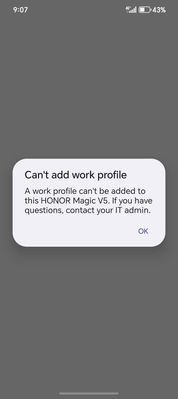
Dear Android Enterprise Support Team, I am experiencing an issue while attempting to enroll my HONOR Magic V5 device into Microsoft Intune for device management. I just bought the device one week ago, but when I try to add a work profile, I receive the following error message: "Can't add work profile. A work profile can't be added to this HONOR Magic V5. If you have questions, contact your IT admin." This issue is preventing me from completing the enrollment process required by my organization. I have already consulted with my company’s global IT support team, and they confirmed that there is no alternative solution on our side. The only way to resolve this issue is for HONOR to make the HONOR Magic V5 compatible with the Microsoft Intune application and Android Enterprise work profile enrollment. Device Details: Model: HONOR Magic V5 OS Version: Magic OS 9.0.1 Android version: 15 Model: MBH-N49 Error Screenshot: attached as below Could you please advise if this device supports Android Enterprise work profiles or if there are any compatibility limitations? If there is a workaround or firmware update required, kindly provide guidance. Your prompt assistance would be greatly appreciated as this is impacting my ability to comply with company security policies.160Views0likes2Comments
Common identifier between AMAPI & Require for setup app for validation
We are enrolling devices using AMAPI by generating a QR code with an assigned policy either for work profile or fully managed enrollment. During enrollment, the device prompts for a require for setup app, which, after configuration, returns RESULT_OK, marking the setup as complete and finalizing the device enrollment. Before returning RESULT_OK, To identify the enrolling device, the backend gets the device ID and enterprise ID from the Pub/Sub provisioning notification. The device ID (which matches the GSF ID) is then sent by the require for setup app to the backend for validation. This identifier is also used to enforce enrollment limits based on the enterprise license count. The Issue: Up to Android 14, retrieving the GSF ID was possible. However, in Android 15, it now returns null. Question: Is there an alternative identifier that can be used to identify the enrolling device—one that the backend can retrieve and that the setup app can also access during enrollment? Below is the information we receive from Pub/Sub when a device is enrolled: { "name": [*Hidden for privacy reasons] "managementMode": "PROFILE_OWNER", "state": "PROVISIONING", "enrollmentTime": "2025-04-04T06:17:02.751Z", "lastPolicySyncTime": "2025-04-04T06:17:02.817Z", "softwareInfo": { "androidVersion": "15", "androidDevicePolicyVersionCode": 10323580, "androidDevicePolicyVersionName": "128.32.3 (10323580)", "androidBuildNumber": "AP3A.240905.015.A2", "deviceKernelVersion": "5.15.149-android13-8-00010-gc2e0ba41ba85-ab12040008", "bootloaderVersion": "unknown", "androidBuildTime": "2025-03-11T13:26:50Z", "securityPatchLevel": "2025-03-01", "primaryLanguageCode": "en-IN", "deviceBuildSignature": "c9009d01ebf9f5d0302bc71b2fe9aa9a47a432bba17308a3111b75d7b2143456", "systemUpdateInfo": { "updateStatus": "UP_TO_DATE" } }, "hardwareInfo": { "brand": "Redmi", "hardware": "mt6835", "deviceBasebandVersion": "MOLY.NR17.R1.TC8.PR2.SP.V1.P51,MOLY.NR17.R1.TC8.PR2.SP.V1.P51", "manufacturer": "Xiaomi", "serialNumber": [*Hidden for privacy reasons] "model": "23124RN87I", "enterpriseSpecificId": [*Hidden for privacy reasons] }, "policyName": [*Hidden for privacy reasons] "memoryInfo": { "totalRam": "5865836544", "totalInternalStorage": "806965248" }, "userName": [*Hidden for privacy reasons] "enrollmentTokenName": [*Hidden for privacy reasons] "securityPosture": { }, "ownership": "PERSONALLY_OWNED" } *Updated by Community admin - removed due to privacy reasons 4 April256Views1like5Comments