EMM
190 Topics
admin.google.com and Enterprise.google.com Domain account Merge
Hey Everyone! Recently found out that we are using multiple google.ca tenants to manage some on prem machines (chrome os and browser), going to do a Domain validation for our Zero touch portal (enterprise.google.com) and just wanted to verify what's going to happen once we complete the Merge of domain accounts. Since these seems to be completely separate admin consoles, how do we know which one will be kept and what wont? what is required to migrate over without any impact? So I guess a few questions; How are the two tenants linked in any way?Admin.google.com and Enterprise.google.com What happens if there are two tenants and we merge, which one it kept? since we are doing the validation on the Enterprise.google.com site, nothing mentioned the Admin portal impact. Very confused on this whole situation, documentation does not mention if someone else has already configured and using another admin console and the proper way to perform a domain validation. thanks in advance!24Views0likes0Comments
Fido2 key and their issues using them on Android
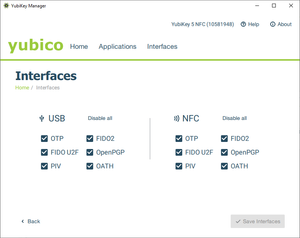
First, do Android support using Fido2 keys on Android? Yes, it does support both using bluetooth, NFC and USB authentication. For reference: https://developers.google.com/identity/fido/android/native-apps But does it mean that it is straight forward to use it in a enterprise environment without hiccups? No, the support lacks many features that both Windows and iOS has supported for long time. If I buy a modern Fido2 with OTP support, will it work straight out of the box for using the USB? No, you need to disable the OTP support first. Here is how you can do that from yubikey manager, this works for Yubikey. Other vendors might have something similar. But for Fido2 keys without OTP support, it should work out of the box for USB-C, like Google titan. Why this happens, dont know. Can we use NFC for Entra ID authentication like we can on Windows and iOS? No. Android does not currently support CTAP2 for NFC, only for USB-C input. CTAP1 (FIDO U2F) supports certificate based authentication, but CTAP supports user verification with PIN and biometrics. Entra ID requires UV (user verification) before accepting login. As far as I know, there is also support for bluetooth. But I dont have any fido2 keys that support bluetooth yet. So why does this matter? With Android you can have shared devices with secure login for multiple users with a single log in for all supported apps, auto log off and many other possibilities. https://learn.microsoft.com/en-us/entra/identity-platform/msal-shared-devices Other sources/discussions: https://www.reddit.com/r/yubikey/comments/1oncuh2/whats_the_point_of_nfc_on_android/ https://www.reddit.com/r/yubikey/comments/13tlzoc/fido2_inconsistent_across_windowsandroid/ https://fidoalliance.org/specifications/786Views3likes14CommentsIMEI2 becomes the default IMEI with an eSIM.
Hello, On our Ivanti Neurons MDM, we use this API to retrieve IMEIs: getImei() in TelephonyManager is equivalent to: getImei(getDefaultSim()); So when the only sim is inserted in the second slot: getImei() is the same as getImei(1) causing duplication in the report. Ref: https://android.googlesource.com/platform/frameworks/base/+/b6587ea/telephony/java/android/telephony/TelephonyManager.java#843 The API used to retrieve IMEIs seems to target getImei(getDefaultSim()), which causes problems with eSIMs that use IMEI2. It therefore retrieves IMEI2 as the default IMEI, which can cause problems with registration consoles such as ZTE, where only IMEI1 is entered. Is there a way to correct this to avoid IMEI swapping? Regards.212Views3likes8CommentsIntune - Zebra Scanners - not recognized as company devices in ZTP
Hi, we are using MS Intune and Google Zero Touch Portal, and a large number of Zebra scanners. We created several profiles in ZTP with DPC extras (JSON) to link the devices to the corresponding Intune enrollment profiles. However, when the scanners are set up and connected to wifi, they will not identify as company devices, but continue setup in "private" mode. I assume there is a problem in our JSON config, but I could not find it. I already checked some other discussions in this forum, but could not yet find a solution. Apologies, if this problem should already be resolved, then I am happy if you point me in the right direction. :) Thanks very much and best regards TobiasSolved87Views0likes8Comments
"Your administrator has not given you access to this item" - Intune issues with Google accounts and previously used apps
Basic set up: Managed Google Play + Intune Devices all set up as "Corporate-owned, fully managed user devices" Policies are set to allow all apps from store and to allow other accounts to be installed on devices. GSuite individual Google accounts with corporate email addresses signed in to all devices to allow for things like Photos backup. Problem: When migrating a user to a new device, some apps cannot be installed. When a user is signed into Google Play with their Google Account, any app that is already linked to their Google Account from their previous device (for example: WhatsApp, Samsung Notes, Translate), cannot be installed with the error "Your administrator has not given you access to this item". If I sign the user out from their Google account, install the app and then sign them in again, it all works fine, but this should not be necessary. It seems like the problem is stemming from the Play Store not liking the fact that the corporate Play Store profile is trying to install apps that the Google account has already signed in to previously. Any thoughts on fixes? Thanks.159Views0likes4Comments
Play Protect is blocking our DPC app — appeal already submitted, looking for guidance
Hello everyone, We are currently facing an issue where Google Play Protect is blocking our Android application during device provisioning. Context: - It is not distributed via Google Play (but is already published); it is hosted externally and installed during provisioning via QR code. - The app is properly signed, and provisioning works at the system level, but Play Protect blocks the app with the message “App blocked to protect your device.” - This started happening recently on new devices / factory reset devices. We have already submitted the official Play Protect appeal form as recommended in the documentation: The form was completed with all required information (APK, package name, signing certificate, use case, etc.). At this point, we are looking for guidance from the community: - How long does it usually take for the Play Protect appeal form to receive a response or decision? - Is there any additional step or channel recommended for Android Enterprise DPC apps in this situation? Any insights or shared experiences would be greatly appreciated. Thank you in advance for your time and support. Best regardsSolved1.3KViews1like24Comments
PiP Mode Not Working in Lock Task (Kiosk) Mode – Any Official Support or Workaround?
Hi everyone, I’m from ManageEngine MDM, and we’ve observed that Picture-in-Picture (PiP) mode does not work when a device is in Lock Task (Kiosk) mode. In our deployments, the device is configured as Device Owner, and we use DevicePolicyManager#setLockTaskPackages() to enable kiosk mode. However, when an app attempts to enter PiP using enterPictureInPictureMode(), it does not function while Lock Task mode is active. We are receiving multiple customer requests for this capability, particularly for use cases such as: Video conferencing apps running in PiP while a primary kiosk app remains in the foreground Monitoring/streaming apps that require PiP overlay within a controlled kiosk environment Enterprise-dedicated devices that require limited multitasking We would appreciate clarification on the following: Is PiP intentionally restricted in Lock Task mode by design? Is there any supported approach to enable PiP while maintaining kiosk restrictions? Are there any planned API enhancements to support this in enterprise (Device Owner) scenarios? Any insights, guidance, or recommended best practices would be greatly appreciated. Thanks in advance!63Views0likes0Comments
Cant finish setup
After correctly completing the configuration of my MDM with the ZTE account, getting this error while registering the device: "Cant finish setup. Zero touch enrollment isn't available. Check your internet connection and try again." Things already cross verified: The internet connection is stable. The EMM setup contains the correct signin url and the zte account contains the correct extra enrollment token in configuration. The device is assigned the correct configuration. The service account allowlisting google form is also approved. The signin url api never got hit during the enrollment of the device and just got this error message.77Views0likes6Comments
We have all our devices on Samsung Knox; I would like to try using Android Zero-Touch enrollment as well. Is that possible?
We got all our new company Samsung phones added into Samsung Knox. None of the distributors we work with are Android Zero Touch partners; we've asked them to join and they probably won't any time soon. I read that there's been some effort to unify Samsung Knox and Android Zero Touch, although in many cases it still seems like EMMs have better support for Android Zero Touch whereas Samsung would prefer you use their in-house EMM. We would like to try using the Android Zero Touch enrollment as well. Unlike Samsung, it seems like I can't even register my own customer account. So my questions: is there any possible way to get just a Zero Touch customer account set up, with no devices added, when none of the resellers I actually bought a device from are Android partners? Also, is there some way I could get some of our Knox enrolled devices to use Zero Touch?214Views0likes15Comments