Enrolment
248 Topics[Day 2] Mission Intune : When Migration Becomes a Mission (Almost) Impossible
Good Morning Everyone 🕵️ Deep within the digital infrastructure, a high-stakes mission is being prepped. Five mobility experts have been deployed to solve a massive puzzle: migrating tens of thousands of smartphones to Microsoft Intune. The Goal: Ensure a fluid, secure, and uninterrupted transition for thousands of users. The Battlefront: A complex landscape filled with legacy policies, mixed configurations, and strict deadlines. It’s a race against the clock where one wrong move could start a domino effect. From scripts to security protocols—nothing is left to chance. Failure is not an option. Following Broadcom’s acquisition of VMware in 2023, the Workspace ONE product is now owned by Omnissa. Broadcom’s commercial strategy, which has influenced its spin-off companies, had become highly aggressive toward all customers. Consequently, we have decided to migrate the management of our Android and iOS tertiary fleet to Microsoft Intune.. While we are familiar with Intune, several limitations should be noted: Reporting: Intune offers basic reporting through Microsoft Endpoint Manager and Power BI integration, but lacks the advanced, customizable dashboards available in Workspace ONE. Deployment Performance: Application and configuration deployments can be slow, with status updates often delayed due to Intune’s reliance on periodic device check-ins rather than real-time communication. iOS Management: Intune provides full functionality only for devices enrolled via Apple Business Manager (ABM). Non-ABM devices have restricted supervision capabilities, limiting advanced configuration and app deployment. Error Handling: Intune does not display granular error codes in its console. Troubleshooting often requires log collection from the device or use of Microsoft Support tools, increasing diagnostic complexity. Conditional Access & Compliance: Intune integrates tightly with Azure AD for conditional access policies, which is a strength, but requires additional configuration and licensing for advanced scenarios. App Protection Policies: Strong for Microsoft 365 apps, but less flexible for third-party apps compared to Workspace ONE. Migration Strategy Overview The project aims to migrate the entire mobile fleet—a few tens of thousands Android and some iOs devices—between September 2023 and December 2024. Cybersecurity requirements mandate a shift from COBO (with personal Google accounts allowed) to COPE, reinforcing corporate control and reducing exposure to security risks. Key Challenges Technical Constraints: Devices incompatible with Android 13 require hardware replacement. For most employees, migration involves full device reset and Intune re-enrollment—a complex, time-consuming process. Security Limitations: Backup tools cannot be authorized, increasing the risk of data loss and user errors. A recurring issue is failure to remove Microsoft Authenticator configurations, creating significant support overhead. Performance Impact: The Samsung Galaxy A32, previously adequate under COBO, performs poorly under COPE, affecting user experience. Status and Strategic Decision By June 2024, progress is far below target. To mitigate operational disruption and support overload, the strategy shifts: forced migrations are discontinued. Migration now occurs only during: Hardware replacement (obsolescence, failure, or breakage) Voluntary device reset This approach prioritizes stability and resource optimization while maintaining compliance with security standards. We’ve been with Intune for almost two years, we make do with it and we are hardly surprised anymore when something doesn’t work. If you have any questions, don't hesitate to reach out via the comments below Kris299Views13likes15Comments
Android COPE Devices randomly wiping
Hello, Recently our COPE profile in ZT is not functioning. The device will go through the enrollment, it gets registered correctly in our tenant (Entra/Intune) and we can get to the home screen just fine. However, after some time the device will receive the following notification: “Your organization has set up this device to be managed by your organization. If this is an error, contact your device’s provider. All data on the device will be deleted. Your device will automatically reset in 2 hour.” The config in ZT and the one in Intune match (token is correct and the DPC extras are fine). This profile was working up until 2 weeks ago. We’re stumped. We recreated a different COPE profiles with the required DPC extras as per Microsoft’s documentation, tried removing compliance policies and device configurations to make it a plain profile. No luck, still receives the reset notification. Phones tested: Samsung A15, Samsung A16 all running the latest Android 16OS with the latest security patch. Any help would be appreciated, thank you!204Views0likes10Comments
Play Protect is blocking our DPC app — appeal already submitted, looking for guidance
Hello everyone, We are currently facing an issue where Google Play Protect is blocking our Android application during device provisioning. Context: - It is not distributed via Google Play (but is already published); it is hosted externally and installed during provisioning via QR code. - The app is properly signed, and provisioning works at the system level, but Play Protect blocks the app with the message “App blocked to protect your device.” - This started happening recently on new devices / factory reset devices. We have already submitted the official Play Protect appeal form as recommended in the documentation: The form was completed with all required information (APK, package name, signing certificate, use case, etc.). At this point, we are looking for guidance from the community: - How long does it usually take for the Play Protect appeal form to receive a response or decision? - Is there any additional step or channel recommended for Android Enterprise DPC apps in this situation? Any insights or shared experiences would be greatly appreciated. Thank you in advance for your time and support. Best regardsSolved1KViews1like22Comments
Organization Has Reached Its Usage Limits" Error with 0 Devices - Troubleshooting Guide
I'm developing a custom MDM solution using Google Android Management API. Successfully created enterprise enterprises/LC02x32bm6 with work email domain, but getting: "Can't set up device. Your organization has reached its usage limits." Key Details: Enterprise created successfully via API Enrollment token generated successfully 0 devices currently enrolled Cloud Console shows 0% API quota usage Billing account linked to project GET /api/enterprise/callback → Returns enterpriseName POST /api/enterprise/enrollment-token → Returns enrollment token Device enrollment → ❌ "Usage limits" error Has anyone encountered this "usage limits" error with 0 devices? Android Management API usage is 0%. Any insights appreciated! Happy to share code snippets or API responses if helpful.15Views0likes0CommentsPlay Protect Blocking Custom DPC Apps — How to Get Approval or Alternatives?
Hi everyone, I'm a developer who helps enterprises build custom DPC (Device Policy Controller) Reference Documentation apps to manage Android devices based on their unique requirements. Recently, Play Protect has started blocking the installation of custom DPC apps, even when these apps are signed and used internally. The warning claims the app may pose a risk due to access to sensitive data - even though it's strictly for enterprise use. To make things more difficult: Google is no longer accepting registration of custom DPC apps with Android Enterprise, which limits official distribution and management options. Android Management APIs don’t support all use cases, and also have quote limit. I’ve applied twice to join the Android Enterprise portal to build a SaaS-based device management platform, but both requests were rejected without a clear reason. My questions for the community: Is there any official way to get a custom DPC app approved or whitelisted by Play Protect? Are there any alternative ways to manage Android devices at scale (outside of AMAPI or legacy EMM)? How can new developers or startups gain access to Android Enterprise features when onboarding is currently restricted? Any help, direction, or shared experience would be greatly appreciated. Thanks, KulwinderSolved1.8KViews6likes18Comments
Issue: Play Protect Blocks DPC Installation During QR Provisioning on Android 14 / One UI 6.1
Hello, We use QR code provisioning to install our custom Device Policy Controller (DPC) app from a custom download URL (not Google Play). The exact same APK + QR configuration: Works on: Samsung Galaxy S20 — Android 13 / One UI 5.0 Blocked on: Samsung Galaxy S21 — Android 14 / One UI 6.1 Play Protect stops installation with the message: "App blocked to protect your device. This app can request access to sensitive data. This can increase the risk of identity theft or financial fraud." Provisioning QR: { "android.app.extra.PROVISIONING_DEVICE_ADMIN_COMPONENT_NAME": "<DeviceAdmin component>", "android.app.extra.PROVISIONING_DEVICE_ADMIN_PACKAGE_CHECKSUM": "<Package checksum>", "android.app.extra.PROVISIONING_DEVICE_ADMIN_PACKAGE_DOWNLOAD_LOCATION": "<S3 bucket url>", "android.app.extra.PROVISIONING_LOCALE": "en_US", "android.app.extra.PROVISIONING_TIME_ZONE": "Europe/Helsinki", "android.app.extra.PROVISIONING_LEAVE_ALL_SYSTEM_APPS_ENABLED": false, "android.app.extra.PROVISIONING_DEVICE_ADMIN_PACKAGE_NAME": "<Package name>", "android.app.extra.PROVISIONING_WIFI_HIDDEN": true, "android.app.extra.PROVISIONING_WIFI_SECURITY_TYPE": "WPA", "android.app.extra.PROVISIONING_WIFI_SSID": "<WiFi SSID>", "android.app.extra.PROVISIONING_WIFI_PASSWORD": "<WiFi Password>" } Questions: Question 1: What changed in Android 14 or One UI 6.1 related to: - Sideloading DPCs during provisioning - Play Protect enforcement during QR setup Question 2: What is the new required approach to ensure the DPC installation is allowed? (e.g., signature checksum requirement, Play signing, allow list, new provisioning extras) Question 3: Is there updated documentation that describes the new DPC provisioning security rules? We need to understand the change and how to properly support Android 14+ devices in enterprise deployments. Thank you!Solved158Views2likes5Comments
Issue with Android Enterprise provisioning: afw#identifier invalid and Play Protect blocking app during QR enrollment
We are an organization using a third-party MDM / Device Policy Controller (DPC) solution to manage our Android Enterprise devices. The DPC application is published on Google Play and has been working for managed provisioning. Recently, we started facing issues during Android Enterprise enrollment, and we are seeking guidance on the correct and supported setup. Issues observed 1. afw#identifier enrollment When attempting enrollment using afw#<identifier>, the setup fails with errors such as invalid token, wrong setup, or unable to continue enrollment. This previously worked and now fails consistently, even though the DPC remains published on Google Play. 2. QR code–based provisioning When using QR code provisioning, the device completes initial setup but then Google Play Protect shows “App blocked by Play Protect” for the DPC. The DPC app is Play-approved and not sideloaded by end users. We have already submitted a Play Protect appeal through the official appeal form. 3. Distribution method For QR provisioning, the DPC APK is currently hosted on our own HTTPS server, and the QR includes: Device Admin component SHA-256 signature checksum Secure download location Despite this, Play Protect flags the app after provisioning. Clarifications we are seeking Are there recent changes or requirements for afw#identifier enrollment that could cause invalid token or setup errors? Does Play Protect apply additional checks during QR-based provisioning, even for Play-approved DPC apps? Is using a self-hosted APK download location still supported for Device Owner provisioning, or is Managed Google Play / Zero-Touch enrollment now required? Is there a supported way to allowlist or whitelist a legitimate enterprise DPC app so it is not blocked during provisioning? Are there recommended best practices for third-party MDM providers or enterprise customers to avoid Play Protect blocks during enrollment? We are not attempting to bypass Play Protect or supported security mechanisms. We want to ensure our Android Enterprise setup follows current Google-recommended practices and understand the correct approach going forward. Any guidance or clarification from the community or product experts would be appreciated.177Views0likes4Comments
Enable third-party Android mobile management
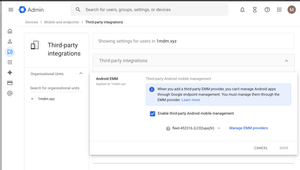
Hey Android Enterprise community, I'm trying to understand what the "Enable third-party Android mobile management" checkbox in Google Admin does. How does this affect situations where multiple Android Enterprises are bound to multiple EMM solutions? Will both Android Enterprise continue working if they are bound to different EMM solutions, even if only one is selected on the screen above? If I use the Enrollment token link method to provision a device and have no users in my Google Workspace, will switching the EMM provider in the dropdown below the checkbox have any effect? Also, does Authenticate Using Google affect provisioning if there are no users in Google Workspace? Thanks, MarkoSolved239Views0likes7Comments
ZTE Enrollment Profiles Issue
Greetings everyone! New day, new challenge. I’ve received a number of Zebra tablets. We already use ZTE, which works fine, but as you know it assigns devices to a single profile based on the serial number. The issue is: These tablets (same model) will be used for many different purposes, and I don’t think it’s efficient to take each device out of the box, read the serial number, and manually assign it to a different ZTE profile. I could easily end up managing 200 different profiles. So my question is: Is there a way to let the device choose which group or category it should belong to during enrollment? For example, during setup the device could ask the user which category it belongs to and based on that selection it would automatically join the correct group and receive the appropriate configuration. Is this possible? Or am I dreaming? 😄 Has anyone faced this issue and found a good solution? Thanks in advance!133Views0likes13Comments
Intune Migrate Managed Google Play Account to Managed Google Domain
Hi there, I’m looking for clarification on Microsoft's recent update about upgrading tenants from a Managed Google Play account to a Managed Google Domain account in Intune. Intune Android Enterprise Update We have 130+ Android Enterprise devices enrolled in Intune with an old Gmail account we dont have direct access to. Our Intune connection was originally set up using this account back in 2023. Now we have the option to "Upgrade" our account but we need to understand the risks before we proceed. Microsoft says that we can continue managing devices under the new Entra‑linked Managed Google Domain account without deprecating the old method, and without device impact. Is the migration fully in‑place and non-disruptive? Meaning: No need to retire devices No re-enrollment No break in Managed Google Play sync No loss of approved apps or assignments Is this migration guaranteed to perform an in-place transition of the administrative account without: Breaking the existing Android Enterprise binding Generating a new enterprise ID Requiring any user/device actions Interrupting app delivery or policy deployment? Any advice from someone who has already completed the upgrade would be great! Thank you in advance for any clarification.71Views1like2Comments