Recent discussions

Managed Configuration in Google Messages
Following Samsung's decision to start sunsetting Samsung Messages (and recommending Google Messages) on newer devices we are now evaluating GM across our estate. Devices are managed by Intune and we can see we can push App Config for RCS Messages and Archiving via the Config designer but after opening up GM I get the "Use Gemini" in my face. Currently we don't use Gemini on our devices - infact we remove it. I have found the option under Settings in GM to Hide the Gemini button but it would be good if we could push that config down with the App......searching round not found anything to date - any thoughts?BigMatt2 days agoLevel 1.5: Cupcake20Views0likes0Comments
Forced Auto Install Issues
Since mid-November '25, forced auto install is not functional for our organization. Apps are loaded and installable as work apps but do not progress as an auto install from our policy. Has anyone experienced a similar issue? No policy changes, no SW updates on the MDM client. Functionality just stopped working.THTClient3 days agoLevel 1.5: Cupcake11Views0likes0Comments
Enable third-party Android mobile management
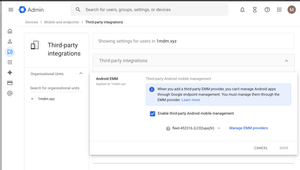
Hey Android Enterprise community, I'm trying to understand what the "Enable third-party Android mobile management" checkbox in Google Admin does. How does this affect situations where multiple Android Enterprises are bound to multiple EMM solutions? Will both Android Enterprise continue working if they are bound to different EMM solutions, even if only one is selected on the screen above? If I use the Enrollment token link method to provision a device and have no users in my Google Workspace, will switching the EMM provider in the dropdown below the checkbox have any effect? Also, does Authenticate Using Google affect provisioning if there are no users in Google Workspace? Thanks, Markomarkolisica3 days agoLevel 1.6: Donut10Views0likes0Comments
Zero-Touch + Intune enrollment fails after Microsoft sign-in (redirects to portal.manager.microsoft.com)
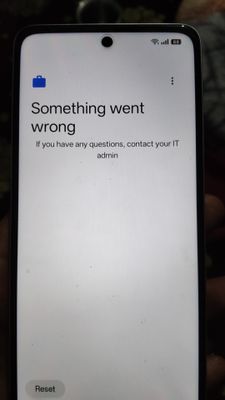
Hi everyone, I’m experiencing an issue during Android Zero-Touch enrollment with Microsoft Intune. The process begins normally and progresses through all the expected steps: 1. Getting your phone ready 2. Checking info 3. “This device belongs to your organisation” 4. Setup your phone 5. Setting up your device 6. “This device isn’t private” 7. Google services 8. Updating device 9. Welcome to Chrome 10. Microsoft sign-in page The problem occurs AFTER I successfully sign in with my work account. Instead of continuing with Android Enterprise (intune) setup, the device opens this URL: **portal.manager.microsoft.com** This page shows “Page not found.” Immediately after that, the device shows: **“Can’t set up device. To finish setup, sign in to your work account.”** At this point the enrollment cannot continue. The device is assigned to a Zero-Touch configuration with the DPC: `com.google.android.apps.work.clouddpc` We also have a JSON configuration supplied from the Intune portal. Has anyone seen this behaviour before where enrollment fails right after Microsoft authentication and redirects to an incorrect URL? Is this likely related to the Zero-Touch configuration JSON, the DPC, or a known issue with Intune handover? Any guidance would be greatly appreciated. Thank you!Zipwater4 days agoLevel 1.5: Cupcake3Views0likes0Comments
Unable to register device using Google Services Framework Android ID - Page unresponsive
I am unable to register a new device utilizing the Google Services Framework Android ID. Upon entering the ID and clicking the register button, the page is unresponsive. I have tested this on multiple browsers (Chrome, Brave, Firefox) with extensions disabled, but the issue persists. The page simply does not react.fx3ti6 days agoLevel 1.5: Cupcake29Views0likes0Comments
Device screen sensitivity
Hello AE community, Our users encounter screen sensitivity issue while using a screen proctection on their devices, Device impacted is Samsung A9+, There is a setting to enhance screen sensitivity but it is not manageable thought Ivanti NMDM, or Knox Service Plugin. We also use Bluebird devices, for this manufacturer, sensitity setting is manageable using their OEM Config app. Is there another method to manage this setting ? Should i make a FER (Feature Enhancement Request) to Samsung directly ? Regards BatlacBatlac9 days agoLevel 1.6: Donut21Views0likes0Comments
Set up a new Android Enterprise domain in Intune/EMM when an old-style Google Account is still connected
Hi, I have a situation similar to this older discussion - situation as follows: My EMM is MS Intune. Managed Goole Play Store was set up in April 2024 before the new method of creating Android Enterprise admin accounts on a managed Google domain - using a normal Gmail account This Gmail/Google account was forcibly deleted in the last month, presumably for inactivity, as the first linked discussion describes. Only the final termination email was ever sent to the recovery email, no other warnings were received. Recovery was not possible (it just said that no recovery methods were set up, even though there was a recovery email - hence the warnings...!) and now the account shows as nonexistent rather than potentially recoverable, although it's less than the quoted 30 days that recovery is available. I have seen (Community Manager) Lizzie's helpful posts and advice from a couple of years ago, including this article describing the potential for having support migrate the EMM bind from one account to another. However, I don't yet have another account to migrate to, since I would be moving from an old Gmail account to a new managed domain account - which I don't yet have, as I can't sign up as a 'new customer' to Android Enterprise within Intune, because the old bind still exists, and I haven't found anything to tell me how to sign up other than going through the EMM. I want to keep the old bind active so it doesn't break existing devices, even though I think that's what's stopping me signing up to Android Enterprise in the new way. Removing this existing orphaned bind will break everything, and Lizzie's info in other posts has suggested that the bind will stay mostly-working if left alone, whereas removing it will trigger retirement of all devices. MS/Intune support don't seem to be aware of the possibility of contacting Google support to migrate a bind, but even if they were, I don't yet know what to tell them (as I have no new destination account, of course). They just advise me that it will need a new account and re-enrolment of all devices, which I'm hoping to avoid. I know this is convoluted, but that's why I was hoping for help. Is there a way to get a new Android Enterprise admin account set up, using the new managed domain method, without breaking the existing bind - and then to migrate the bind across? Thanks Devlefrinj16 days agoLevel 1.5: Cupcake36Views0likes0Comments
Android Enterprise Partner Application/Quota Status
Hi, We own and manage an asset management solution used by various clients. Recently (in the last 12 months) we have implemented an MDM/EMM type of solution that uses the Android Management API to enrol/register devices and assist clients with their asset management processes and managing risk through the Android Management API. Now, from an Android Management API perspective, we understand the permissible usage policies and believe we do comply with the requirement. When we originally started the endeavour, the quota on how many device can be registered was a default of 500 devices. We recently noted when some clients try to enrol/register devices, that during the set up process on their devices, that it states that they have reached the usage capacity limits. When we checked the project(s) associated with the clients, most have between 200 - 380 devices enrolled/registered which is below the 500 device qouta. More recently, we noted that the Android Management API permissible usage policies were changed/updated on 29 October 2025 from a default of 500 devices to having to request an initial quota of 500. This means that that enterprises or projects we have recently set up would fail. We submit a request for a quota increase on earlier projects and a request for an initial quota on a new project. This was more than a week, or 7 working days, ago. We also submit an application to become and Android Enterprise Partner on the 12th of November 2025 which we received a response with additional questions about two days later which we responded to promptly. The challenge here is managing client expectations and frustrations in not being able to enroll/register and additional devices, with one client looking to enrol/register over 5000 devices and another prospective client having over 15000 devices. Is there any way we can see the progress on the quota increase/initial quota requests and progress of the partner application or whether there is any other questions or concerns we can remediate to move forward? Its been a challenging week trying to manage our frustrated clients and really want to use the Android Management API and Android Enterprise much more in the future but the limitations are prohibiting us from doing so. Any assistance or perhaps someone we can contact would be appreciated.garethdavid19 days agoLevel 1.5: Cupcake46Views0likes0CommentsDo certifications matter when researching new devices?
Hey everyone, Episode 3 of The Secure Element went live last month! Bigdogburr (our go-to security expert) sat down with Brian Wood from Google’s Device Security and Privacy team to unpack how devices get approved for use in the US federal government. Spoiler: it’s not simple! From government-approved labs running tests, to annual re-certifications, to the role of NIAP (National Information Assurance Partnership) — there’s a lot going on behind the scenes to make sure devices are truly secure and trustworthy. When you’re looking at new devices, do you pay attention to security certifications or accreditations? If so, what certifications are you most interested in your region? Or do you focus on something else entirely? Let me know your thoughts below — I’d love to hear how you approach this! Chat soon, EmilieEmilie_B20 days agoGoogle Community Manager29Views2likes0Comments


Explore other customer resources
Help Center
Explore step-by-step how-to guides.
Solutions Directory
Find solutions and partners.
Website
Discover more about Android's features.