Android Enterprise Customer Community
Recently active
Hello, WhenI’m trying to add an Admin to the reseller protal of Zero Touch I’m getting an error message“Unexpected error occurs, please retry later”.Can someone help us in this? Many thanks
Hello Team, We have checked in various post available in Android Community. It seems we are not able to enroll devices because of initial quota is 0.We have filled and submitted the form to increase or lift the safety quota. Its been 15 days since, we don’t have any feedback and not able to enroll device. What to do in this scenario? Whom to contact to grant us initial quota?
Hi everyone, I’m trying to enroll a fully managed Android device using the Android Management API. I generate an enrollment token, create the QR code, factory reset the device, and start the QR-based provisioning process. Everything works until the Android Device Policy step, where I get the following error: “Since your organization has reached its usage limits, this device can’t be set up.” I am unable to get past this point. Here is what I have already checked:Listing devices through the API returns an empty list. There are no enrolled devices at all.Billing is active on the cloud project and the Android Management API is enabled.Enterprise creation works, policies return correctly, and I can generate enrollment tokens without any issues.The device is correctly factory reset and the QR scan is working as expected.I tested with both a Workspace-based enterprise and a Gmail-based enterprise. The same limit error appears on both, even though both enterprises have zer
Hi everyone,I submitted a quota request over two weeks ago via the Google Form (link: https://docs.google.com/forms/d/e/1FAIpQLSf4VCzblf27V6jx1_iFt7lD1WjyCDpSDzQcxunTbQdbkEGG4Q/viewform). Submission Date: 2026/07/06 However, the request is still pending approval, and I haven't received any update yet.Could someone please help check: Whether my request was submitted successfully. The estimated timeline or current status for the approval process. Any guidance or advice on how to follow up would be greatly appreciated.Thanks in advance!
Hi Community Team,I am facing an issue where my website (*Link hidden) is not opening properly on the Google Chrome browser (specifically on mobile devices/Android Enterprise managed devices). The site either fails to load completely, shows a connection error, or displays layout breaking issues, whereas it seems to work differently on some other networks or browsers. Could this be related to Chrome's built-in security settings (like HTTPS/SSL enforcement), Android WebView updates, or regional DNS blocking? Please guide me on how to troubleshoot this so that our users can access the website smoothly on Chrome without any errors. Thank you!
Hey,Unfortunately there are no settings and/or no chance configure Widgets on COPE in MS Intune. There is specific setting in Intune restrictions config profile to allow/disallow Widgets for BYOD method.Is this problem tied only MS Intune or is this something for Google? Majority of our 10k fleet enrolled as COPE and it's a big gap not having widgets available for Work Apps.ThanksJarmo
Hi community,Normally, we create a single Google account with only one recovery email for each smartphone that we own. Recently, however, Google changed its guidelines regarding active Google accounts.As a result, our Google accounts were deactivated because we didn't enter a phone number when we created them.How can we solve this problem? Is there a way to manage these Google accounts using a single master account?Thanks in advance
Hello,We are a self-managed enterprise customer (not an EMM provider) building an internal device management console on top of the Android Management API for our own corporate-owned tablet fleet.Our integration works end to end: we created the enterprise, created policies and generated enrollment tokens successfully through the API. However, enrollment fails on the very first device with:"Can't set up device — because your organization has reached its usage limits, this device can't be set up."Details:- Google Cloud Project ID: [edited by the Community Management team]- Enterprise ID: [edited by the Community Management team] (created under our corporate Google Workspace account)- A second enterprise on the same project, enterprises [edited by the Community Management team], shows the same behaviour- Billing is active on the project- Android Management API is enabled- enterprises.devices.list returns an empty list — zero devices registered, no stale PROVISIONING entries- Test device is
Hi,We are working in developing Android XR (.aab) app using unity 3d this build is targeted for Samsung Galaxy XR or only for Android XR devices. Our IT team is using MDM intunes for creating and uploading the app when our team try to upload the build we are getting "Invalid App Bundle" error. We suspecting that MDM is not able to create Dedicated Android XR is that a reason or any idea in resolving it.
Hello,I work in the QA team of a large company. We have recently purchased 10 different devices. We would now like to create a separate Google account for each device so that we can apply different settings and test our mobile apps under various conditions.Is there a special type of Google account or solution available for professional testing that...can be centrally managed by multiple people, allows users to be added and removed easily, can be used to manage multiple devices with different configurations in order to replicate various test scenariosIs Andorid Recommanded a solution for my issue?I would appreciate any tips or recommendations. Thank you!
Only my account was Owner for our Android Zero Touch portal, when I added another email, it changed my Owner role to the role I was assigning to the new user (Assigner) How do I get this fixed? Can’t find any way of contacting Google support to correct this, other than posting here.
Hi everyone,I'm hoping someone has encountered this situation before.Our organisation has a Microsoft Intune tenant connected to Managed Google Play for Android Enterprise. The Managed Google Play administrator account was created by a previous administrator before my time, and unfortunately we no longer know who originally configured it.The account is Managedgoogle@domain.com our corporate email address. I have full access to this mailbox, so I can receive emails sent to it.The issue is that when attempting to recover the Google account, Google only offers to send a one-time passcode to the registered mobile phone number. It does not offer email verification, despite me having full access to the mailbox.The Managed Google Play enterprise is still connected to Intune and functioning, but I'd like to regain administrative access to the Google account so we aren't dependent on an inaccessible recovery phone number.I can also prove organisational ownership if required, including:Ownership
Hello Android Enterprise Community,I am experiencing an issue where Google Photos does not appear on the Managed Home Screen (MHS) home screen, despite being correctly configured in the allow-list. I have already contacted both Microsoft Intune Support and Samsung Support, and I would like to share their responses and seek further guidance. EnvironmentDevice: Samsung Galaxy A25 5G (Model: SCG33)OS: Android 15Enrollment: Android Enterprise - Corporate-owned Dedicated Device (Fully Managed, Dedicated)Kiosk Mode: Multi-app kiosk (Managed Home Screen)MDM: Microsoft IntuneSymptomGoogle Photos (com.google.android.apps.photos) does not appear as an icon on the MHS home screen, even though it is correctly listed in the applications allow-list in the app configuration policy.All other apps (Google Maps, LINE WORKS, Samsung Camera, Phone, etc.) are displayed and working correctly on the same MHS configuration.What I have already verifiedGoogle Photos is assigned as Required to All Devices via Ma
Good day Team, We are currently a device reseller in South Africa as well as an MDM provider. We assist customers with MDM, either as a full turnkey solution or on a support basis. We applied to become a Zero Touch Reseller to allow us to upload IMEIs for customers, similar to the way we do for Samsung devices on KME. Our request has been declined twice now. Could you please get some guidance on why we are being declined? Many thanks.David
Hello Android Enterprise Community, I’m excited to join this community and learn from everyone here. I am currently working on AI Enterprise Platform projects involving intelligent device management, IoT, and enterprise software systems. I am interested in exploring how Android Enterprise can support secure device enrollment, enterprise device management, managed applications, and scalable deployments. I would like to learn from the community about: - Android Enterprise enrollment strategies- Device management and security best practices- Integration between Android devices, AI systems, and IoT environments- Enterprise-scale deployment approaches I look forward to connecting with other members, exchanging knowledge, and contributing my experiences. Thank you. Best regards,Nuttida Goedseesuk
Hello,We are an Indian edtech company building an academic platform for coaching institutes and K-12 schools, and we are preparing an Android Management API quota application. Before we submit, I would appreciate a sanity check on whether our deployment model fits the permissible usage policy.Deployment model:- Institutional 1:1 programme. Our contracting customer is the institution; we support it directly.- Approximately 5,000 devices in the first cohort, across a small number of institutions.- Devices are purchased by families rather than the institution, because supplying hardware centrally would put the programme out of reach for most of our families. Families purchase from an institution-approved device list. Devices are enrolled into the institution's managed fleet under its device policy.- Documented guardian consent is obtained per device before enrolment, issued by the institution.- Fully managed (device owner), provisioned by QR from factory reset.- Policy is time-bounded. D
I cant login to my google account for Intune it was deleted
I tried to create a new account but didn’t finish the process on the first day. When I came back the next day to complete it, I received the error message:ERROR_CREATING_USER – Portal user already exists for contactThis means the system has already linked my contact information to a portal user profile, even though I never fully completed the registration. Because of that, I’m unable to create a new account now. The incomplete registration seems to have locked my contact details, leaving me stuck in the process.
Buenas, no puedo agregar o quitar aplicaciones desde https://enterprise.google.com/ al acceder al apartado de aplicaciones e intentar añadir una nueva, esa ventana permanece en blanco. Esto me pasa desde cualquier navegador incluido Chrome, desde cualquier red, con o sin VPN, en distintos equipos.
Good afternoon!I need your assistance. I would like to get a consultation on how to register corporate Samsung devices in Android Zero-touch.
Hello,I have built a device management system using Android Management API. Devices are enrolled in Device Owner mode. After enrolling Samsung devices (especially newer models like Samsung A07), I noticed that Samsung Smart Switch does not work anymore. On older Samsung devices, Smart Switch works even after enrollment. But on newer Samsung devices, Smart Switch does not work once the device is enrolled as Device Owner. I am not using any third-party MDM solutions only Android Management API. My questions: Is Samsung Smart Switch blocked automatically when a device is enrolled in Device Owner mode? Is this expected behavior on newer Samsung devices? Is there any policy configuration that allows Smart Switch to function while still using Device Owner mode?Is this a Samsung restriction or an Android Enterprise restriction?warning screen shot is I would appreciate any clarification on this behavior. Thank you.
Hello everyone,I'm looking for advice from anyone who has successfully joined the Android Enterprise EMM Partner Program.Our organization recently applied for the program but was informed that the application did not meet the required criteria. We understand that Google does not provide detailed feedback regarding application decisions.Afterward, we attempted to start the onboarding process again, but the Partner Portal consistently displays the following message after entering our valid D-U-N-S number:"Something went wrong! If this problem persists, please contact support."We contacted the Android Enterprise Community Team, and they replied that they cannot provide specific feedback or details regarding application decisions.I would appreciate hearing from anyone who has experienced a similar situation.Specifically:Is there a waiting period before submitting another application? Does Google reset the previous onboarding/application record, or should a new application be created? Has a
Hello,4 days ago a security issue has been discovered on linux and this time all posts says it is impacting Android. I’m waiting from Samsung on this (exchange with ETS already) but is there some infos somewhere from Google on this CVE ? the forum AI agent says this CVE is not on the data.CVE-2026-46242https://www.securityweek.com/proof-of-concept-exploit-released-for-linux-bad-epoll-root-access-vulnerability/
Apparently, Google has a new policy that only approved DPCs can be installed through QR Provisioning; otherwise, their installation will be blocked.Link: https://developers.google.com/android/play-protect/warning-dev-guidance#android_enterprise_dpc_enrollment The problem is that I am not able to understand how to apply for DPC approval. I found this page, but still not able to find out where to apply. Your help is appreciated. Thanks
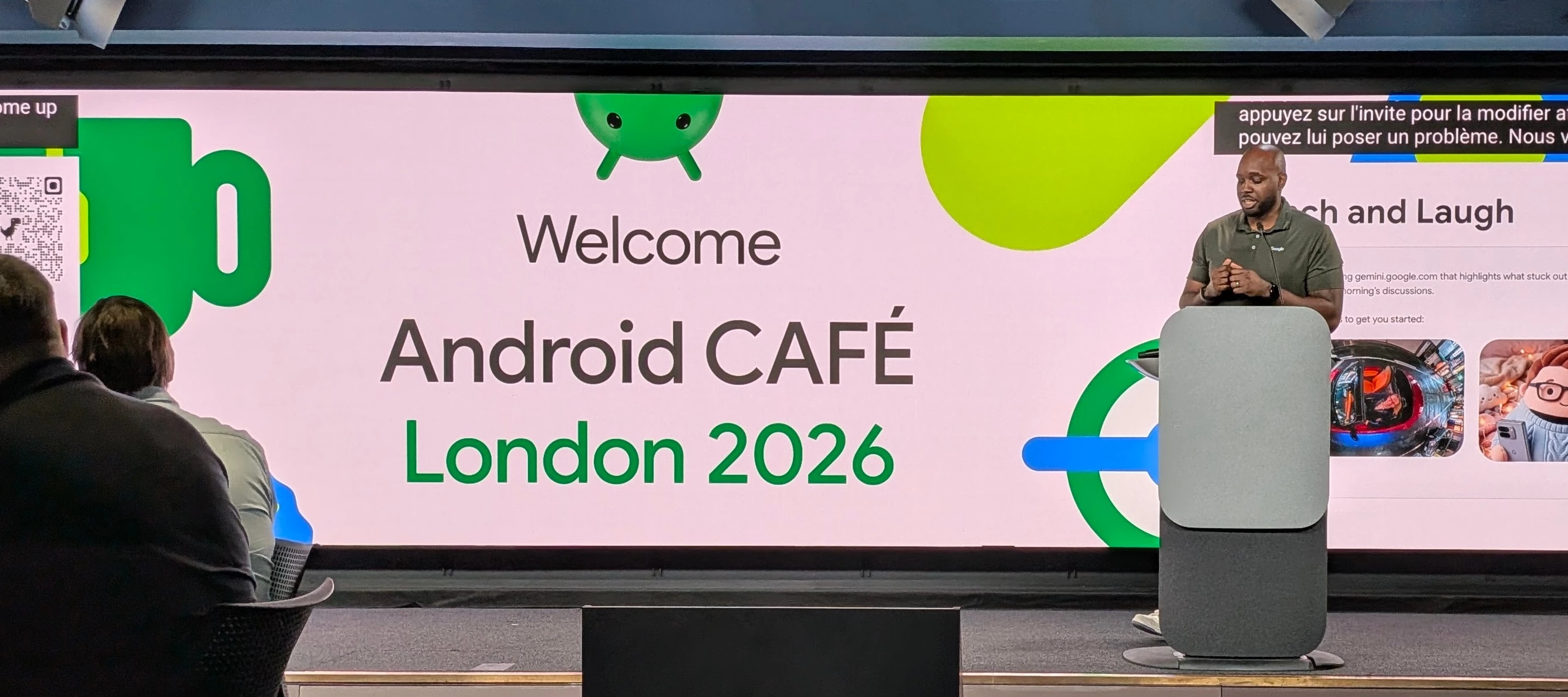
Hey everyone, Last Thursday, Jun 4, 2026, we hosted an in-person gathering for our CAFE members and friends at Google's London office. It was a pleasure to welcome IT admins and owners from both the Android and ChromeOS CAFE communities. We are incredibly grateful to everyone who made the journey to be there; seeing so many familiar and new faces together in one room was truly a highlight. The CAFE (Customer Advisory for Enterprise) is a dedicated private group, for product development and discussion, housed here in the Customer Community. Whilst a lot of the discussions often happen online, several times a year we host an in-person event. The heart of the event was our Product Roundtable Discussions. These sessions provided a unique opportunity for customers to speak directly with our Product Managers and Google team members across an array of enterprise topics, ensuring that your real-world requirements/use cases are heard and help to shape current and potential future product decisi
Already have an account? Login
No account yet? Create an account
Enter your E-mail address. We'll send you an e-mail with instructions to reset your password.