Recent discussions
**CLOSED**[Survey] End of Year Customer Success Programs Feedback
***This survey is now closed*** Hello everyone, As 2025 comes to a close and we look toward a new year, this is often an excellent time for reflection. It has been a busy year, and we've so enjoyed speaking with you and seeing the interact with other community members. The Android Enterprise Customer Success team is dedicated to ensuring that our programs and resources—including the Customer Community, The CAFE, and Advisory Services—are useful, enjoyable, and impactful for you and your teams. As we head into 2026, we’d love to hear directly from you! Would you mind sparing less than 5 minutes (I’ve been assured it won’t take a minute more 😀) to complete our Customer Success Products CSAT survey and share your overall experience please? The survey contains multiple sections for each customer programs. Please only select 'Yes' for the area(s) relevant to you. Your honest feedback is vital and will directly influence the improvements and new features we prioritise. The Customer Community is a collective space, so it’s really important to us that you help to shape the direction. Thank you so much and let me know if you have any questions or thoughts you’d like to share with everyone, below. Lizzie (and the whole AE team)Lizzie3 days agoGoogle Community Manager220Views6likes6Comments
Intune - Zebra Scanners - not recognized as company devices in ZTP
Hi, we are using MS Intune and Google Zero Touch Portal, and a large number of Zebra scanners. We created several profiles in ZTP with DPC extras (JSON) to link the devices to the corresponding Intune enrollment profiles. However, when the scanners are set up and connected to wifi, they will not identify as company devices, but continue setup in "private" mode. I assume there is a problem in our JSON config, but I could not find it. I already checked some other discussions in this forum, but could not yet find a solution. Apologies, if this problem should already be resolved, then I am happy if you point me in the right direction. :) Thanks very much and best regards TobiasSolvedTReinhold3 days agoLevel 1.6: Donut65Views0likes8CommentsFido2 key and their issues using them on Android
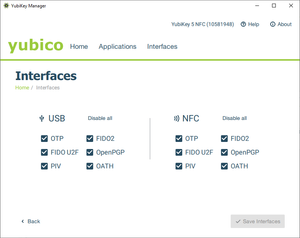
First, do Android support using Fido2 keys on Android? Yes, it does support both using bluetooth, NFC and USB authentication. For reference: https://developers.google.com/identity/fido/android/native-apps But does it mean that it is straight forward to use it in a enterprise environment without hiccups? No, the support lacks many features that both Windows and iOS has supported for long time. If I buy a modern Fido2 with OTP support, will it work straight out of the box for using the USB? No, you need to disable the OTP support first. Here is how you can do that from yubikey manager, this works for Yubikey. Other vendors might have something similar. But for Fido2 keys without OTP support, it should work out of the box for USB-C, like Google titan. Why this happens, dont know. Can we use NFC for Entra ID authentication like we can on Windows and iOS? No. Android does not currently support CTAP2 for NFC, only for USB-C input. CTAP1 (FIDO U2F) supports certificate based authentication, but CTAP supports user verification with PIN and biometrics. Entra ID requires UV (user verification) before accepting login. As far as I know, there is also support for bluetooth. But I dont have any fido2 keys that support bluetooth yet. So why does this matter? With Android you can have shared devices with secure login for multiple users with a single log in for all supported apps, auto log off and many other possibilities. https://learn.microsoft.com/en-us/entra/identity-platform/msal-shared-devices Other sources/discussions: https://www.reddit.com/r/yubikey/comments/1oncuh2/whats_the_point_of_nfc_on_android/ https://www.reddit.com/r/yubikey/comments/13tlzoc/fido2_inconsistent_across_windowsandroid/ https://fidoalliance.org/specifications/Rakib3 days agoLevel 2.3: Gingerbread708Views3likes13Comments
Impact of Google Scribe Changes on Samsung S-Pen Usability in Industrial Contexts
Hello, We have observed a significant change in S-Pen behavior following the integration of Google Scribe into Android 15 / 16 on our Galaxy Tab Active 5. Previously, the stylus allowed cursor movement (or select an write area) within text fields without triggering handwriting input. This was essential for our use case. Our technicians are working in proximity to high-voltage electricity and must wear protective gloves. The stylus is their only means of interacting with the tablet during operations. With the recent change, the stylus now immediately writes in text areas instead of moving the cursor, making it impossible to position the cursor without touching the screen with a finger (which is not feasible in our environment). Before with old firmware (Android 14): https://youtube.com/shorts/RXaPRRXaNcs?feature=share After with latest version of Android with Google Scribe (Android 15/16) : https://youtu.be/ZfKKCKcfxUc / https://youtube.com/shorts/EbuibT211lg This modification introduces a critical usability issue for industrial and safety-related workflows. Is there any documented workaround or configuration option to restore the previous behaviour (cursor movement without writing / select area)? If not, could this scenario be considered for future updates of Android? Thank you for your attention to this matter. Best regards,Aurelien123455 days agoLevel 1.6: Donut172Views2likes10Comments
"Your administrator has not given you access to this item" - Intune issues with Google accounts and previously used apps
Basic set up: Managed Google Play + Intune Devices all set up as "Corporate-owned, fully managed user devices" Policies are set to allow all apps from store and to allow other accounts to be installed on devices. GSuite individual Google accounts with corporate email addresses signed in to all devices to allow for things like Photos backup. Problem: When migrating a user to a new device, some apps cannot be installed. When a user is signed into Google Play with their Google Account, any app that is already linked to their Google Account from their previous device (for example: WhatsApp, Samsung Notes, Translate), cannot be installed with the error "Your administrator has not given you access to this item". If I sign the user out from their Google account, install the app and then sign them in again, it all works fine, but this should not be necessary. It seems like the problem is stemming from the Play Store not liking the fact that the corporate Play Store profile is trying to install apps that the Google account has already signed in to previously. Any thoughts on fixes? Thanks.csuke5 days agoLevel 1.5: Cupcake123Views0likes4Comments
Play Protect is blocking our DPC app — appeal already submitted, looking for guidance
Hello everyone, We are currently facing an issue where Google Play Protect is blocking our Android application during device provisioning. Context: - It is not distributed via Google Play (but is already published); it is hosted externally and installed during provisioning via QR code. - The app is properly signed, and provisioning works at the system level, but Play Protect blocks the app with the message “App blocked to protect your device.” - This started happening recently on new devices / factory reset devices. We have already submitted the official Play Protect appeal form as recommended in the documentation: The form was completed with all required information (APK, package name, signing certificate, use case, etc.). At this point, we are looking for guidance from the community: - How long does it usually take for the Play Protect appeal form to receive a response or decision? - Is there any additional step or channel recommended for Android Enterprise DPC apps in this situation? Any insights or shared experiences would be greatly appreciated. Thank you in advance for your time and support. Best regardsSolvedrPoyo5 days agoLevel 1.5: Cupcake1.2KViews1like24Comments
PiP Mode Not Working in Lock Task (Kiosk) Mode – Any Official Support or Workaround?
Hi everyone, I’m from ManageEngine MDM, and we’ve observed that Picture-in-Picture (PiP) mode does not work when a device is in Lock Task (Kiosk) mode. In our deployments, the device is configured as Device Owner, and we use DevicePolicyManager#setLockTaskPackages() to enable kiosk mode. However, when an app attempts to enter PiP using enterPictureInPictureMode(), it does not function while Lock Task mode is active. We are receiving multiple customer requests for this capability, particularly for use cases such as: Video conferencing apps running in PiP while a primary kiosk app remains in the foreground Monitoring/streaming apps that require PiP overlay within a controlled kiosk environment Enterprise-dedicated devices that require limited multitasking We would appreciate clarification on the following: Is PiP intentionally restricted in Lock Task mode by design? Is there any supported approach to enable PiP while maintaining kiosk restrictions? Are there any planned API enhancements to support this in enterprise (Device Owner) scenarios? Any insights, guidance, or recommended best practices would be greatly appreciated. Thanks in advance!Siva9 days agoLevel 1.5: Cupcake53Views0likes0Comments
2FA sign in error at Android Zero Touch portal
I am the IT admin/owner of our Android Zero Touch instance, and I am trying to log into the portal to view and interact with devices associated with our organization. Our zero touch instance is linked with our Intune tenant, and is working correctly. I keep getting the error that my sign in was rejected because it doesn't meet my organization's 2 step verification policy and to contact my IT admin for more information. I am that IT admin, and I can't login. My login information is correct, I have our account ID, and I'm just trying to get in touch with someone to help with the login. I can't even login to support portal to get help, so I had to use my personal Google account to post this.fzhang108789 days agoLevel 1.5: Cupcake81Views0likes4Comments
Cant finish setup
After correctly completing the configuration of my MDM with the ZTE account, getting this error while registering the device: "Cant finish setup. Zero touch enrollment isn't available. Check your internet connection and try again." Things already cross verified: The internet connection is stable. The EMM setup contains the correct signin url and the zte account contains the correct extra enrollment token in configuration. The device is assigned the correct configuration. The service account allowlisting google form is also approved. The signin url api never got hit during the enrollment of the device and just got this error message.Sarahshk10 days agoLevel 1.5: Cupcake68Views0likes6Comments
Samsung Smart Switch Not Working After Enrolling Device in Android Management API (Device Owner Mode) [NEW SAMSUNG PHONES, NOT OLD]
Hello, I have built a device management system using Android Management API. Devices are enrolled in Device Owner mode. After enrolling Samsung devices (especially newer models like Samsung A07), I noticed that Samsung Smart Switch does not work anymore. On older Samsung devices, Smart Switch works even after enrollment. But on newer Samsung devices, Smart Switch does not work once the device is enrolled as Device Owner. I am not using any third-party MDM solutions only Android Management API. My questions: Is Samsung Smart Switch blocked automatically when a device is enrolled in Device Owner mode? Is this expected behavior on newer Samsung devices? Is there any policy configuration that allows Smart Switch to function while still using Device Owner mode? Is this a Samsung restriction or an Android Enterprise restriction? I would appreciate any clarification on this behavior. Thank you.Solvedsemhzaid10 days agoLevel 1.6: Donut75Views0likes2Comments

Explore other customer resources
Help Center
Explore step-by-step how-to guides.
Solutions Directory
Find solutions and partners.
Website
Discover more about Android's features.