Recent discussions

Clarification on DPC Policy
After numerous support tickets saying Google Play Protect has blocked our DPC app from being installed with the QR code I found this site and from what I understand there was a change at the start of this month that was only advertised to Google Enterprise Partners regarding who can use QR code enrollment and other Android APIs in their app. Applied for EMM/DPC account twice and each time less than 12 hours later denied with "On reviewing the information that you have submitted in your application, your organization does not meet the requirements to enter the community." I have explained that we have contracts with companies (which we are now in breach of) and are in talks with the Military for a custom DPC solution. RRiVEN LLC has been a company since 2011 and our DUNS profile reflects that. I have read https://developers.google.com/android/management/permissible-usage https://developers.google.com/android/play-protect/warning-dev-guidance#android_enterprise_dpc_enrollment and https://support.google.com/work/android/answer/16694822 We are not a financing solution, we are not for monitoring or eavesdropping, and we don't install apps/services on devices. Unsure why our application keeps getting denied. Like most major changes the Android Enterprise team has handled this poorly and as you can see from all the posts this is impacting a large number of people. If there is an aspect we need to change about our app we are open to making that change but we don't know why we are getting denied. We need any help we can get before we are sued for breach of contract. Who can help us?Solvedrriven10 days agoLevel 1.6: Donut92Views0likes2Comments
URGENT: Registration Blocked - "Oops Something went wrong" at DUNS Step (Ghost Application)
Hi Android Enterprise Community Team, We are currently blocked from the partner onboarding process due to a system error that seems to have locked our DUNS number in a "ghost" application state. Here is the chronological sequence of the issue: First Attempt: I initially applied using a generic Gmail address and was correctly declined. Second Attempt (Corporate): I followed the instructions and re-applied using my corporate email. The Error: This second application was marked as "Declined - Further information was requested but not received". However, I never received any email requesting further information (I have checked all Spam/Junk folders multiple times). The process seemingly timed out on the server side without notifying me. Current Blocker: Now, when I try to "Resume Onboarding" or start a fresh application via androidenterprise.dev with my corporate email, the system allows me to log in but throws a generic "Oops Something went wrong" error immediately after I click "Next" on the DUNS Number verification step. It appears my DUNS number is locked inside the previous "declined/closed" application, and the system throws an exception when I try to reuse it. I urgently need the onboarding team to RESET my application status or release my DUNS number so I can submit a fresh, correct form. ( By the way, there is no information why our application was declined. What must we do, we dont know at this point ) Thank you for your assistance. (This post was edited to remove personal information, in compliance with our guidelines)Solvedhmtcr17 days agoLevel 1.6: Donut92Views0likes5Comments
DUNS number not working to verify develops account
we are asked to verify our google developer accounts on the console. however, when trying to do so, our DUNS number was not working. we know it's the correct number as it's used in a different portal.SolvedHARSAFE23 days agoLevel 1.5: Cupcake71Views0likes5Comments
Device Owner Enrollment Error: “Organization Has Reached Its Usage Limits” Even With Zero Devices
Hi everyone, I’m trying to enroll a fully managed Android device using the Android Management API. I generate an enrollment token, create the QR code, factory reset the device, and start the QR-based provisioning process. Everything works until the Android Device Policy step, where I get the following error: “Since your organization has reached its usage limits, this device can’t be set up.” I am unable to get past this point. Here is what I have already checked: Listing devices through the API returns an empty list. There are no enrolled devices at all. Billing is active on the cloud project and the Android Management API is enabled. Enterprise creation works, policies return correctly, and I can generate enrollment tokens without any issues. The device is correctly factory reset and the QR scan is working as expected. I tested with both a Workspace-based enterprise and a Gmail-based enterprise. The same limit error appears on both, even though both enterprises have zero devices. I moved the cloud project under my organization in Google Cloud to avoid any project-level quota problems. Based on everything I have checked, it appears that the enterprise (or account) has been automatically restricted to a device quota of zero, and the restriction has not lifted even after several days. I would like to understand the following: Is this quota lock normal for new enterprises, and how long does it usually take to lift? Is this quota tied to AMAPI commercial approval? Is it expected that zero devices can be enrolled before approval? Is there any way to request a quota review so that at least one test device can be enrolled? I am building a commercial EMM solution and simply need to test device-owner provisioning on a physical device, but I am currently blocked by this limit. Any guidance from the community or anyone who has dealt with the same situation would be greatly appreciated. Thank you.Solvedrpnexa23 days agoLevel 1.5: Cupcake176Views0likes6Comments
Google Play Protect's new policy for custom DPC
Apparently, Google has a new policy that only approved DPCs can be installed through QR Provisioning; otherwise, their installation will be blocked. Link: https://developers.google.com/android/play-protect/warning-dev-guidance#android_enterprise_dpc_enrollment The problem is that I am not able to understand how to apply for DPC approval. I found this page, but still not able to find out where to apply. Your help is appreciated. ThanksSolvedBharat24 days agoLevel 1.6: Donut110Views0likes2CommentsIs there any way to disable Google Play Protect (GPP) during QR code enrollment to avoid blocking an MDM app?
I am the developer of Headwind MDM, the open source MDM for Android. In December 2025, many of our users reported the same issue. While installing an MDM app by the QR code method, it is blocked by Play Protect: "This app can request access to sensitive data". A detailed description of the issue is here. As per Play Protect guidelines, this may happen if an app uses sensitive permissions—RECEIVE_SMS, READ_SMS, NOTIFICATION_LISTENER, and ACCESSIBILITY. We removed these permissions in May 2025, and at that time the issue was resolved. Unfortunately the issue re-appeared again in December, and we were unable to determine why Headwind MDM agent is blocked at the enrollment stage. Even removing all permissions from the manifest didn't resolve the issue! Looks like there is an AI which automatically blocks software in an opaque way (by signature or code similarity). Interesting - sideloading and installing the same MDM agent APK on a non-managed device doesn't trigger Google Play block! I'm not talking about the ethics as it was already discussed in another related topic. All I know is that this behavior of Play Protect is a critical threat to our MDM project. Technically, is there a way to bypass Play Protect, for example by adding a parameter in the enrollment QR code? P.S. I already submitted the appeal form. If you have a similar issue, please fill and submit this form, this may speed up the issue resolution.SolvedHeadwindMDM24 days agoLevel 1.6: Donut673Views2likes15Comments
EMM Quota
Hi Everyone, I am trying to set up a fully managed device for my organization. I have completed the process of enterprise creation, but as I generate the enrollment QR and begin setup of my Android, I get an error stating "Since your organization reached its usage limits, this device can't be set up". What am I missing as I can't see any graph or option to increase my limit. Furthermore, I have deleted all the devices from my enterprise. My organization needs a scalable solution so that we can manage thousands of device . Please let me know how to proceed forward. ThanksSolvedLAKSHAYNE27 days agoLevel 1.5: Cupcake133Views0likes12CommentsGoogle Play Protect's new policy for custom DPC
Apparently, Google has a new policy that only approved DPCs can be installed through QR Provisioning; otherwise, their installation will be blocked. Link: https://developers.google.com/android/play-protect/warning-dev-guidance#android_enterprise_dpc_enrollment The problem is that I am not able to understand how to apply for DPC approval. I found this page, but still not able to find out where to apply. Your help is appreciated. ThanksSolvedBharat27 days agoLevel 1.6: Donut359Views2likes3Comments
Forced Auto Install Issues
Since mid-November '25, forced auto install is not functional for our organization. Apps are loaded and installable as work apps but do not progress as an auto install from our policy. Has anyone experienced a similar issue? No policy changes, no SW updates on the MDM client. Functionality just stopped working.SolvedTHTClient29 days agoLevel 1.6: Donut100Views0likes7Comments
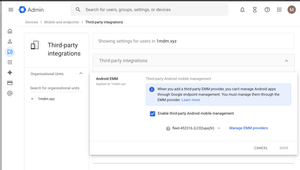
Enable third-party Android mobile management
Hey Android Enterprise community, I'm trying to understand what the "Enable third-party Android mobile management" checkbox in Google Admin does. How does this affect situations where multiple Android Enterprises are bound to multiple EMM solutions? Will both Android Enterprise continue working if they are bound to different EMM solutions, even if only one is selected on the screen above? If I use the Enrollment token link method to provision a device and have no users in my Google Workspace, will switching the EMM provider in the dropdown below the checkbox have any effect? Also, does Authenticate Using Google affect provisioning if there are no users in Google Workspace? Thanks, MarkoSolvedmarkolisica29 days agoLevel 1.6: Donut140Views0likes6Comments

Explore other customer resources
Help Center
Explore step-by-step how-to guides.
Solutions Directory
Find solutions and partners.
Website
Discover more about Android's features.