Recent discussions

DUNS number not working to verify develops account
we are asked to verify our google developer accounts on the console. however, when trying to do so, our DUNS number was not working. we know it's the correct number as it's used in a different portal.SolvedHARSAFE8 days agoLevel 1.5: Cupcake61Views0likes5Comments
EMM Quota
Hi Everyone, I am trying to set up a fully managed device for my organization. I have completed the process of enterprise creation, but as I generate the enrollment QR and begin setup of my Android, I get an error stating "Since your organization reached its usage limits, this device can't be set up". What am I missing as I can't see any graph or option to increase my limit. Furthermore, I have deleted all the devices from my enterprise. My organization needs a scalable solution so that we can manage thousands of device . Please let me know how to proceed forward. ThanksSolvedLAKSHAYNE12 days agoLevel 1.5: Cupcake121Views0likes12Comments
Forced Auto Install Issues
Since mid-November '25, forced auto install is not functional for our organization. Apps are loaded and installable as work apps but do not progress as an auto install from our policy. Has anyone experienced a similar issue? No policy changes, no SW updates on the MDM client. Functionality just stopped working.SolvedTHTClient14 days agoLevel 1.6: Donut96Views0likes7Comments
Device screen sensitivity
Hello AE community, Our users encounter screen sensitivity issue while using a screen proctection on their devices, Device impacted is Samsung A9+, There is a setting to enhance screen sensitivity but it is not manageable thought Ivanti NMDM, or Knox Service Plugin. We also use Bluebird devices, for this manufacturer, sensitity setting is manageable using their OEM Config app. Is there another method to manage this setting ? Should i make a FER (Feature Enhancement Request) to Samsung directly ? Regards BatlacSolvedBatlac20 days agoLevel 1.6: Donut53Views0likes4Comments
Unable to upload bulk CSV file to ZeroTouch
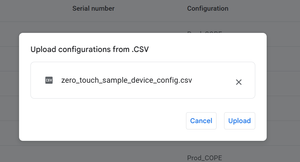
Hi Team, Is there currently an issue uploading a bulk .csv file to ZeroTouch? It's giving me an error. See below. Steps below: I downloaded the sample .csv file then updated it with my data, then uploading it again to the portal as is without changing the name or file extension as seeing above, yet its giving me an error. This was working not long ago, just wondering if there is currently an issue. ThanksSolvedSteve24 days agoLevel 1.6: Donut126Views0likes11Comments
OnePlus 15 not listed in the AER(Android Enterprise Recommended) devices
OnePlus 15 not listed in the AER(Android Enterprise Recommended) devices Hello Everyone, I've noticed that the OnePlus 15 is not included in the Android Enterprise Recommended (AER) devices list, which can be found here: https://androidenterprisepartners.withgoogle.com/devices/#!?search=Oneplus. While the OnePlus 13 is currently listed, I'm curious to know when the OnePlus 15 might be added. I discovered that the absence of the OnePlus 15 from the AER list is not allowing work profile to be installed on my oneplus 15. Could someone provide insight into whether the OnePlus 15 will be added to the AER list in the near future? Your guidance would be greatly appreciated.SolvedRohitsharma108825 days agoLevel 1.6: Donut119Views1like5Comments
Zero touch Enrollment
i had this weird issue while trying to auto provision the devices , i created one configuration to auto redirect the devices to an enrollment profile, added the Jason file of the token to it and assigned it to certain devices , yet it didn't work the device realize that it is belong to organization and i see my company support contact means it been recognized on my zero touch portal but it ask me to scan QR code for enrollment and not detect the token Jason text in the DPC extras also the profile works fine if i scanned the QR, any suggestions ??😅Solvedceermotors26 days agoLevel 1.6: Donut156Views0likes10Comments
Enable third party EMM (Intune)
So I am trying to enable Managed Google Play in Intune to use for Android device management. We already have a managed Google domain, but we have device management turned off. To my knowledge we only use it for Workplace. When I try to enable managed google play in Intune I get two different error messages Any ideas or tips of what we need to enable or open up in the Google admin console to enable third party EMM? Does the account I am using to enable managed google play have to be a google super admin or something?Solvedmatsm27 days agoLevel 2.0: Eclair70Views0likes4Comments
Rejection From AM-API initial quota approval
So, we were developing our EMM solution (almost done), and now for deployment purposes, we had to apply for an initial quota via the form. apparently we got a rejection email, stating the use case violates the permissible usages which i've ready and doesnt look like we do. I'd like to reach out to those folks (or if someone can help me connect to them) and try to understand their POV and clarify in case of any mis-phrasing from my side (since english isn't my first language) Regards, Rino JamesSolvedrinojames00727 days agoLevel 1.6: Donut45Views1like3Comments
Zero Touch phones randomly wipe themselves
Hello, We are a large corporate and mostly use Samsung phones as Android devices. Enrolment is being done via ZT portal to a default profile which is Corporate Owned Work Profile provided via Microsoft Intune. We are noticing an increased amount of cases where users set up their phones (no QR code, no text token) with default configuration added using DPC extras and within first few hours they would reset to a factory default state without any notice. This has become a real issue as it is affecting more and more people. Devices enrolled without ZT do not suffer from this issue, even though they are using the exact same enrolment profile. I saw many posts like this here and elsewhere on the internet, but no actual solution. What is the problem here and is it being actively looked by Google?SolvedAndrius29 days agoLevel 2.0: Eclair268Views1like30Comments
Explore other customer resources
Help Center
Explore step-by-step how-to guides.
Solutions Directory
Find solutions and partners.
Website
Discover more about Android's features.