Recent discussions

URGENT: Registration Blocked - "Oops Something went wrong" at DUNS Step (Ghost Application)
Hi Android Enterprise Community Team, We are currently blocked from the partner onboarding process due to a system error that seems to have locked our DUNS number in a "ghost" application state. Here is the chronological sequence of the issue: First Attempt: I initially applied using a generic Gmail address and was correctly declined. Second Attempt (Corporate): I followed the instructions and re-applied using my corporate email. The Error: This second application was marked as "Declined - Further information was requested but not received". However, I never received any email requesting further information (I have checked all Spam/Junk folders multiple times). The process seemingly timed out on the server side without notifying me. Current Blocker: Now, when I try to "Resume Onboarding" or start a fresh application via androidenterprise.dev with my corporate email, the system allows me to log in but throws a generic "Oops Something went wrong" error immediately after I click "Next" on the DUNS Number verification step. It appears my DUNS number is locked inside the previous "declined/closed" application, and the system throws an exception when I try to reuse it. I urgently need the onboarding team to RESET my application status or release my DUNS number so I can submit a fresh, correct form. ( By the way, there is no information why our application was declined. What must we do, we dont know at this point ) Thank you for your assistance. (This post was edited to remove personal information, in compliance with our guidelines)hmtcr14 minutes agoNew member11Views0likes2Comments[Survey] End of Year Customer Success Programs Feedback
Hello everyone, As 2025 comes to a close and we look toward a new year, this is often an excellent time for reflection. It has been a busy year, and we've so enjoyed speaking with you and seeing the interact with other community members. The Android Enterprise Customer Success team is dedicated to ensuring that our programs and resources—including the Customer Community, The CAFE, and Advisory Services—are useful, enjoyable, and impactful for you and your teams. As we head into 2026, we’d love to hear directly from you! Would you mind sparing less than 5 minutes (I’ve been assured it won’t take a minute more 😀) to complete our Customer Success Products CSAT survey and share your overall experience please? The survey contains multiple sections for each customer programs. Please only select 'Yes' for the area(s) relevant to you. Your honest feedback is vital and will directly influence the improvements and new features we prioritise. The Customer Community is a collective space, so it’s really important to us that you help to shape the direction. Thank you so much and let me know if you have any questions or thoughts you’d like to share with everyone, below. Lizzie (and the whole AE team) Click the link below to start the survey. (Or to open this in a new tab and display it larger, click here). Loading…Lizzie2 hours agoGoogle Community Manager65Views5likes3Comments
Play Protect is blocking our DPC app — appeal already submitted, looking for guidance
Hello everyone, We are currently facing an issue where Google Play Protect is blocking our Android application during device provisioning. Context: - It is not distributed via Google Play (but is already published); it is hosted externally and installed during provisioning via QR code. - The app is properly signed, and provisioning works at the system level, but Play Protect blocks the app with the message “App blocked to protect your device.” - This started happening recently on new devices / factory reset devices. We have already submitted the official Play Protect appeal form as recommended in the documentation: The form was completed with all required information (APK, package name, signing certificate, use case, etc.). At this point, we are looking for guidance from the community: - How long does it usually take for the Play Protect appeal form to receive a response or decision? - Is there any additional step or channel recommended for Android Enterprise DPC apps in this situation? Any insights or shared experiences would be greatly appreciated. Thank you in advance for your time and support. Best regardsrPoyo15 hours agoLevel 1.5: Cupcake113Views1like4CommentsIs there any way to disable Google Play Protect (GPP) during QR code enrollment to avoid blocking an MDM app?
I am the developer of Headwind MDM, the open source MDM for Android. In December 2025, many of our users reported the same issue. While installing an MDM app by the QR code method, it is blocked by Play Protect: "This app can request access to sensitive data". A detailed description of the issue is here. As per Play Protect guidelines, this may happen if an app uses sensitive permissions—RECEIVE_SMS, READ_SMS, NOTIFICATION_LISTENER, and ACCESSIBILITY. We removed these permissions in May 2025, and at that time the issue was resolved. Unfortunately the issue re-appeared again in December, and we were unable to determine why Headwind MDM agent is blocked at the enrollment stage. Even removing all permissions from the manifest didn't resolve the issue! Looks like there is an AI which automatically blocks software in an opaque way (by signature or code similarity). Interesting - sideloading and installing the same MDM agent APK on a non-managed device doesn't trigger Google Play block! I'm not talking about the ethics as it was already discussed in another related topic. All I know is that this behavior of Play Protect is a critical threat to our MDM project. Technically, is there a way to bypass Play Protect, for example by adding a parameter in the enrollment QR code? P.S. I already submitted the appeal form. If you have a similar issue, please fill and submit this form, this may speed up the issue resolution.HeadwindMDM16 hours agoLevel 1.6: Donut384Views2likes14Comments
Samsung Devices: Can't call from a personal app
Hi everyone we received some reports from our users in the last couple of month that suddently the phone app on COPE devices (Samsung A-series) starts to show "Can't call from a personal app" - Your organisation only allows you to make calls from work apps. Workaround: Reboot the device. For most of the reports this workaround has to take place once and the message is gone forever. A very small amount of devices starts to show this message again after a couple of weeks. Rebooting is resolving the issue again. Any idea of how to prevent this? Even emergency calls are not possible if this error is appearing! Does anyone else have seen this behavior? Raised a case with Samsung today. Thanks! DanielSolvedweberda20 hours agoLevel 2.2: Froyo3.4KViews2likes55Comments
Enable third party EMM (Intune)
So I am trying to enable Managed Google Play in Intune to use for Android device management. We already have a managed Google domain, but we have device management turned off. To my knowledge we only use it for Workplace. When I try to enable managed google play in Intune I get two different error messages Any ideas or tips of what we need to enable or open up in the Google admin console to enable third party EMM? Does the account I am using to enable managed google play have to be a google super admin or something?matsm21 hours agoLevel 2.0: Eclair51Views0likes2CommentsOutlook and Teams with PSTN calling in work profile
Hi today we raised a case with Microsoft for a specific work profile issue with their current Outlook and MS Teams implementation. I wanted to share this here, maybe there are some other customers/admins facing this issue. Our org started to move from Cisco to MS Teams PSTN calling some month ago and everything was fine, but I assume an update to either Outlook or Teams app was published and the issue started. Scenario: COPE or BYOD MS Teams and MS Outlook in work profile MS Teams has a PSTN line configured (either mobile or landline) Open Outlook, search for any contact and try to start a call to a mobile or desk number. The OS does not ask whether you like to use the phone on personal profile (as it did the last couple of years 😅) - it will hand over the call request to MS teams! You cannot decide to make the phone call with your Phone app :-( This breaks almost all use cases for our users. Even worse: A phone number like +49 123 828282 is transfered to MS teams app in a broken format and the call is made to +492492012320828282 💥😔 Compared to Google contacts in the work profile: The app is always handling the call request to the phone app on the personal profile and incorporate the MS Teams app. 🤔 Anyone else here in the community experiencing this issue? Thanks! Danielweberda24 hours agoLevel 2.2: Froyo37Views1like1Comment
Device Owner Enrollment Error: “Organization Has Reached Its Usage Limits” Even With Zero Devices
Hi everyone, I’m trying to enroll a fully managed Android device using the Android Management API. I generate an enrollment token, create the QR code, factory reset the device, and start the QR-based provisioning process. Everything works until the Android Device Policy step, where I get the following error: “Since your organization has reached its usage limits, this device can’t be set up.” I am unable to get past this point. Here is what I have already checked: Listing devices through the API returns an empty list. There are no enrolled devices at all. Billing is active on the cloud project and the Android Management API is enabled. Enterprise creation works, policies return correctly, and I can generate enrollment tokens without any issues. The device is correctly factory reset and the QR scan is working as expected. I tested with both a Workspace-based enterprise and a Gmail-based enterprise. The same limit error appears on both, even though both enterprises have zero devices. I moved the cloud project under my organization in Google Cloud to avoid any project-level quota problems. Based on everything I have checked, it appears that the enterprise (or account) has been automatically restricted to a device quota of zero, and the restriction has not lifted even after several days. I would like to understand the following: Is this quota lock normal for new enterprises, and how long does it usually take to lift? Is this quota tied to AMAPI commercial approval? Is it expected that zero devices can be enrolled before approval? Is there any way to request a quota review so that at least one test device can be enrolled? I am building a commercial EMM solution and simply need to test device-owner provisioning on a physical device, but I am currently blocked by this limit. Any guidance from the community or anyone who has dealt with the same situation would be greatly appreciated. Thank you.rpnexa24 hours agoLevel 1.5: Cupcake87Views0likes4Comments
DUNS number not working to verify develops account
we are asked to verify our google developer accounts on the console. however, when trying to do so, our DUNS number was not working. we know it's the correct number as it's used in a different portal.SolvedHARSAFE2 days agoLevel 1.5: Cupcake56Views0likes5Comments
Enable third-party Android mobile management
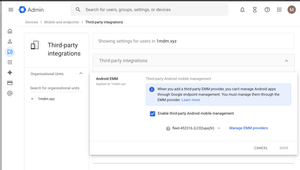
Hey Android Enterprise community, I'm trying to understand what the "Enable third-party Android mobile management" checkbox in Google Admin does. How does this affect situations where multiple Android Enterprises are bound to multiple EMM solutions? Will both Android Enterprise continue working if they are bound to different EMM solutions, even if only one is selected on the screen above? If I use the Enrollment token link method to provision a device and have no users in my Google Workspace, will switching the EMM provider in the dropdown below the checkbox have any effect? Also, does Authenticate Using Google affect provisioning if there are no users in Google Workspace? Thanks, Markomarkolisica2 days agoLevel 1.6: Donut34Views0likes1Comment


Explore other customer resources
Help Center
Explore step-by-step how-to guides.
Solutions Directory
Find solutions and partners.
Website
Discover more about Android's features.